Hi everyone,
I am running a new Windows 11 desktop rig (10-core CPU, RTX 5060 Ti, Phison 1TB SSD) which was first booted on July 29. Windows Update automatically started rolling out the Windows 11 version 25H2 feature update immediately.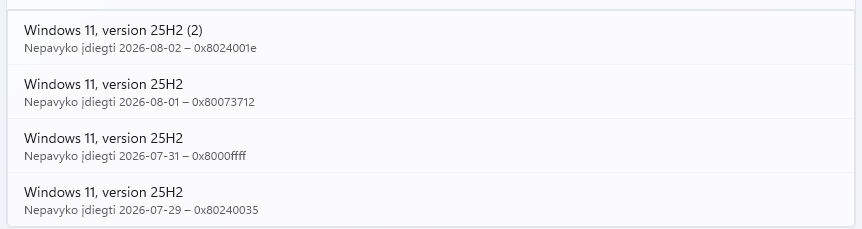
However, due to a boot loop issue, I had to perform a System Restore from the recovery environment on July 31. Ever since that system rollback, Windows Update has been completely broken and stuck in an endless loop.
It attempts to install the 25H2 update, fails at restart, and then spends 40 minutes undoing changes. The main error codes showing up in my history are 0x8000ffff and 0x80073712.
To protect my SSD from constant wear and stop this endless loop, I have forcefully set the "wuauserv" service to "Disabled" in Services. My latest history log now shows error 0x8024001e (Task Cancelled), which confirms the update engine is successfully frozen for now.
Is anyone else experiencing this exact driver/registry component store conflict on version 25H2 after a system rollback? Are there any known manual driver cleanup steps that can fix this before the next Patch Tuesday? Attached is my update history screenshot.
Thanks for any advice!
' cx='32' cy='32' r='32' /%3E%3Ctext x='50%25' y='55%25' dominant-baseline='middle' text-anchor='middle' fill='%23FFF' %3EUG%3C/text%3E%3C/svg%3E)

