SQL Server Reporting Services
A SQL Server technology that supports the creation, management, and delivery of both traditional, paper-oriented reports and interactive, web-based reports.
This browser is no longer supported.
Upgrade to Microsoft Edge to take advantage of the latest features, security updates, and technical support.
' cx='32' cy='32' r='32' /%3E%3Ctext x='50%25' y='55%25' dominant-baseline='middle' text-anchor='middle' fill='%23FFF' %3EWM%3C/text%3E%3C/svg%3E)
Below command creates a new table in SQL Server and loads your trace file into it:
SELECT * INTO TraceTable FROM::fn_trace_gettable('c:\profiler1.trc', default)
The default parameter means that if the trace is across multiple trace files, it will automatically read the next trace file(s) too. If your trace consists of a lot of trace files you can limit how much you read by setting it to for example 3 to just load the first three files.
Once you have the trace file in your table it might be a good idea to add indexes on the table, for example an index for Reads and one for Duration. Then query it, like this for example:
SELECT Reads, Duration, * FROM MyTraceTemp ORDER BY Reads DESC
DISCLAIMER : THIS CODE AND INFORMATION IS PROVIDED "AS IS" WITHOUT WARRANTY OF ANY KIND, EITHER EXPRESSED OR IMPLIED, INCLUDING BUT NOT LIMITED TO THE IMPLIED WARRANTIES OF MERCHANTABILITY AND FITNESS FOR A PARTICULAR PURPOSE.
A SQL Server technology that supports the creation, management, and delivery of both traditional, paper-oriented reports and interactive, web-based reports.
A Microsoft platform for building enterprise-level data integration and data transformations solutions.
A Microsoft online analytical data engine used in decision support and business analytics, providing the analytical data for business reports and client applications such as Power BI, Excel, Reporting Services reports, and other data visualization tools.
A Microsoft extension to the ANSI SQL language that includes procedural programming, local variables, and various support functions.
' cx='32' cy='32' r='32' /%3E%3Ctext x='50%25' y='55%25' dominant-baseline='middle' text-anchor='middle' fill='%23FFF' %3EC%3C/text%3E%3C/svg%3E)
Received report as the following: "This thread is confusing. It looks like the author has posted multiple different topics as replies, but they are unrelated to the original topic. The thread is tagged with multiple different technologies. It's just confusing"
Just like the other thread, I'll just leave it "as is" and close the report.
@Willsonyuan-msft please also consider to open a series on Wiki and post it there instead.
DISCLAIMER : THIS CODE AND INFORMATION IS PROVIDED "AS IS" WITHOUT WARRANTY OF ANY KIND, EITHER EXPRESSED OR IMPLIED, INCLUDING BUT NOT LIMITED TO THE IMPLIED WARRANTIES OF MERCHANTABILITY AND FITNESS FOR A PARTICULAR PURPOSE.
Title: Calculated Measure in Linked Measure group is not automatically refreshed after cube writbeck
Source link: https://learn.microsoft.com/en-us/answers/questions/153920/calculated-measure-in-linked-measure-group-is-not.html
Scenario :
We have 1 OLAP cube called C1, in C1 we have one measure [Sales1] , one calculated measure called [TwoTimesSales1] (Which equals to 2*[Sales1]), for this measure group we enabled writeback;
A second cube called C2, in C2 we have one measure [Sales2];
Last, we have a third cube called C3. In C3, we have linked measure group [Sales1] [Sales2] [TwoTimesSales1]. And we have a calculated measure [Last] = [Sales1] + [Sales2 ]
Procedure and Results :
Now, when user query C1 [Sales1], the result;
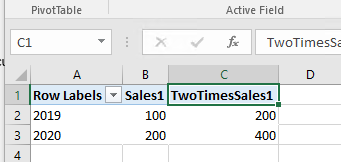
the user could publish writeback to the query. For example, changing 2019 sales1 “100” to “111”. After publishing, we could see the calculated measure in C1 get the updated value immediately.
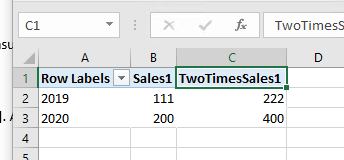
But in the Cube 3, when we click refresh data in PowerPivot. We get :
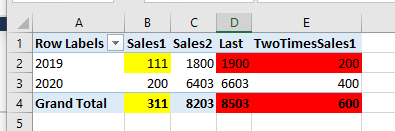
Only the linked measure [Sales1] changed its value. The calculated measure [Last] in C3, would not change accordingly and kept the old sum as a wrong total here.
Also the linked – calculated measure [TwoTimesSales1] , has not changed its value either.
Workaround :
We could work around this by either clearing the cache using query:
<ClearCache xmlns="http://schemas.microsoft.com/analysisservices/2003/engine">;
<Object>
<DatabaseID>DEMO</DatabaseID>
</Object>
</ClearCache>
Or processing the cube 3 after the writeback operation is published.
Either way we could get the correct value in c3 afterwards:
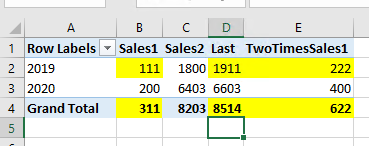
We could also schedule task to do these operation using SQL Server Agent in a quarter or an hour , so the users could get correct answer after a while.
Conclusion :
It seems this is a hidden limitation of using Linked Measure with Calculated Measure. When we have writeback enabled partition, either to calculate measure first in the source cube then to use it in linked measure group, or getting linked measure value first and then calculate it in the end cube, are bad approaches that would have wrong results. The calculated measure in end cube is processed and stored in its cache. Changing storage mode ROLAP/MOLAP could not help on this. Enable proactive caching and set the interval to a small value could solve the problem, but would involve risks that can crash the SSAS server.
Generally speaking , although this is not in the list of Usage limitation of linked measure group, we would recommend user to avoid using linked calculated measure and writeback together. If we have to come to this scene , using a cube to have all the measures and calculation in it, then enable writeback is a better choice.
DISCLAIMER : THIS CODE AND INFORMATION IS PROVIDED "AS IS" WITHOUT WARRANTY OF ANY KIND, EITHER EXPRESSED OR IMPLIED, INCLUDING BUT NOT LIMITED TO THE IMPLIED WARRANTIES OF MERCHANTABILITY AND FITNESS FOR A PARTICULAR PURPOSE.
Fuzzy Matching in T-SQL
Normally we will use like ‘LIKE’, ‘IN’, ‘BETWEEN’ and other boolean operators to have more flexible, "fuzzier" filters when querying data.
At the very least, knowing these keywords will save you from having to write a tedious number of conditional statements just to get variations of a data value.
For example, instead of this:
SELECT * from person.person
WHERE FirstName ='Michele' OR FirstName ='Michael'

--OR
SELECT * from person.person
WHERE FirstName IN ('Michele','Michael')
We have:
SELECT * from person.person
WHERE FirstName LIKE '%MICH%'

--OR
SELECT * from person.person
WHERE FirstName LIKE 'MICH_E_'
But in some situations, we could not achieve our requirement when we use ‘LIKE’, ‘IN’, ‘BETWEEN’ and so on.
For example, we would like to compare two values ( for example, ‘Hector’ and ‘Hacktere’) who have the similar spelling or pronunciation but ‘LIKE’ is not working.
To do a fuzzy matching in this situation, we could try with one function 'Jaro-Winkler Stored Procedure' mentioned in
Roll Your Own Fuzzy Match / Grouping (Jaro Winkler) - T-SQL and it could be a good solution for some specific situations.
Following is one example:
DECLARE @SOURCE TABLE
  (
  SRCNAME VARCHAR(100)
  )

  INSERT @SOURCE
  SELECT 'Stephan sBaum' UNION ALL
  SELECT 'Ida debSou' UNION ALL
  SELECT 'Hector nicoCarrasco' UNION ALL
  SELECT 'LUKE RUDD' UNION ALL
  SELECT 'S.Caljouw' UNION ALL
  SELECT 'Christelle Bregnauld' UNION ALL
  SELECT 'Mike'

 DECLARE @TARGET TABLE
(
TGTNAME VARCHAR(100)
)

 INSERT @TARGET
SELECT 'Stephen' UNION ALL
SELECT 'Hacktere' UNION ALL
SELECT 'Hacktery' UNION ALL
SELECT 'Stephan' UNION ALL
SELECT 'luky rodd' UNION ALL
SELECT 'Christ' union all
SELECT 'Mike'

 ;with cte as (
select a.SRCNAME,b.TGTNAME,
[dbo].[fn_calculateJaroWinkler](a.SRCNAME,b.TGTNAME) similar
 from @SOURCE a
cross apply @TARGET b)

 select a.SRCNAME [SRC Name], b.TGTNAME [Targert Name]
from @SOURCE a
left join cte b on a.SRCNAME=b.SRCNAME
where similar>0.6
and left(a.SRCNAME,1)=LEFT(TGTNAME,1)
Output:
SRC Name Targert Name
Stephan sBaum Stephen
Stephan sBaum Stephan
Hector nicoCarrasco Hacktere
Hector nicoCarrasco Hacktery
LUKE RUDD luky rodd
Christelle Bregnauld Christ
Mike Mike
We could define the similarity by ourselves while calling this function. In above example, I chose 0.6 as the lowest value and we could get the expected output.
In some other situations, we need to compare the values in the same group which means Fuzzy grouping in TSQL.
Then we could try with SOUNDEX() function which returns a four-character (SOUNDEX) code to evaluate the similarity of two strings.
Let’s see another example as below:
DECLARE @SOURCE TABLE
  (
  ClassName VARCHAR(100),
  SRCNAME VARCHAR(100)
  )

  INSERT @SOURCE
  SELECT 'Class1','Stephan' UNION ALL
  SELECT 'Class1','Stephen' UNION ALL
  SELECT 'Class2','Hector' UNION ALL
  SELECT 'Class2','Hacktere' UNION ALL
  SELECT 'Class2','Hacktery' UNION ALL
  SELECT 'Class3','Christelle' UNION ALL
  SELECT 'Class3','Christ' UNION ALL
  SELECT 'Class4','Mike' UNION ALL
  SELECT 'Class4','Mike1' UNION ALL
  SELECT 'Class4','Mike12' UNION ALL
  SELECT 'Class4','Mike1234' UNION ALL
  SELECT 'Class5','123' UNION ALL
  SELECT 'Class5','456'

select t1.SRCNAME,
   t2.SRCNAME
 from @SOURCE t1
inner join
(
   select SRCNAME , snd, rn
   from
   (
     select  SRCNAME,soundex(SRCNAME) snd,
   row_number() over(partition by ClassName
                    order by soundex(SRCNAME)) rn
from @SOURCE
   ) d
   where rn = 1
) t2
   on soundex(t1.SRCNAME) = t2.snd;
Output:
SRCNAME SRCNAME
Stephan Stephan
Stephen Stephan
Hector Hector
Hacktere Hector
Hacktery Hector
Christelle Christelle
Christ Christelle
Mike Mike
Mike1 Mike
Mike12 Mike
Mike1234 Mike
123 123
456 123
In above example, we could see that all the similar values in the same group have the same values on the right side. Then we could find all potential duplicates in sub groups and proceed with next steps.
Of course, we could find some other fuzzy search related good functions and choose a more suitable one in our real cases.
DISCLAIMER : THIS CODE AND INFORMATION IS PROVIDED "AS IS" WITHOUT WARRANTY OF ANY KIND, EITHER EXPRESSED OR IMPLIED, INCLUDING BUT NOT LIMITED TO THE IMPLIED WARRANTIES OF MERCHANTABILITY AND FITNESS FOR A PARTICULAR PURPOSE.
Question:
SSIS Script Task to Check if the Flat File Exists and the Flat File’s Size
Solution:
Step1: Create some test flat file in the folder;
Step2: Create two variables and add them in Script Task;
Step3: Edit the useful C# code (We can use Message Box to show the output);
Step4: Add Precedence Constraint between Script Task and the next task;
Step5: Set different value in the variable to test the Script Task.
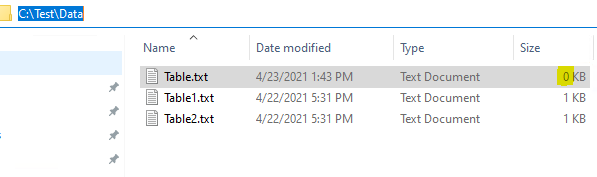
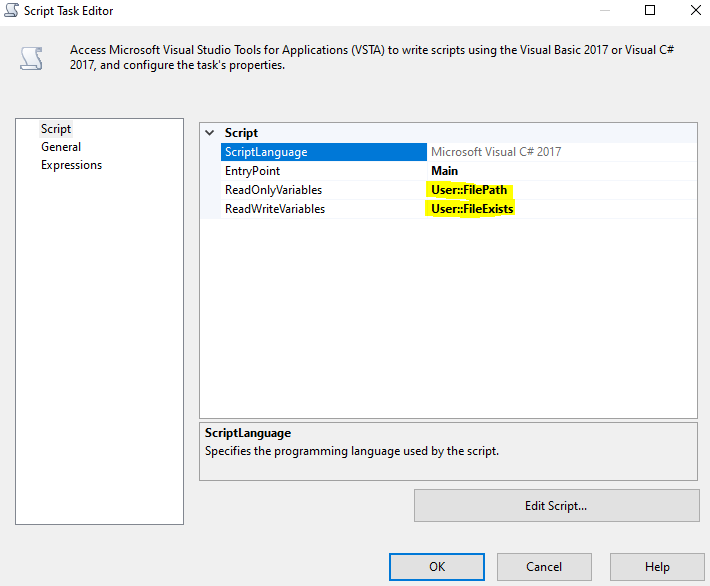
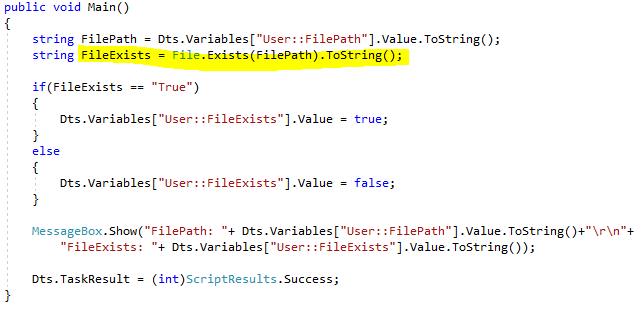
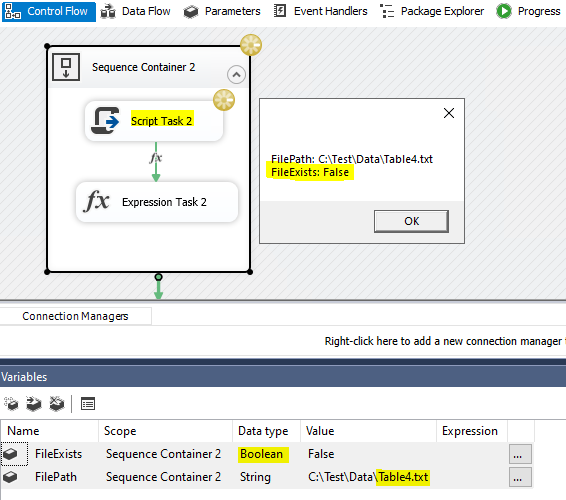
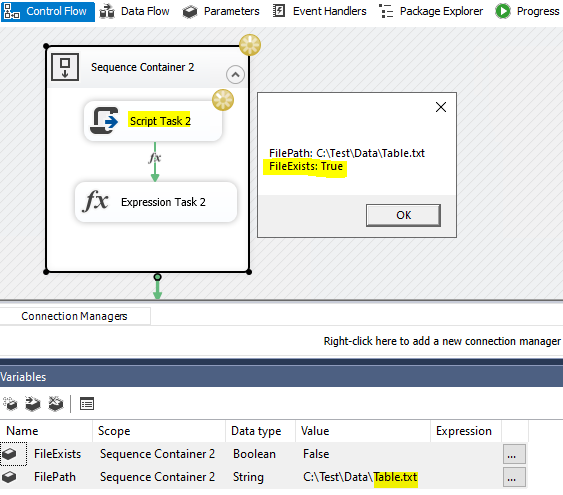
Useful C# code:
#region Namespaces
using System;
using System.Data;
using Microsoft.SqlServer.Dts.Runtime;
using System.Windows.Forms;
using System.IO;
#endregion
public void Main()
{
            string FilePath = Dts.Variables["User::FilePath"].Value.ToString();
            string FileExists = File.Exists(FilePath).ToString();
            if(FileExists == "True")
            {
                Dts.Variables["User::FileExists"].Value = true;
            }
            else
            {
                Dts.Variables["User::FileExists"].Value = false;
            }

            MessageBox.Show("FilePath: "+ Dts.Variables["User::FilePath"].Value.ToString()+"\r\n"+
                "FileExists: "+ Dts.Variables["User::FileExists"].Value.ToString());

            Dts.TaskResult = (int)ScriptResults.Success;
}
DISCLAIMER : THIS CODE AND INFORMATION IS PROVIDED "AS IS" WITHOUT WARRANTY OF ANY KIND, EITHER EXPRESSED OR IMPLIED, INCLUDING BUT NOT LIMITED TO THE IMPLIED WARRANTIES OF MERCHANTABILITY AND FITNESS FOR A PARTICULAR PURPOSE.
Question:
Linked Server error: Login Failed for user 'NT AUTHORITY\ANONYMOUS LOGON'
Context:
The "Login failed for user 'NT AUTHORITY\ANONYMOUS LOGON'" indicates a delegation and Kerberos issue. And this issue generally occurs in the following situations:
The user logs on to the client computer C, and connects to the server running SQL Server instance SQLSERVER1 on machine B, then query the data on SQLSERVER2 on machine A through the linked server.
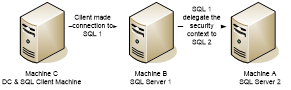
If SQL Server authentication is used for User on SQLSERVER1 on machine B, it means that a SQL Login User must be created on SQLSERVER2 on machine A, with the exact same password.
If Windows authentication is used, we should consider delegation and Kerberos issue.
Troubleshooting and Solution:
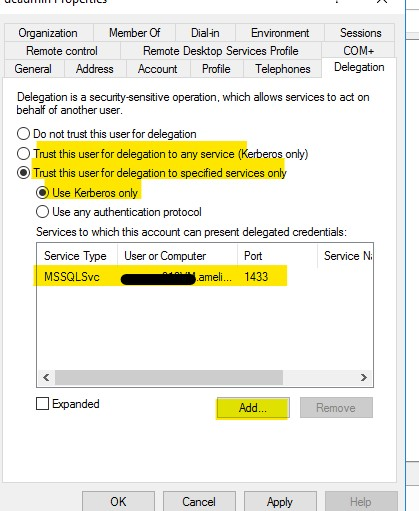
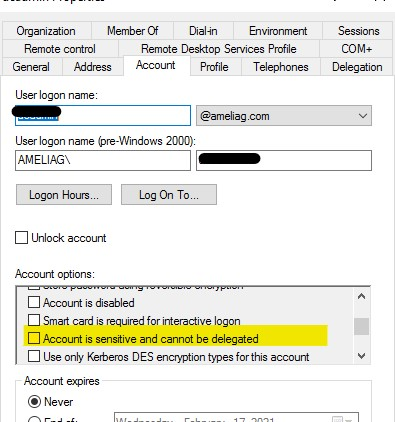
Then go to the account tab in properties and ensure that the "account is sensitive and cannot be delegated" option is not selected.
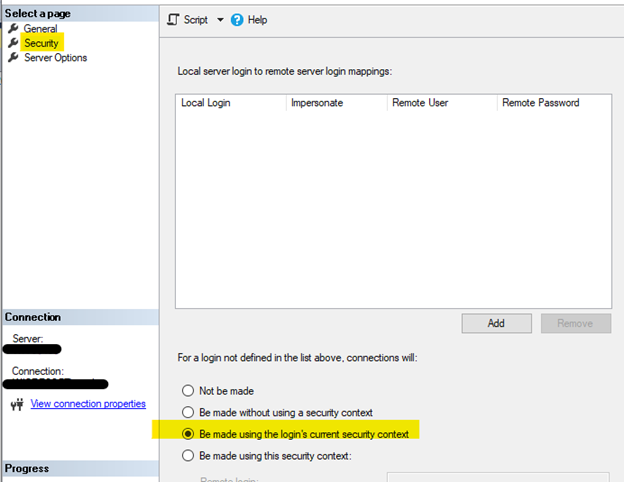
In addition, when configuring security, choose “Be made using the login's current security context” in the linked server properties-> security tab to log in to the target linked server. Under this choice, the local SQL Server will also do a double hop, passing the client's security context to the remote SQL Server.
DISCLAIMER : THIS CODE AND INFORMATION IS PROVIDED "AS IS" WITHOUT WARRANTY OF ANY KIND, EITHER EXPRESSED OR IMPLIED, INCLUDING BUT NOT LIMITED TO THE IMPLIED WARRANTIES OF MERCHANTABILITY AND FITNESS FOR A PARTICULAR PURPOSE.
DISCLAIMER : THIS CODE AND INFORMATION IS PROVIDED "AS IS" WITHOUT WARRANTY OF ANY KIND, EITHER EXPRESSED OR IMPLIED, INCLUDING BUT NOT LIMITED TO THE IMPLIED WARRANTIES OF MERCHANTABILITY AND FITNESS FOR A PARTICULAR PURPOSE.
Issue description
==============
SSMS crashes when re-docking tabs or splitting the window
Solution
==============
Windows updates to the .NET Framework introduced a known issue, which results in an application crash for SQL Server Management Studio (SSMS) when docking tabs or splitting the window. For Windows 10 1809 and Server 2019, as of February 16th, a fix has been released in Windows Update to resolve this issue. After installing KB4601558, you should no longer experience the tab-related crash.
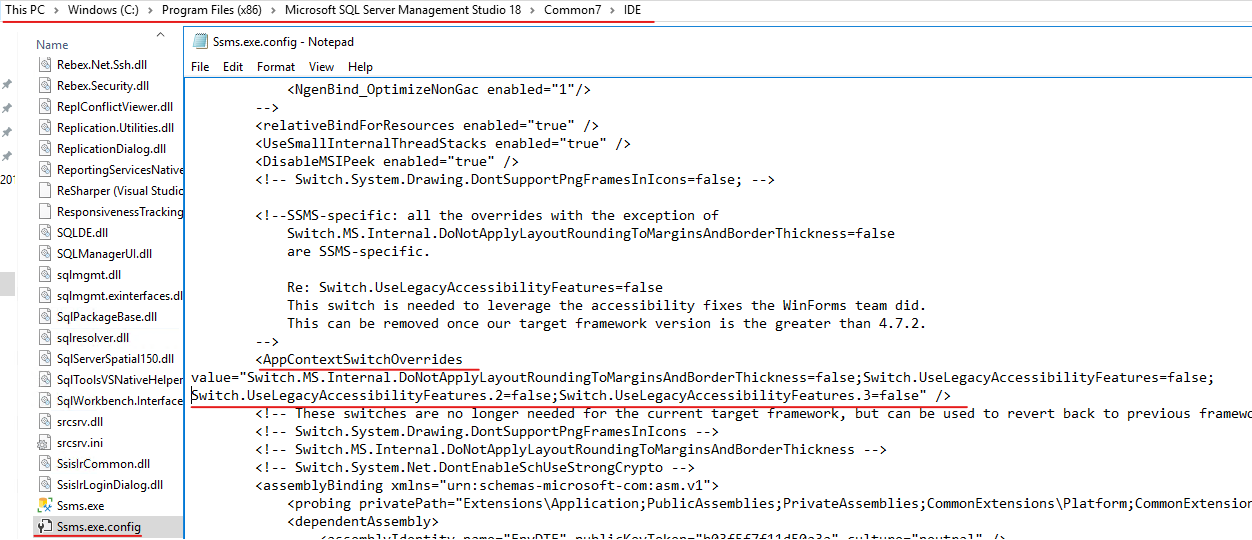
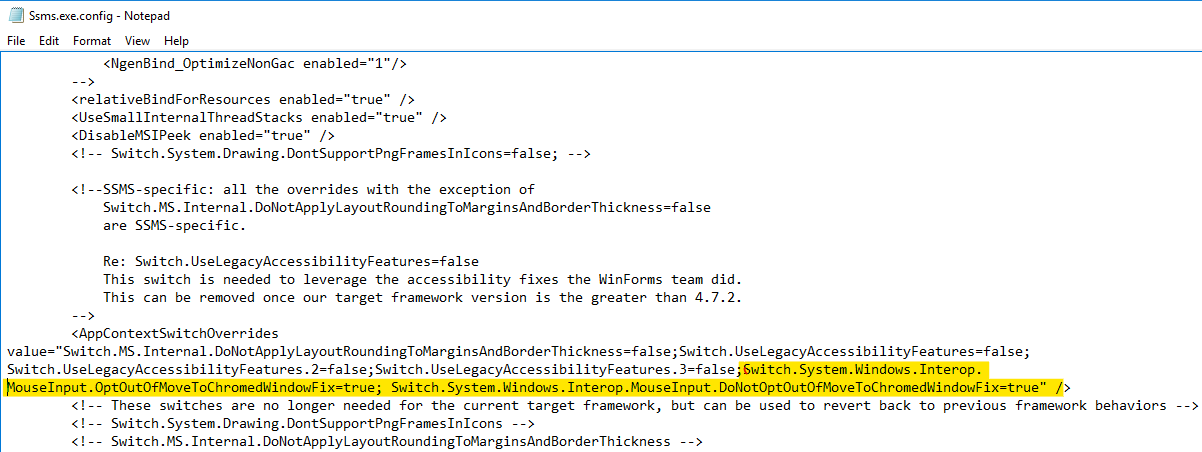
If the crash persists after applying all available Windows updates, follow these steps to mitigate the issue:
Reference
==============
https://learn.microsoft.com/en-us/sql/ssms/troubleshoot/workaround-move-tabs?view=sql-server-ver15
DISCLAIMER : THIS CODE AND INFORMATION IS PROVIDED "AS IS" WITHOUT WARRANTY OF ANY KIND, EITHER EXPRESSED OR IMPLIED, INCLUDING BUT NOT LIMITED TO THE IMPLIED WARRANTIES OF MERCHANTABILITY AND FITNESS FOR A PARTICULAR PURPOSE.