Microsoft Teams | Microsoft Teams for business | Other
Additional features, settings, or issues not covered by specific Microsoft Teams categories

This browser is no longer supported.
Upgrade to Microsoft Edge to take advantage of the latest features, security updates, and technical support.
' cx='32' cy='32' r='32' /%3E%3Ctext x='50%25' y='55%25' dominant-baseline='middle' text-anchor='middle' fill='%23FFF' %3ERR%3C/text%3E%3C/svg%3E)
Dear colleagues,
I could not find any way of avoiding a sound from Teams telling me the actions I am running "mute on" "mute off" "incoming call"...
How can I disable this kind of notifications?
Thank you very much!
Kindest regards
Additional features, settings, or issues not covered by specific Microsoft Teams categories
' cx='32' cy='32' r='32' /%3E%3Ctext x='50%25' y='55%25' dominant-baseline='middle' text-anchor='middle' fill='%23FFF' %3EJM%3C/text%3E%3C/svg%3E)
Welcome to Q&A forum!
Where is your mute or unmute button? Teams call or Teams meeting?
If the answer is Teams meeting, how did you join the meeting?
In my test environment, Teams client did not have the sounds "mute on" or "mute off". So i am curious about how did you hear it.

Thank you very much for your feedback!
I am in a meeting (as you could see in the screenshot) everytime I push the mute button it says "Mute on" and then If I remove it it says "mute off".
On the same hand, If I am in a meeting and I speak while muted the same voice says "muted" and when there is an incoming call from a colleague it says "incoming call".
It did not happen in my previous Teams experience (another company) and not happening to all my (new) colleagues... so some help will be very welcomed as it is a bit annoying to be honest.
(In my previous experience when you spoke and you were muted also a message appeared in the top of the teams screen and now it is NOT appearing)
THANK YOU VERY MUCH!
Kindest regards,
Thanks for your information!
According to your screenshot, it seems this issue is persist in your own Teams meeting. And I also did a test in our environment. When we mute or unmute the microphone, there is no sound prompting me to do this. Could you check if the Teams client is the newest version?
In addition, please try to change another device to see if this issue can be reproduced.
Hi @JimmyYang-MSFT !
Thank you very much for your feedback!
I have contacted other colleagues and they are facing the same issue!
We also tried to connect teams through a phone and it was not giving the same sounds, so it might be at a device level but your assistance will be very much welcome!
Can you let me know how I check the Teams client version?
From my understanding, it is the newest version as the "reply" option appears in the chat even from the laptop (and it is a pretty new feature on the laptops ;) )
THANK YOU VERY MUCH FOR YOUR KINDNESS!
Kindest regards,
You could check Teams version from here. The newest version is 1.4.00.29469 (64-bit)
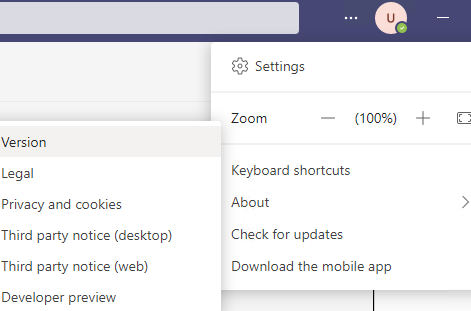

So, I guess that I am on the right version, correct?
Any idea where this sound can come from?
Thank you very much!
Kindest regards,
I doubt this voice is come from your microphone device. I am not sure about it because I did several test in our Teams client by changing different device. All of them is normal. So could you try to change another microphone device to see if it can be reproduced?
It has been a while, how is everything going?
If you have any update about this issue, please feel free to post back.
Hi Jimmy,
Sorry for my late reply, hectic week here and a long weekend!
Thank you very much!
I have tested with a different headset device and you were right with the new (old) ones I have no additional sounds/messages.
The device is a poly (plantronic) blackwire 5220 C5220 USB-A, any advice on how to remove the sounds while using Teams? Maybe it is just a configuration on the device settings?
Thank you very much!
Kindest regards,
' cx='32' cy='32' r='32' /%3E%3Ctext x='50%25' y='55%25' dominant-baseline='middle' text-anchor='middle' fill='%23FFF' %3EBB%3C/text%3E%3C/svg%3E)
Hey there,
I had the same issue and it seems to be a Planatronics problem:
You can disable this using Planatronics software.
Thank you very much!!!
I was able to disconnect the voice using the Plantronics Hub!
(Now I only have a bip! ;) )
Have a nice rest of the day (mine will be better for sure ;) )

I use Aftershock Openmove as earphone for Teams, and I have this behaviour since a few days. Before everything worked fine.
I have discovered that pressing 2 seconds Volume+ and Volume-, in my earphone, then notifies me by voice "Mute On", but stills on teams muted.
This avoid me to hear the 5 seconds beeps.. Unfortunatelly this behaviour will appear again if i mute on and off using the Mic icon in teams.
Hope that this will be fixed and recovered as before....
Kind Regards
' cx='32' cy='32' r='32' /%3E%3Ctext x='50%25' y='55%25' dominant-baseline='middle' text-anchor='middle' fill='%23FFF' %3EDM%3C/text%3E%3C/svg%3E)
I have exactly the same problem, also using Aftershock, it drives me nuts!
Turning on and off the headphones constantly can solve the problem temporarily (until you unmute and then mute again).
If you found a solution, please let me know!

I also have the same exact issue (In my case, also happen to use Aftershokz)
It should not be headset issue but more of Microsoft Teams issue as headset didnt have any problems for years until after a Windows or MS Teams auto update a few days ago.
Other than the voice over "mute on" "mute off" notification sounds in Teams, when muted, there is a persistent 5 second dial tone at the background interferring throughout the call.
Tentatively, the simple workaround is to remain unmute.
I scoured the web and found similar past issues with Microsoft Skype interferring with headset (Note: Its an outdated solution; not able to work on Windows 10)
https://answers.microsoft.com/en-us/skype/forum/all/skype-for-business-interfering-with-headset-audio/c2fb626f-887a-4f5a-ac68-aadb6d92404d
Hope Microsoft team can roll back/disable the mandatory voice over for headsets in Mircosoft Teams!
' cx='32' cy='32' r='32' /%3E%3Ctext x='50%25' y='55%25' dominant-baseline='middle' text-anchor='middle' fill='%23FFF' %3EAH%3C/text%3E%3C/svg%3E)
So I am also using aftershokz and noticed this problem on wednesday may 11th, so it makes sense this was due to a recent update in Windows or Teams.
It is using the mute and unmute function of the headset itself, because in the past with teams, if I muted myself using the buttons on my headset, this was the symptoms of using the built in mute functionality. So to avoid this issue, I always used the mute function within teams, and then there was no issues.
But now it's super distracting hearing the beeping and the mute on mute off voice everytime I need to participate in a meeting.
I much rather roll back to the previous update then deal with this, My only solution is for me to use a different headset that doesn't have it's own built in mute function. So if you guys have different headsets you can use, try them, as other headsets that don't have verbal queues when your muted will work just fine.
But I want to use my aftershokz as it's perfect for being able to talk to people locally and be in a teams meeting at the same time since they don't cover the ears!
' cx='32' cy='32' r='32' /%3E%3Ctext x='50%25' y='55%25' dominant-baseline='middle' text-anchor='middle' fill='%23FFF' %3ES%3C/text%3E%3C/svg%3E)
I reached out to Aftershokz about this and they are aware of the issue, however, it is out of their hands. I have heard if you have an Aftershokz Opencomm device then they will send you a device that will keep this from happening, you need to reach out to their technical support team. I, unfortunately, do not have an Opencomm device. The other alternative they suggested to me was to join the Teams meeting through a browser. I guess through the browser the mute button within Teams does not control Bluetooth headsets and works as it used to. I have not had a chance to try this myself.
' cx='32' cy='32' r='32' /%3E%3Ctext x='50%25' y='55%25' dominant-baseline='middle' text-anchor='middle' fill='%23FFF' %3EAG%3C/text%3E%3C/svg%3E)
Please allow us to remove the voice prompts of "muted" and "unmuted" - rather have them as little beeps
' cx='32' cy='32' r='32' /%3E%3Ctext x='50%25' y='55%25' dominant-baseline='middle' text-anchor='middle' fill='%23FFF' %3EAX%3C/text%3E%3C/svg%3E)
I have the exact same problem starting from a couple of days. please fix that!
' cx='32' cy='32' r='32' /%3E%3Ctext x='50%25' y='55%25' dominant-baseline='middle' text-anchor='middle' fill='%23FFF' %3EA6%3C/text%3E%3C/svg%3E)
Please allow users to turn off the voice prompts of "muted" and "unmuted"
Please allow users to turn off the repeated beeping when muted.
' cx='32' cy='32' r='32' /%3E%3Ctext x='50%25' y='55%25' dominant-baseline='middle' text-anchor='middle' fill='%23FFF' %3EK%3C/text%3E%3C/svg%3E)
i have same issue, it appeared week or two ago. some Update did it?
Sennheiser Momentum 4
Teams android mobile app does not do it!
i use bluetooth dual connection. but even phone disable does not change it.
as the voice is the same, as Connected notification, so it comes from headset software ?
but still, command for it comes from computer? why phone mute in Teams does not say it then.
' cx='32' cy='32' r='32' /%3E%3Ctext x='50%25' y='55%25' dominant-baseline='middle' text-anchor='middle' fill='%23FFF' %3EJN%3C/text%3E%3C/svg%3E)
I have the same problem with EPOS Connect, it is not saying anything but have a beep when i mute or unmute.
Very annoying and no option to turn it off :(
Started few days ago.
Yes this is a MS Teams issue. I have been using Aftershokz for a year and it only started happening after a Teams update.
' cx='32' cy='32' r='32' /%3E%3Ctext x='50%25' y='55%25' dominant-baseline='middle' text-anchor='middle' fill='%23FFF' %3ERM%3C/text%3E%3C/svg%3E)
Check for the MS Teams feature request/issue reporting page so you can ask for it. Doing it here won't move things I think.
Probably is a headset software feature, in my case I had to use the vendor app to disable the voice as they had that option there, not in MS Teams.
You could try to use the software that manages your device, there probably you will have an option to disable it.
Checked but couldn't find any related option :/
' cx='32' cy='32' r='32' /%3E%3Ctext x='50%25' y='55%25' dominant-baseline='middle' text-anchor='middle' fill='%23FFF' %3EJR%3C/text%3E%3C/svg%3E)
hello, the problem occurs when the headphones are connected with the USB receiver to the laptop/pc.
To solve it you must connect it via bluetooth, that would be all.
I hope it helps you
hello, the problem occurs when the headphones are connected with the USB receiver to the laptop/pc.
To solve it you must connect it via bluetooth, that would be all.
I hope it helps you
' cx='32' cy='32' r='32' /%3E%3Ctext x='50%25' y='55%25' dominant-baseline='middle' text-anchor='middle' fill='%23FFF' %3EAA%3C/text%3E%3C/svg%3E)
Do we have a solution for this? I'm using OpenComm by AfterShokz and after the Teams update last spring this Mute/Unmute sound including a "busy signal" is totally killing the Teams experience. I have no issue using the headset with any other video conferencing tools such as Google Space or Zoom.
To me this is clearly a Microsoft issue that they need to address asap as we've been asking for a fix for more than half a year now...
' cx='32' cy='32' r='32' /%3E%3Ctext x='50%25' y='55%25' dominant-baseline='middle' text-anchor='middle' fill='%23FFF' %3EAL%3C/text%3E%3C/svg%3E)
Likely a duplicate of https://feedbackportal.microsoft.com/feedback/idea/83697ca5-6d79-ec11-8d21-0022482779ae
' cx='32' cy='32' r='32' /%3E%3Ctext x='50%25' y='55%25' dominant-baseline='middle' text-anchor='middle' fill='%23FFF' %3EJH%3C/text%3E%3C/svg%3E)
I don't want the beep everytime someone mutes and unmutes in a teams call its terriblly distracting.
@Roland Miranda this is the endorsed forum for questions.
' cx='32' cy='32' r='32' /%3E%3Ctext x='50%25' y='55%25' dominant-baseline='middle' text-anchor='middle' fill='%23FFF' %3ESB%3C/text%3E%3C/svg%3E)
I had this same problem with my Poly headset. I attempted to reach Poly Support but was redirected to HP Support, so evidently HP owns Poly. Anyway, that's neither here nor there. HP Support had me install the Plantronics hub software that can be downloaded from https://support.hp.com/us-en/document/ish_9728794-9728758-16. That application provides the ability to turn off this infuriating "feature" that they decided to enable by default. I have verified that it works; I'm just sitting here toggling the mute button over and over while enjoying the glorious silence.
' cx='32' cy='32' r='32' /%3E%3Ctext x='50%25' y='55%25' dominant-baseline='middle' text-anchor='middle' fill='%23FFF' %3EPH%3C/text%3E%3C/svg%3E)
If someone is still struggling with this issue on Plantronics/Poly headphones, I found the holy grail:
Go to https://webapp.lens.poly.com/
Try to connect your device from top left corner > select your device> settings > mute on/off alerts.
Thanks to Reddit. This works on corporate devices too as this does not need permissions.
P.S.: Seems like this is an headphones issue not Teams/Microsoft.
' cx='32' cy='32' r='32' /%3E%3Ctext x='50%25' y='55%25' dominant-baseline='middle' text-anchor='middle' fill='%23FFF' %3EPM%3C/text%3E%3C/svg%3E)
' cx='32' cy='32' r='32' /%3E%3Ctext x='50%25' y='55%25' dominant-baseline='middle' text-anchor='middle' fill='%23FFF' %3EA%3C/text%3E%3C/svg%3E)
' cx='32' cy='32' r='32' /%3E%3Ctext x='50%25' y='55%25' dominant-baseline='middle' text-anchor='middle' fill='%23FFF' %3EMF%3C/text%3E%3C/svg%3E)
I dusted off my Microsoft credentials just so I could log in to up-vote your response, and also say, "Thanks!" Huge help.
' cx='32' cy='32' r='32' /%3E%3Ctext x='50%25' y='55%25' dominant-baseline='middle' text-anchor='middle' fill='%23FFF' %3EBP%3C/text%3E%3C/svg%3E)
It looks Teams provided a stronger functional connection between Teams and headset devices. E.g. I use Jabra (Elite 75t) headset and recently it started notifying me: "Muted" / "Unmuted". But it is Jabra voice and not Teams notification in fact. Also a headset button to mute / unmute a mic started working during Teams meetings. As a workaround, I disabled voice notifications in my Jabra app but it is not a satisfying solution.
I think it might be a great feature, when you attend a call not looking at Teams app. Imagine, you just listen to the meeting and cooking at the same. If you want to say one sentence during a one hour meeting, it is cool you can just press a button in your headset not even looking at screen. In such a scenario it is even desirable that your headset makes you sure you are muted or not. Another scenario is if you want just to do a quick check, whether you are muted and Teams screen is not in sight. You just press mute button - "Unmuted" - press again - "Muted" - and you are sure nobody hears you.
But, if you actively attend the meeting and you unmute frequently to say something, then it is a terrible experience. You hear these annoying notifications even if you use CTRL + Spacebar (Push-to-talk). First, you here when you push CTRL + SPACE (Unmuted), next you here it again when you release the shortcut (Muted). User experience lays down on the ground here!
Dear MSFT, please, do something about it because it is unacceptable and terrible user experience. I think that when a user mutes / unmutes from Teams app, the headset device should not get a feedback message about such an action basically. However, when mute / unmute request comes from a headset device, then it is worth to send back a confirmation so the headset notifies listener. But the best would be to have some configuration possibility here.
' cx='32' cy='32' r='32' /%3E%3Ctext x='50%25' y='55%25' dominant-baseline='middle' text-anchor='middle' fill='%23FFF' %3EME%3C/text%3E%3C/svg%3E)
The same for my Senheiser HD350 BT.
J recently had the same issue, but I'm using a Plantronics headset. To fix this, I went to the vendor's page, downloaded the app to manage the headset and there, I had the option to replace the voice for a bip. Maybe you can check Jabra settings.
Yes, I did so but I treat it as workaround.
' cx='32' cy='32' r='32' /%3E%3Ctext x='50%25' y='55%25' dominant-baseline='middle' text-anchor='middle' fill='%23FFF' %3ER%3C/text%3E%3C/svg%3E)
+1
It seems that I have exactly same problem as you do...
Jabra Elite 75t as well - few days ago, out of the blue moon, Teams started attacking me with muted/unmuted notifications :/
I'll apply the same workaround: switching to beeps. Hopefully Microsoft will address the issue.
For me it's not a workaround, it's the solution, because is the headset driver, it behaves like that.
MS Teams is not the one telling the headset to speak, it's the headset having that configuration.
Actually my headset says "No volumen" when I decrease it to 0, and that happens at Windows level, MS Teams has nothing to do.
@Ronald Miranda
My headset with teams only started doing this after a Teams update. Teams is telling the headset to speak.
The solution cannot be to change device.
MS Teams is sending many signals to the system and the apps are the ones implementing that as they want. I never said that the solution is to change the devices. I can only speak about Plantronics, they offer with the device an app to configure the settings and there you can disable the speaking and that's what I did :)
We can ask MS Teams to remove what? The speech? I don't think Teams is sending an audio to the headset.
@Ronald Miranda
I have asked MS to make an option to turn off the feature that was added in the update.
Do you have also the audio message "Volume minimum" when decreasing to 0 the volume with the headset?
' cx='32' cy='32' r='32' /%3E%3Ctext x='50%25' y='55%25' dominant-baseline='middle' text-anchor='middle' fill='%23FFF' %3EB%3C/text%3E%3C/svg%3E)
I've found a workaround. Please set the following entry in the register to "0":
Computer\HKEY_LOCAL_MACHINE\SYSTEM\ControlSet001\Control\Bluetooth\Audio\Hfp\AudioGateway\Enabled
Probably it also affects another setting, but I have no negative impact.
This is a great workaround, unfortunately in my corporate environment users are not allowed to make manual registry modifications.
' cx='32' cy='32' r='32' /%3E%3Ctext x='50%25' y='55%25' dominant-baseline='middle' text-anchor='middle' fill='%23FFF' %3EWR%3C/text%3E%3C/svg%3E)
Many thanks, this worked for me. Hopefully MS will put in something cleaner but I am very grateful - a hack is much better than no solution :)
Note: I needed to restart the "Bluetooth Audio Gateway Service" for the change to take effect
' cx='32' cy='32' r='32' /%3E%3Ctext x='50%25' y='55%25' dominant-baseline='middle' text-anchor='middle' fill='%23FFF' %3EBP%3C/text%3E%3C/svg%3E)
Thanks for this comment - worked for me too.
Alternative - is to disable windows Bluetooth Audio Gateway Service.
it can be disabled from "services" app by changing startup type to Disabled, but that takes effect after restart. For the current session, you need to Stop it.
' cx='32' cy='32' r='32' /%3E%3Ctext x='50%25' y='55%25' dominant-baseline='middle' text-anchor='middle' fill='%23FFF' %3EML%3C/text%3E%3C/svg%3E)
Well, though this works. It downgraded my BT from "Headset or Headphones" to only "Headphones" so the microphone is now forced through the laptop mic. Not great. And though music sounds good in headphone-mode, voice calls are crummy. So weird / annoying. Thanks for this though.
' cx='32' cy='32' r='32' /%3E%3Ctext x='50%25' y='55%25' dominant-baseline='middle' text-anchor='middle' fill='%23FFF' %3EA%3C/text%3E%3C/svg%3E)
Thanks. I use Shokz and their Loop 100 USB fix it.
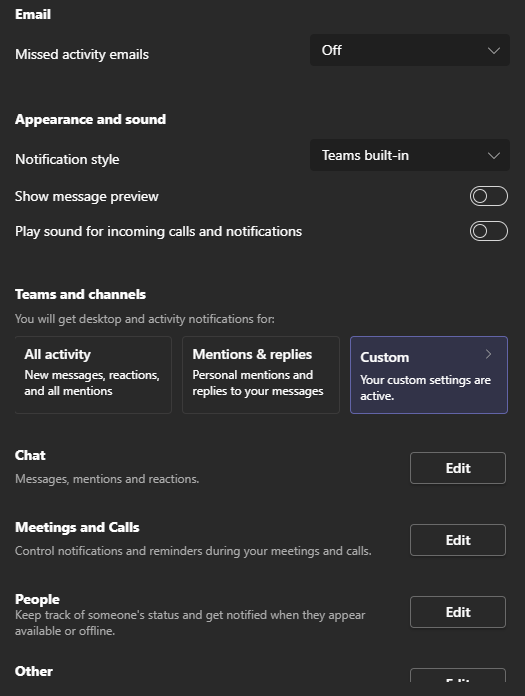
Can you please advise on how to get to above settings?
Thanks