Microsoft Teams | Development
Building, integrating, or customizing apps and workflows within Microsoft Teams using developer tools and APIs

This browser is no longer supported.
Upgrade to Microsoft Edge to take advantage of the latest features, security updates, and technical support.

Please tell me how to get the team id, channel id, your profile id and team member id.
Building, integrating, or customizing apps and workflows within Microsoft Teams using developer tools and APIs
Answer accepted by question author
' cx='32' cy='32' r='32' /%3E%3Ctext x='50%25' y='55%25' dominant-baseline='middle' text-anchor='middle' fill='%23FFF' %3EPM%3C/text%3E%3C/svg%3E)
Hi @UrmatchikhEgor-9878,
For already created team you can get the team id and channel id from Teams UI. Select the three dots beside your team name and select get link to teams.
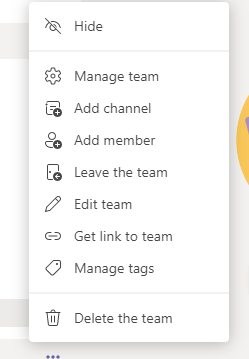
After this you will get a url which will contain groupId=xxxx which will be your team id.
Similary you can get channel id by selecting the three dots beside channel name and selecting get link to channel.
The channel id will be in format 19%3axxxxxxx%40thread.tacv2.
Note : If you want to use this channel id in graph api or some other operations you will have to replace "%3a" with ":" and "%40" with "@".
You can also get above two id's in response object when creating a new team or channel using graph api. You can refer below links
https://learn.microsoft.com/en-us/graph/api/team-post?view=graph-rest-1.0&tabs=http
https://learn.microsoft.com/en-us/graph/api/channel-post?view=graph-rest-1.0&tabs=http
By team member id are you referring to user object id ? You can get user object id from azure under user's section.
Refer below link.
https://learn.microsoft.com/en-us/partner-center/find-ids-and-domain-names
Let us know if you have any query.
Thanks
Okay, thanks, I thought so. Then another question is, what permissions do I need to work with this data? If I contact an unauthorized user from Microsoft Graph, will they swear for permissions? And if authorized? And if I need to work with this data on a third-party service, it won't be enough for me to have the team and channel id, how would I better implement this? All this is done so that messages are sent to certain channels on certain triggers. Thanks again
If you are sending messages on behalf of user, you will need to use delegated permissions of ChannelMessage.Send to send message in channels. However the user account must be a work or school account and personal account is not supported. You can get more information in permission section of this document.
https://learn.microsoft.com/en-us/graph/api/channel-post-messages?view=graph-rest-1.0&tabs=http
Thanks