Developer technologies | VB
An object-oriented programming language developed by Microsoft that can be used in .NET.
This browser is no longer supported.
Upgrade to Microsoft Edge to take advantage of the latest features, security updates, and technical support.

I remember I had an automatic code formating right after I pressed ctrl+s.
Now I don't have that.
All I have is "Code Formatter" that makes a lot of commets which I don't need and when I remove those comments with "Clear Comments" it will remove my personal commets also.

Will be super glad for help here.
An object-oriented programming language developed by Microsoft that can be used in .NET.
A family of Microsoft suites of integrated development tools for building applications for Windows, the web, mobile devices and many other platforms. Miscellaneous topics that do not fit into specific categories.
An object-oriented and type-safe programming language that has its roots in the C family of languages and includes support for component-oriented programming.
' cx='32' cy='32' r='32' /%3E%3Ctext x='50%25' y='55%25' dominant-baseline='middle' text-anchor='middle' fill='%23FFF' %3EPM%3C/text%3E%3C/svg%3E)
Hi, @Elado
I have not heard from you for a couple of days. Please let me know if there is anything that I can help here.
Hi, I did ctrl+k, ctrl +d and that did help me.
I’m searching for one time two keys press, its more easy, fast and not confusing!
Thanks
Hi, @Elado
I updated my answer please check it
' cx='32' cy='32' r='32' /%3E%3Ctext x='50%25' y='55%25' dominant-baseline='middle' text-anchor='middle' fill='%23FFF' %3EA%3C/text%3E%3C/svg%3E)
Late to the party...
but, you can do this
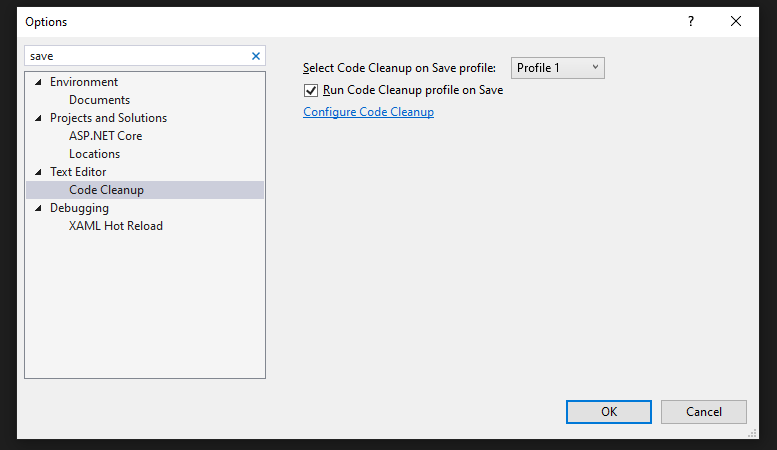
Open the settings, and search for the save.
from the Text Editor->Code Cleanup
check the Run Code Cleanup profile on Save, also you can configure it in your way. and OK :)

I have
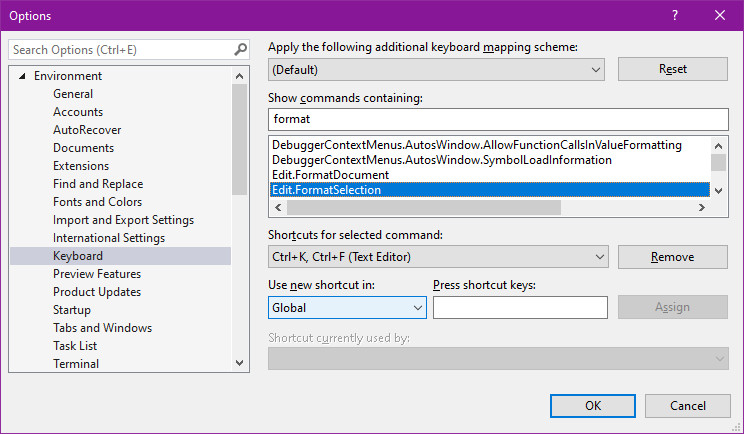
Ctrl + K, Ctrl + F
to format the selected text
or
Ctrl+ K, + Ctrl + D for the document :
Thank you. I will try that with the menu picture you put.
Although I remember Ctrl k or ctrl d didn't do nothing.
It can be changed, but Ctrl K on a selection, then Ctrl F, correctly formats the code for me

You may of used Format Document on Save Visual Studio extension.
Enables auto formatting of the code when you save a file. Visual Studio supports auto formatting of the code with the CTRL+E,D or CTRL+E,F key shortcuts but with this extension the command 'Format Document' is executed on Save.
Hi, @Elado
Welcome to Microsoft Q&A!
To format a selection: Ctrl+K, Ctrl+F
To format a document: Ctrl+K, Ctrl+D
See the pre-defined keyboard shortcuts. (These two are Edit.FormatSelection and Edit.FormatDocument.)
*
Update:
You can Identify and customize keyboard shortcuts in Visual Studio.
Sincerely,
Peng
*
If the answer is helpful, please click "Accept Answer" and upvote it.
Note: Please follow the steps in our documentation to enable e-mail notifications if you want to receive the related email notification for this thread

The Code Formatter is a 3rd party Visual Studio plugin. Read the openly published documentation to see if this feature is available?
' cx='32' cy='32' r='32' /%3E%3Ctext x='50%25' y='55%25' dominant-baseline='middle' text-anchor='middle' fill='%23FFF' %3EPA%3C/text%3E%3C/svg%3E)
Here's the extension I use to format documents on save:
https://marketplace.visualstudio.com/items?itemName=MadsKristensen.CodeCleanupOnSave
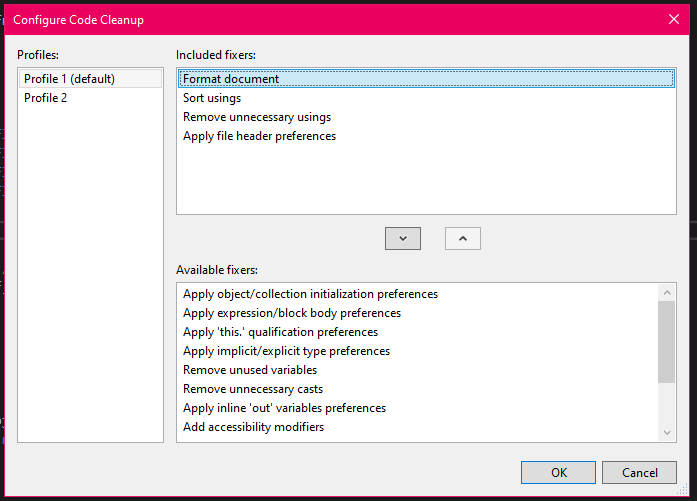
You should have a default Code Cleanup profile if you go to "Analyze > Code Cleanup > Configure Code Cleanup"
If you move "Format document" from "Available fixers" to "Included fixer" (if it's not already) then press "Ok" and it should format your documents based on your preferences.
There are a few fixers I use that are quite handy (Sort usings/Remove unnecessary usings probably the most useful to me):