Hi
I'm trying to find a way to add a LPR printer port via PowerShell. The add-printerport creates standard TCP/IP port only.
Basically what this Ok button does in the background I'd like to know. Figured so far, that it creates a bunch of registry entries, which if I create via reg add, it won't show up in printmanagement.msc/ports.
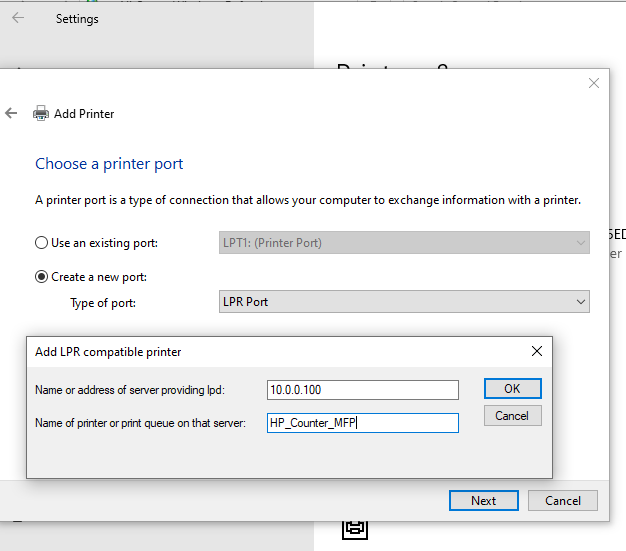
Thank you!
My goal is to have a script that adds a printer (say HP_MFP_Counter) on a domain joined print server (10.0.0.100) to a non-domain joined computer on the same network.
The registry entries are these, but something else is running additionally I can't figure out. This is all I found using Sysinternals Process Monitor.
Reg add "HKEY_LOCAL_MACHINE\SYSTEM\CurrentControlSet\Control\Print\Monitors\LPR Port\Ports\10.0.0.100:HP_Counter_MFP" /v "Printer Name" /t REG_SZ /d "HP_Counter_MFP" /f
Reg add "HKEY_LOCAL_MACHINE\SYSTEM\CurrentControlSet\Control\Print\Monitors\LPR Port\Ports\10.0.0.100:HP_Counter_MFP" /v "Server Name" /t REG_SZ /d "10.0.0.100" /f
Reg add "HKEY_LOCAL_MACHINE\SYSTEM\CurrentControlSet\Control\Print\Monitors\LPR Port\Ports\10.0.0.100:HP_Counter_MFP" /v "EnableBannerPage" /t REG_DWORD /d 0 /f
Reg add "HKEY_LOCAL_MACHINE\SYSTEM\CurrentControlSet\Control\Print\Monitors\LPR Port\Ports\10.0.0.100:HP_Counter_MFP" /v "HpUxCompatibility" /t REG_DWORD /d 0 /f
Reg add "HKEY_LOCAL_MACHINE\SYSTEM\CurrentControlSet\Control\Print\Monitors\LPR Port\Ports\10.0.0.100:HP_Counter_MFP" /v "OldSunCompatibility" /t REG_DWORD /d 0 /f
' cx='32' cy='32' r='32' /%3E%3Ctext x='50%25' y='55%25' dominant-baseline='middle' text-anchor='middle' fill='%23FFF' %3EG%3C/text%3E%3C/svg%3E)

' cx='32' cy='32' r='32' /%3E%3Ctext x='50%25' y='55%25' dominant-baseline='middle' text-anchor='middle' fill='%23FFF' %3ER%3C/text%3E%3C/svg%3E)
' cx='32' cy='32' r='32' /%3E%3Ctext x='50%25' y='55%25' dominant-baseline='middle' text-anchor='middle' fill='%23FFF' %3ERM%3C/text%3E%3C/svg%3E)