Microsoft Security | Microsoft Entra | Microsoft Entra ID
A cloud-based identity and access management service for securing user authentication and resource access

This browser is no longer supported.
Upgrade to Microsoft Edge to take advantage of the latest features, security updates, and technical support.
' cx='32' cy='32' r='32' /%3E%3Ctext x='50%25' y='55%25' dominant-baseline='middle' text-anchor='middle' fill='%23FFF' %3EM%3C/text%3E%3C/svg%3E)
Hi,
I have been looking to set up SSPR put have been having issues setting up Password Writeback.
I have found it is due to permission inheritance in AD, caused by the Domain Users group being a protected group.
(meaning that even if I do enable inheritance to set the correct permissions, Admin SDHolder will just reset them next time it runs)
I was just wondering what the best (most secure) way to get around this would be?
I know I could just enable inheritance on the AdminSDHolder container, but I'm concerned whether that's going to risk presenting a security issue?
Or if I was to add the Azure AD Connect account (MSOL) with the required permissions directly to the ACL of the container, would that be a better solution?
Would appreciate any feedback.
Many thanks
A cloud-based identity and access management service for securing user authentication and resource access

@Motty ,
Thank you for providing detailed information.
For security reasons a Windows AD account that belongs to on-premises AD protected group(s) cannot use SSPR+Password Writeback to reset his/her on-premises password using the flow "Forgot my password" rather administrators can change their password in the cloud but can't reset a forgotten password.
Therefore, workaround would be assign required permissions to AdminSDHolder container for Azure AD connector account either manually or by using AAD connect PowerShell module but assign required permissions to AdminSDHolder container is not recommended, so if you wish to leverage SSPR+Password Writeback to reset password of user then best way would be removing user account from protected groups.
To know more about How does self-service password reset writeback work in Azure Active Directory, refer.
However, "Domain Users" group is not a Protected Group in Active Directory by default, and here is a list of protected accounts and groups by operating system, therefore I'm curious whether "Domain Users" members were specifically added to member-of any protected groups such as Domain Admins, Server Operators, Account operators or Enterprise admins etc.., ? if so then you may see AdminCount attribute set to 1.
In order to determine if a user is or was member of a protected group you can check the if the on-premises AD user object has the AdminCount attribute set:
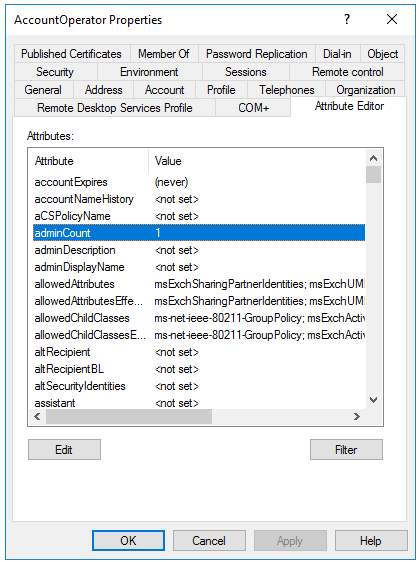
Hope this helps.
@sikumars-msft
Thank you, I didn't realise that the property also extended to groups that were members of a protected group.
I have found that the Domain Users group has the adminCount set to 1 is a member of the Print Operators group.
Therefore, in order to resolve the issue, would I need to:
Actually, I've just realised - all the users in the group will still have an adminCount set to 1 and will still have inheritance blocked.
I'm therefore thinking I need to
I'll create a test environment to run this in first.
@Motty , I'd want to check in and see if you have any other questions or if you were able to resolve this issue. Kindly notify me if you have any other queries.
We appreciate your time and understanding while we worked through this issue.
------------
Please remember to "Accept Answer" if any answer/reply helped, so that others in the community facing similar issues can easily find the solution.

Hi @Siva-kumar-selvaraj , when implementing https://learn.microsoft.com/en-us/azure/active-directory/authentication/howto-sspr-windows, All users must have the AdminSDHolder value set to 0 to allow SSPR ?
Hello @Motty ,
Thanks for reaching out.
Important points to be aware of when synchronizing groups (such as the Domain Users group) from Active Directory to Azure AD:
Therefore, to resolve the issue in the scenario that some built-in groups (such as the Domain Users group) aren't synced, create a new group that contains all the applicable members and appropriate permissions of the built-in group. Then, add that group as a member to the built-in group that's not synced. Use the new group instead of the built-in group to manage members. By using this method, you still manage only one group.
You don't want to change the attributes of the built-in group or change the scoping rules of the identity sync appliance to allow critical system objects to be synced. It may trigger other unexpected behavior.
Hope this helps.
------
Please "Accept the answer" if the information helped you. This will help us and others in the community as well.
Hi @sikumars-msft
Thanks for coming back to me.
I don't think I've quite explained myself well enough. I am not having any issues regarding syncing of users.
The problem I have is that I'm trying to set up password writeback, and, to do that, I have to give the account used by Azure AD Connect permission to reset the passwords of our users in AD.
The advice from Microsoft is to apply the permission at domain level, which I have done.
(see this article - https://learn.microsoft.com/en-us/azure/active-directory/authentication/tutorial-enable-sspr-writeback)
The problem is, however, that the permissions do not inherit through to the user accounts.
The reason for this, I believe, is because of the AdminSDHolder, which resets the permissions on any user in a "protected group" to match the permissions on the SDHolder container.
(https://social.technet.microsoft.com/wiki/contents/articles/22331.adminsdholder-protected-groups-and-security-descriptor-propagator.aspx)
Having run a PowerShell command to identify Protected Groups in our domain, it seems the group in question is the Domain Users group.
My question, therefore, is how do I get around this.
I could enable inheritance on the AdminSDHolder container, but the article in question advises against that.