Share via

Investigation of Administrator-Disabled Location Settings on Windows 11

Anonymous
2024-10-09T20:20:56+00:00

Hello!

I would like to check on a situation occurring in my environment. An employee reported that after an update to their operating system, the Privacy and Security settings related to Location are disabled by an administrator on the device.

However, there are no policies for this type of block created in the environment. Is this a standard behavior in Windows 11? Is there any way to work around this?

I want to highlight that our users typically do not have local administrator access, and when I access it with a privileged account, I can enable the service.

I have tried executing this command, but it had no effect: Reg add "HKEY_LOCAL_MACHINE\SYSTEM\CurrentControlSet\Services\lfsvc" /v Start /t REG_DWORD /d 2 /f

Here’s the version installed on the client:

Microsoft Windows 11 Pro 10.0.22631 build 22631.

***Moved from Windows / Windows 11 / Configurações***

Windows for home | Windows 11 | Settings

Locked Question. This question was migrated from the Microsoft Support Community. You can vote on whether it's helpful, but you can't add comments or replies or follow the question.

0 comments No comments
Answer accepted by question author
  1. Anonymous
    2025-01-13T14:51:41+00:00

    Hello Sidoti-IT,

    I hope this message finds you well.

    Yes, I found the cause and the solution. I discovered that the issue was occurring because of my helpdesk team. When they were formatting the computer or starting the first access during the Windows installation process, there is a series of questions regarding enabling or disabling services, and one of them is the location service. I noticed that the helpdesk team was selecting "No" to enable the location service.

    As a workaround, if this happens, simply add the user as a local administrator to enable the location service.

    I hope this response helps you.

    5 people found this answer helpful.
    0 comments No comments

10 additional answers

Sort by: Most helpful
  1. Anonymous
    2024-10-10T05:08:09+00:00

    Hi JulianoNasciment,

    Welcome to Microsoft Community.

    Based on the original description, we understand that devices in your organization are experiencing an issue where the status of the Location feature associated with Administrators cannot be modified.

    What you are observing is not standard behavior for Windows 11.

    Policies, policy-related registry value changes, and application conflicts/overrides may be common factors associated with such issues.

    For "Location", there are other policies and registry entries in the system.

    Content in the following threads described relevant examples.

    We are not able to share the content of the external link directly for you, but please try to read the information in the link in its entirety, which includes the basic Settings check and other Group Policy checks, registry entry checks (DisableLocation under LocationAndSensors).

    Disclaimer: Generally, modifying registry subkeys or work group is intended for advanced users, administrators, and IT Professionals. It can help fix some problems, however, serious problems might occur if you modify the registry incorrectly. Therefore, make sure that you follow these steps carefully. For further protection, back up the registry before you modify it. Then, you can restore the registry if a problem occurs. For more information about how to back up and restore the registry, click How to back up and restore the registry in Windows - Microsoft Support to view the article.

    If I misunderstand your situation, feel free to correct me and share the information.

    Best Regards,

    Kyo.Y - MSFT | Microsoft Community Technical Support

    3 people found this answer helpful.
    0 comments No comments
  2. Anonymous
    2024-10-17T12:05:16+00:00

    Good morning,

    We are reporting that this problem is also occurring on our machines. The behaviour is identical:

    Location settings are disabled and users who are not administrators on their machines cannot re-enable them,

    This is causing a lot of problems with widely used third party applications such as Adobe and Digital Signatures,. browser and Office Suite.

    I will report the problem via the Feedback Hub.

    2 people found this answer helpful.
    0 comments No comments
  3. Anonymous
    2024-10-12T09:53:23+00:00

    Hi JulianoNascimento,

    Thank you for getting back to us.

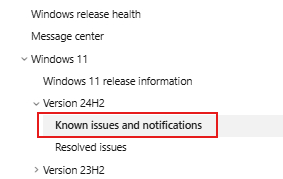
    The content in this link described known issues that may be relevant.

    Windows 11, version 24H2 known issues and notifications | Microsoft Learn
    Image

    Currently, we have not received other feedback or support articles related to this separate issue.

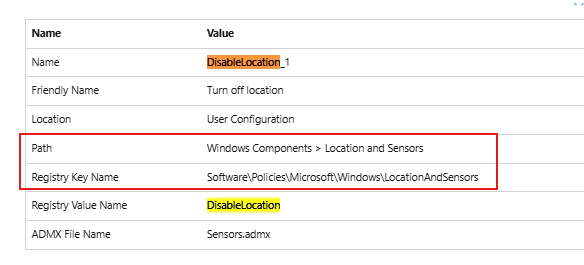
    Regarding the “logs” you mentioned, do you mean the “DisableLocation” entry under “Polices” that was not found?

    The registry is in a way another manifestation/implementation of Group Policy.

    If you don't find a corresponding entry, you can manually create the corresponding item or value.

    For example, the content in this link described some correspondence between some Group Policy and Registry entries.

    ADMX_Sensors Policy CSP | Microsoft Learn
    Image

    Disclaimer: Generally, modifying registry subkeys or work group is intended for advanced users, administrators, and IT Professionals. It can help fix some problems, however, serious problems might occur if you modify the registry incorrectly. Therefore, make sure that you follow these steps carefully. For further protection, back up the registry before you modify it. Then, you can restore the registry if a problem occurs. For more information about how to back up and restore the registry, click How to back up and restore the registry in Windows - Microsoft Support to view the article. 

    Best Regards,

    Kyo.Y - MSFT | Microsoft Community Technical Support

    1 person found this answer helpful.
    0 comments No comments
  4. Anonymous
    2024-10-10T12:48:40+00:00

    Good morning Kyo.Y - MSFT,

    Thank you very much for your response!

    I conducted a test here by adding the user who was facing the issue with enabling location services to the local administrators group on the machine.

    After performing a logoff/logon, I was able to enable the service. I also restarted the machine, and the service remained active.

    It doesn’t seem to be any applied policy; it looks like a security feature in Windows 11 that was applied, but I couldn’t find or map it.

    I followed your suggestion to check the logs and didn’t find anything created as shown in the screenshots you provided.

    I know Windows 11 has a strong focus on security. Do you have any information about whether an update could have influenced this issue?

    1 person found this answer helpful.
    0 comments No comments
