Share via

Reg Windows 11 24H2 Update Safeguard Holding On Device

Anonymous
2025-02-14T10:35:26+00:00

Hi Team,

I still don't get a Windows 24H2 update and I checked from my end I found that Microsoft put my device on safeguard holding but my hardware requirements satisfied with the 24H2 requirement below I can provide some resources to verify at your end and tell me when Microsoft revoke the safeguard holding on my device

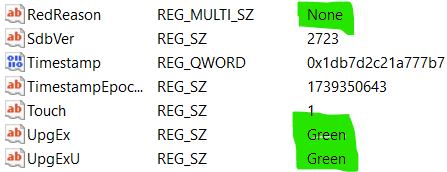
{

    "AppName": "Lenovo/Dynabook devices with drivers that use ONNXRuntime",

    "BlockType": "GatedBlock",

    "SafeguardId": "53340062",

    "NAME": "",

    "VENDOR": "Lenovo",

    "EXE_ID": "{c6f2b9e1-d0d5-421d-a9b7-5c1eefa9910d}",

    "DEST_OS_GTE": "GE24H2",

    "DEST_OS_LT": "XY30H1",

    "FirstAppraiserDate": "2024-10-03T21:09:26.6668441Z",

    "FirstAppraiserVersions": "2603, 2670, 2688, 2688, 2711",

    "LastAppraiserDate": "2025-02-06T23:07:07.7086986Z",

    "LastAppraiserVersions": "2615, 2682, 2700, 2700, 2723",

    "INNERXML": "Lenovo/Dynabook devices with drivers that use ONNXRuntimeLenovo{c6f2b9e1-d0d5-421d-a9b7-5c1eefa9910d}GE24H2XY30H1HARDWARE\\DESCRIPTION\\System\\BIOSSystemManufacturer1*Lenovo*HARDWARE\\DESCRIPTION\\System\\BIOSSystemProductName1*20L5A01FHH*HARDWARE\\DESCRIPTION\\System\\BIOSSystemProductName1*20L6S29D00*HARDWARE\\DESCRIPTION\\System\\BIOSSystemProductName1*20L6S4T80H*HARDWARE\\DESCRIPTION\\System\\BIOSSystemProductName1*20L9CTO1WW*HARDWARE\\DESCRIPTION\\System\\BIOSSystemProductName1*20LAS61K00*HARDWARE\\DESCRIPTION\\System\\BIOSSystemProductName1*81X2*HARDWARE\\DESCRIPTION\\System\\BIOSSystemProductName1*81X8*HARDWARE\\DESCRIPTION\\System\\BIOSSystemProductName1*82HU*HARDWARE\\DESCRIPTION\\System\\BIOSSystemProductName1*82JU*HARDWARE\\DESCRIPTION\\System\\BIOSSystemProductName1*82K2*HARDWARE\\DESCRIPTION\\System\\BIOSSystemProductName1*82KT*HARDWARE\\DESCRIPTION\\System\\BIOSSystemProductName1*82KU*HARDWARE\\DESCRIPTION\\System\\BIOSSystemProductName1*82LX*HARDWARE\\DESCRIPTION\\System\\BIOSSystemProductName1*82MF*HARDWARE\\DESCRIPTION\\System\\BIOSSystemProductName1*82SX*HARDWARE\\DESCRIPTION\\System\\BIOSSystemProductName1*82U9*HARDWARE\\DESCRIPTION\\System\\BIOSSystemProductName1*82XQ*HARDWARE\\DESCRIPTION\\System\\BIOSSystemProductName1*82XX*HARDWARE\\DESCRIPTION\\System\\BIOSSystemProductName1*82YL*HARDWARE\\DESCRIPTION\\System\\BIOSSystemProductName1*82YT*HARDWARE\\DESCRIPTION\\System\\BIOSSystemProductName1*83EQ*AppraiserData1GatedBlockAppraiserData_GatedBlockId153340062"

  },
Windows for home | Windows 11 | Windows update

Locked Question. This question was migrated from the Microsoft Support Community. You can vote on whether it's helpful, but you can't add comments or replies or follow the question.

0 comments No comments

Answer accepted by question author

  1. Anonymous
    2025-02-15T14:54:24+00:00

    Hi Hariprasath,

    You're welcome. Microsoft employees don't check the feedback posted by users in this forum. To send feedback to Microsoft, you may use the Feedback Hub (Win + F). Meanwhile, please refresh the compatibility assessment using the schtasks.exe command posted earlier to see if that helps.


    Some reference about safeguard ID: 53340062.

    Image

    Windows 11, version 24H2 known issues and notifications | Microsoft Learn:

    https://learn.microsoft.com/en-us/windows/release-health/status-windows-11-24h2#issue-details

    So, it might be the webcam driver.

    1 person found this answer helpful.
    0 comments No comments

11 additional answers

Sort by: Most helpful
  1. Anonymous
    2025-02-15T08:36:17+00:00

    Hi Hariprasath,

    If the setup proceeded well, it didn't find any hard blocks. If it encounters any blocks, you'll see the "Attention needed" dialog mentioning the driver causing the issue.

    Upgrading using ISO shouldn't cause any issues. And you have 10 days to revert to the previous build.

    How to run In-place upgrade in Windows 11 - Microsoft Community: https://answers.microsoft.com/en-us/windows/forum/all/how-to-run-in-place-upgrade-in-windows-11/4d469147-2747-4dcb-88a4-aae9273a4500

    Hi Ramesh,

    From appraiser log I found the below snippet which causing the GATED BLOCK I think drivers those using ONNXRuntime causing this issue I found many folders that having "ONNXRuntime.dll" or ". ONNX" file I provided few paths below for your reference based on "SdbAppGuid " I can't be able to find the exact driver. from Microsoft to AMD everything using ONNX module and in appraiser log except Gated Block looks everything fine I can wait till Microsoft remove this safeguard holding on my device, but I want to let them know and take action on this if you required any logs files ask me, I can share it

    C:\WINDOWS\WinSxS\amd64_microsoft-windows-ai-machinelearning_31bf3856ad364e35_10.0.22621.4746_none_e4351f5ed5774aaf 
    
    C:\WINDOWS\WinSxS\wow64_microsoft-windows-ai-machinelearning_31bf3856ad364e35_10.0.22621.4746_none_ee89c9b109d80caa 
    
    C:\WINDOWS\System32\SONiX
    
    "C:\Windows\SystemApps\MicrosoftWindows.Client.CBS_cw5n1h2txyewy\Microsoft.CognitiveServices.Speech.extension.onnxruntime.dll"
    
    "C:\Windows\SystemApps\LKG\MicrosoftWindows.LKG.SpeechRuntime_cw5n1h2txyewy\Microsoft.CognitiveServices.Speech.extension.onnxruntime.dll"
    
    "C:\Windows\System32\Microsoft-Edge-WebView\onnxruntime.dll"
    
    "C:\Windows\System32\DriverStore\FileRepository\amdfdans.inf_amd64_4642113bda5f5b9b\STLN_modelv2.onnx"
    
    <Asset>
          <PropertyList Type="Inventory">
            <Property Name="AssetSpawnTier" Value="DataSource" />
            <Property Name="AssetType" Value="PassiveMatchingInfoEntry" />
            <Property Name="SdbAppGuid" Value="{143bb262-fdc6-4a07-96f7-7d4f2b7586f8}" Ordinal="43" />
            <Property Name="SdbEntryGuid" Value="{c6f2b9e1-d0d5-421d-a9b7-5c1eefa9910d}" Ordinal="43" />
          </PropertyList>
          <PropertyList Type="DataSource">
            <Property Name="ApplicableTargetVersion" Value="GE24H2" Ordinal="43" />
            <Property Name="SdbAppGuid" Value="{143bb262-fdc6-4a07-96f7-7d4f2b7586f8}" Ordinal="43" />
            <Property Name="SdbAppName" Value="Lenovo/Dynabook devices with drivers that use ONNXRuntime" Ordinal="43" />
            <Property Name="SdbAppVendor" Value="Lenovo" Ordinal="43" />
            <Property Name="SdbAppraiserData" Value="GatedBlock" Ordinal="43" />
            <Property Name="SdbAppraiserData_GatedBlockId" Value="53340062" Ordinal="43" />
            <Property Name="SdbBlockOverrideType" Value="SDB_UX_BLOCKTYPE_OVERRIDE_NO_BLOCK" Ordinal="43" />
            <Property Name="SdbEntryGuid" Value="{c6f2b9e1-d0d5-421d-a9b7-5c1eefa9910d}" Ordinal="43" />
          </PropertyList>
          <PropertyList Type="DecisionMaker">
            <Property Name="ApplicableTargetVersion" Value="ALL" Ordinal="2" />
            <Property Name="ApplicableTargetVersion" Value="GE24H2" Ordinal="1" />
            <Property Name="DT_ALL_FIL_BlockUpgradeGatedStatus" Value="FALSE" Ordinal="1" />
            <Property Name="DT_ALL_FIL_DisplayAsGenericHardwareGated" Value="FALSE" Ordinal="1" />
            <Property Name="DT_ALL_FIL_HardBlock" Value="FALSE" Ordinal="1" />
            <Property Name="DT_ALL_FIL_HardBlockUx" Value="FALSE" Ordinal="1" />
            <Property Name="DT_ALL_FIL_HasBlockOverride" Value="FALSE" Ordinal="1" />
            <Property Name="DT_ALL_FIL_InboxHardBlockUx" Value="FALSE" Ordinal="1" />
            <Property Name="DT_ALL_FIL_InboxSoftBlockUx" Value="FALSE" Ordinal="1" />
            <Property Name="DT_ALL_FIL_NeedsInstallPostUpgradeData" Value="FALSE" Ordinal="1" />
            <Property Name="DT_ALL_FIL_NeedsNotifyPostUpgradeData" Value="FALSE" Ordinal="1" />
            <Property Name="DT_ALL_FIL_NeedsReinstallPostUpgradeData" Value="FALSE" Ordinal="1" />
            <Property Name="DT_ALL_FIL_NeedsReinstallPostUpgradeUxData" Value="FALSE" Ordinal="1" />
            <Property Name="DT_ALL_FIL_NeedsUninstallAction" Value="FALSE" Ordinal="1" />
            <Property Name="DT_ALL_FIL_OneBSecFixDetectoidCombined" Value="FALSE" Ordinal="1" />
            <Property Name="DT_ALL_FIL_OneBSecFixFeatureSettingsOverrideMaskOne" Value="FALSE" Ordinal="1" />
            <Property Name="DT_ALL_FIL_OneBSecFixFeatureSettingsOverrideMaskPresent" Value="FALSE" Ordinal="1" />
            <Property Name="DT_ALL_FIL_OneBSecFixFeatureSettingsOverrideMaskThree" Value="FALSE" Ordinal="1" />
            <Property Name="DT_ALL_FIL_OneBSecFixFeatureSettingsOverrideMaskTwo" Value="FALSE" Ordinal="1" />
            <Property Name="DT_ALL_FIL_OneBSecFixFeatureSettingsOverrideMaskZero" Value="FALSE" Ordinal="1" />
            <Property Name="DT_ALL_FIL_OneBSecFixFeatureSettingsOverrideOne" Value="FALSE" Ordinal="1" />
            <Property Name="DT_ALL_FIL_OneBSecFixFeatureSettingsOverridePresent" Value="FALSE" Ordinal="1" />
            <Property Name="DT_ALL_FIL_OneBSecFixFeatureSettingsOverrideThree" Value="FALSE" Ordinal="1" />
            <Property Name="DT_ALL_FIL_OneBSecFixFeatureSettingsOverrideTwo" Value="FALSE" Ordinal="1" />
            <Property Name="DT_ALL_FIL_OneBSecFixFeatureSettingsOverrideZero" Value="FALSE" Ordinal="1" />
            <Property Name="DT_ALL_FIL_SoftBlock" Value="FALSE" Ordinal="1" />
            <Property Name="DT_ALL_FIL_SoftBlockUx" Value="FALSE" Ordinal="1" />
            <Property Name="DT_ALL_FIL_TwoBSecFixDetectoidCombined" Value="FALSE" Ordinal="1" />
            <Property Name="DT_ALL_FIL_UnresolvedAvWarn" Value="FALSE" Ordinal="1" />
            <Property Name="DT_ALL_FIL_UnresolvedReinstallWarn" Value="FALSE" Ordinal="1" />
            <Property Name="DT_ANY_ALL_IncludeInTelemetryUnversioned" Value="TRUE" Ordinal="2" />
            <Property Name="DT_ANY_ALL_IncludeInTelemetryVersioned" Value="TRUE" Ordinal="1" />
            <Property Name="DT_ANY_FIL_BlockAlreadyInbox" Value="FALSE" Ordinal="1" />
            <Property Name="DT_ANY_FIL_BlockUpgradeUxTables" Value="FALSE" Ordinal="1" />
            <Property Name="DT_ANY_FIL_FixedByUninstall" Value="FALSE" Ordinal="1" />
            <Property Name="DT_ANY_FIL_OneBInstalled" Value="FALSE" Ordinal="1" />
            <Property Name="DT_ANY_FIL_PreOneBInstalled" Value="FALSE" Ordinal="1" />
            <Property Name="DT_ANY_FIL_TwoBInstalled" Value="FALSE" Ordinal="1" />
            <Property Name="DT_ANY_FMC_BlockingApplication" Value="FALSE" Ordinal="1" />
            <Property Name="DT_ANY_FMC_NeedsDismissAction" Value="FALSE" Ordinal="1" />
            <Property Name="DT_ORD_FIL_BlockUpgradeCanReinstallStatus" Value="FALSE" Ordinal="1" />
            <Property Name="DT_ORD_FIL_BlockUpgradeCanReinstallUxStatus" Value="FALSE" Ordinal="1" />
            <Property Name="DT_ORD_FIL_BlockUpgradeStatus" Value="FALSE" Ordinal="1" />
            <Property Name="DT_ORD_FIL_BlockUpgradeUntilUpdateStatus" Value="FALSE" Ordinal="1" />
            <Property Name="DT_ORD_FIL_BlockUpgradeUntilUpdateUxStatus" Value="FALSE" Ordinal="1" />
            <Property Name="DT_ORD_FIL_BlockUpgradeUxStatus" Value="FALSE" Ordinal="1" />
            <Property Name="DT_ORD_FIL_DisplayAsGenericHardware" Value="FALSE" Ordinal="1" />
            <Property Name="DT_ORD_FIL_HasMigTypeForMode" Value="FALSE" Ordinal="1" />
            <Property Name="DT_ORD_FIL_MigXmlRemovedStatus" Value="FALSE" Ordinal="1" />
            <Property Name="DT_ORD_FIL_ReinstallAfterUpgradeStatus" Value="FALSE" Ordinal="1" />
            <Property Name="DT_ORD_FIL_ReinstallAfterUpgradeUxStatus" Value="FALSE" Ordinal="1" />
            <Property Name="DT_ORD_FIL_ReinstallAfterUpgradeWarnStatus" Value="FALSE" Ordinal="1" />
            <Property Name="DT_ORD_FIL_ReinstallAfterUpgradeWarnUxStatus" Value="FALSE" Ordinal="1" />
            <Property Name="DT_ORD_GAT_HasGatedSdbEntry" Value="TRUE" Ordinal="1" />
            <Property Name="DT_ORD_GAT_HasGatedWarnSdbEntry" Value="FALSE" Ordinal="1" />
          </PropertyList>
          <PropertyList Type="DecisionAggregator" />
        </Asset>
    
    0 comments No comments
  2. Anonymous
    2025-02-15T02:37:42+00:00

    Hi Hariprasath,

    If the setup proceeded well, it didn't find any hard blocks. If it encounters any blocks, you'll see the "Attention needed" dialog mentioning the driver causing the issue.

    Upgrading using ISO shouldn't cause any issues. And you have 10 days to revert to the previous build.

    How to run In-place upgrade in Windows 11 - Microsoft Community: https://answers.microsoft.com/en-us/windows/forum/all/how-to-run-in-place-upgrade-in-windows-11/4d469147-2747-4dcb-88a4-aae9273a4500

    0 comments No comments
  3. Anonymous
    2025-02-14T19:37:35+00:00

    Hi Hariprasath,

    The compatibility appraiser runs as a scheduled task and updates the assessment every day. Once the compatibility hold is released, I think 24H2 will be offered to your device automatically. There is no way to get notified when the hold is removed.

    To update the assessment manually, you can run the following command from admin Command Prompt:

    schtasks.exe /Run /TN "\Microsoft\Windows\Application Experience\Microsoft Compatibility Appraiser"

    Or, do an in-place using the ISO.

    How to run In-place upgrade in Windows 11 - Microsoft Community: https://answers.microsoft.com/en-us/windows/forum/all/how-to-run-in-place-upgrade-in-windows-11/4d469147-2747-4dcb-88a4-aae9273a4500

    Note:

    The setup runs a compatibility scan and tells you which driver is blocking the 24H2 setup. Then, we can analyze the setup logs and remove the offending driver.

    Hi Ramesh,

    I tried in place upgrade it asks me to install the Windows 11 I run the setup till install option pop up and then I cancelled the Installation I don't like to install manually from my end I prefer through windows update without installing the Windows 11 again do I get the log file what driver causing this issue appraiser log for GE24H2 through just running the setup file if possible, means how can I get the log kindly guide me

    0 comments No comments
  4. Anonymous
    2025-02-14T16:34:35+00:00

    Hi Hariprasath,

    The compatibility appraiser runs as a scheduled task and updates the assessment every day. Once the compatibility hold is released, I think 24H2 will be offered to your device automatically. There is no way to get notified when the hold is removed.

    To update the assessment manually, you can run the following command from admin Command Prompt:

    schtasks.exe /Run /TN "\Microsoft\Windows\Application Experience\Microsoft Compatibility Appraiser"

    Or, do an in-place using the ISO.

    How to run In-place upgrade in Windows 11 - Microsoft Community: https://answers.microsoft.com/en-us/windows/forum/all/how-to-run-in-place-upgrade-in-windows-11/4d469147-2747-4dcb-88a4-aae9273a4500

    Note:

    The setup runs a compatibility scan and tells you which driver is blocking the 24H2 setup. Then, we can analyze the setup logs and remove the offending driver.

    0 comments No comments
