Share via

Hyperlink not showing up in New Outlook

Anonymous
2024-05-17T20:56:32+00:00

I am having a problem with Hyperlink not showing up with new outlook. Whenever there is an email that comes with hyperlink on it ,sometime it comes with clickable link sometime it is not clickable at all .

Outlook | Windows | New Outlook for Windows | For home

Locked Question. This question was migrated from the Microsoft Support Community. You can vote on whether it's helpful, but you can't add comments or replies or follow the question.

0 comments No comments

46 answers

Sort by: Most helpful
  1. Anonymous
    2024-10-23T17:34:47+00:00

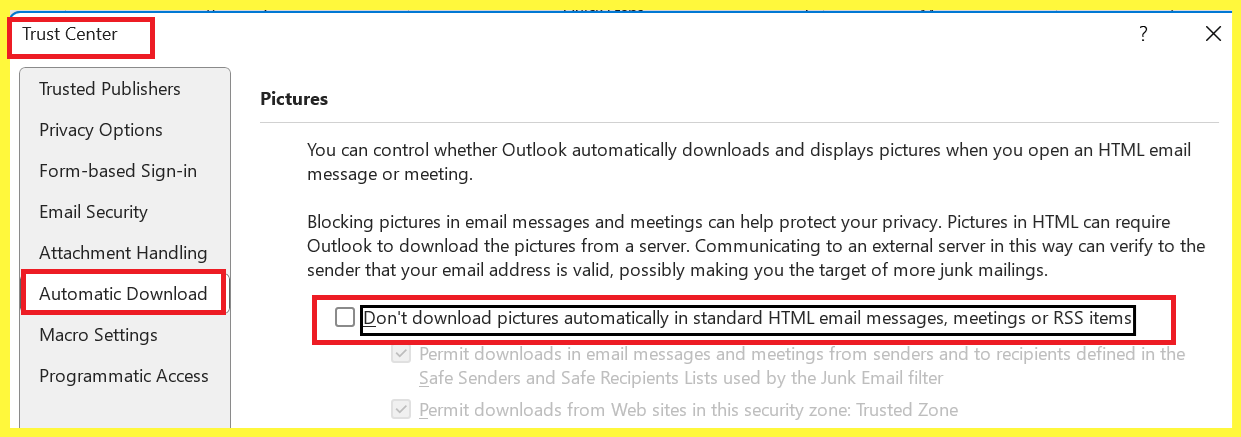
    Hi! I have the same issue. I'm using the new outlook and I can't open the links, they have to be copied and pasted. Also, I don't find “File” > “Options” > “Trust Center” > “Trust Center Settings” > “Automatic Download” Thank you,

    I'm having the same problem. Must copy/paste to open. Don't have a TRUST CENTER in the New Outlook. Any other suggestions?

    The original answer from Mr. Sharma directs us to IE which is no longer used. The answer must be long out-of-date. Another suggestion would be appreciated.

    6 people found this answer helpful.
    0 comments No comments
  2. Anonymous
    2025-02-21T09:06:14+00:00

    We have gone back to the old outlook now as this is not good enough

    4 people found this answer helpful.
    0 comments No comments
  3. Anonymous
    2025-02-13T09:52:30+00:00

    I had same issue not opening hyperlinks and links locally saved on server with the new Outlook

    ---The solution that really works , having a 3 button mouse or where the scroll button is clickable , the scroll button works for opening hyperlink...

    hope it works for you guys

    4 people found this answer helpful.
    0 comments No comments
  4. Anonymous
    2024-12-05T14:50:30+00:00

    This is not an option for me in my Organizations "New Outlook"

    4 people found this answer helpful.
    0 comments No comments
  5. Anonymous
    2024-05-18T19:57:08+00:00

    Hello Binod Sharma,

    Thank you for reaching out to Microsoft community.

    I'm sorry to hear that you're having trouble with hyperlinks in your emails. There are several potential reasons why hyperlinks may not be showing up or being clickable in the new Outlook.

    Based on the description, here are some initial troubleshooting steps you can try:

    • Check your email settings: Make sure that your email settings are configured to allow hyperlinks. To do this, go to File > Options > Trust Center > Trust Center Settings > Automatic Download, and make sure that the "Don't download pictures automatically in HTML e-mail" option is unchecked.
    • Check your browser settings: If you're using a web browser to open your emails, make sure that your browser is set to allow hyperlinks. To do this, go to your browser settings and make sure that the "Block pop-ups" option is unchecked. make sure that any browser extensions or add-ins installed in Outlook are not causing the issue. Try disabling any extensions in the "Settings" > "Extensions" menu.

    Please follow this article to resolve the issue: Hyperlinks are not working - Outlook | Microsoft Learn.

    I hope this helps. Please let me know if you have any further questions or concerns.

    Please note that our initial response may not always resolve the issue right away. However, with your help and more detailed information, we can work together to find a solution.

    If none of these step's work, please let me know and we can explore other options.

    Thank you for choosing the MS community.

    We look forward to hearing back and having a great day ahead!

    Sincerely

    S M Nazmun Nur | Microsoft Community Moderator

    3 people found this answer helpful.
    0 comments No comments