Hi RcMattW,
Good day.
Thank you for posting to the Microsoft Community. We are glad to assist.
The only shortcuts for sending email are Alt + s and CTRL + Enter and these are the ones you are already disabled. I tried to reproduce your behaviour with leftclick+s but the mail wasn't sent. So to help us narrow down the issue that you are facing kindly try the following troubleshooting steps.
- You can try to Repair your office application
- Create a new Outlook profile: To create a new profile, use the profile picker:
- Hold Shift while starting Outlook.
**Tips:**You can also use one of these alternative options to access the profile picker:
    - Using a command line switch, right click the Windows Start button and select **Run**. In the Run dialog box, type: **Outlook.exe/profiles** and then press **Enter**.
    - While Outlook is running, select **File** > **Account Settings** > **Change Profile**. Outlook will restart.
2. On the profile picker dialog box, select **Options**.
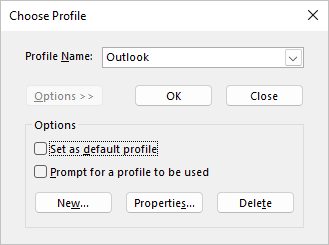
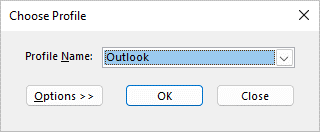 **Note:**Before selecting New, consider selecting the check box for "Prompt a profile to be used." If this is enabled, you will get a prompt every time you start Outlook to pick which profile you want to open. This is helpful when you have multiple profiles and need to switch between them.
3. Select New.
**Note:**Before selecting New, consider selecting the check box for "Prompt a profile to be used." If this is enabled, you will get a prompt every time you start Outlook to pick which profile you want to open. This is helpful when you have multiple profiles and need to switch between them.
3. Select New.
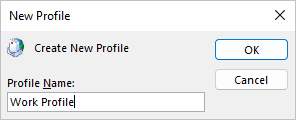
 4. Type a name for the new Outlook Profile and select OK.
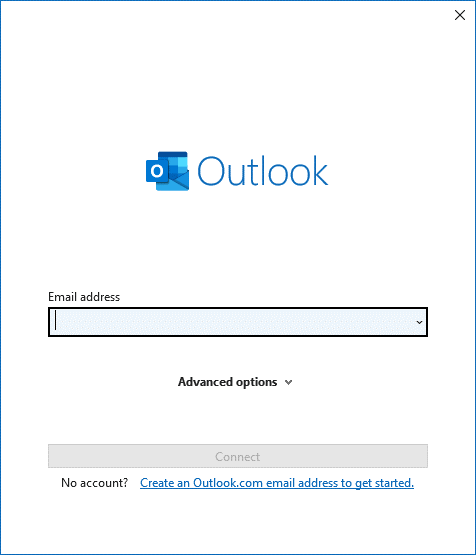
 5. Once the new profile is created, you will need to add an email account to the profile. In the add account dialog, you can optionally add more accounts.
If the issue persists is better to reach out to the Microsoft technical Support team they will have a better view of your issue from the backend and logs side.
We are looking forward to your response! Thanks for your precious time. Have a nice day!
Sincerely,
Microsoft Community Moderator
' cx='32' cy='32' r='32' /%3E%3Ctext x='50%25' y='55%25' dominant-baseline='middle' text-anchor='middle' fill='%23FFF' %3EA%3C/text%3E%3C/svg%3E)
