Microsoft Security | Microsoft Entra | Microsoft Entra ID
A cloud-based identity and access management service for securing user authentication and resource access

This browser is no longer supported.
Upgrade to Microsoft Edge to take advantage of the latest features, security updates, and technical support.
' cx='32' cy='32' r='32' /%3E%3Ctext x='50%25' y='55%25' dominant-baseline='middle' text-anchor='middle' fill='%23FFF' %3EBC%3C/text%3E%3C/svg%3E)
Hello,
I'm trying to validate a token (just using postman), final solution would be written in Java (spring). The problem is I don't find the exact URL to validate the token against AAD.
I found this helpful article : https://learn.microsoft.com/en-us/answers/questions/884100/azure-ad-access-token-validation.html
And in that article they said to validate the token against this URL: https://login.microsoftonline.com/<<
Hello,
I clarified some of the aspects.
We were using Client Credential Flow for authentication, as described in this diagram:
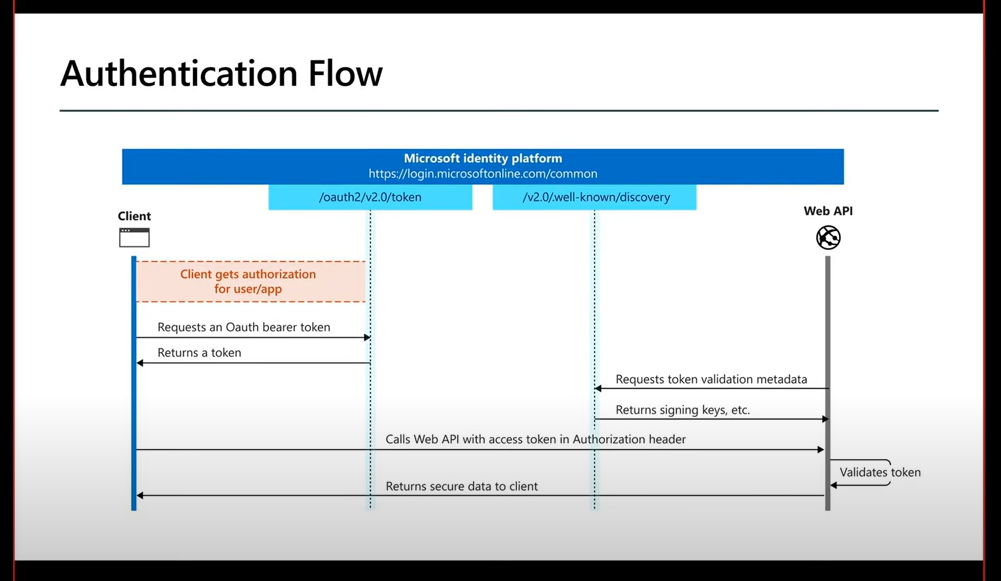
Then, to validate, I managed to validate that, using auth0 java libraries.
An example is here: https://github.com/mauliksoni/aad-token-validation/blob/main/java/validate.java#L38
That's the part I wasn't clear: token validation, is done by libraries (java, .Net, whatever...).
The signature of the token can be validated using a tool like this one: https://jwt.io/
This video was useful, it's pretty much similar with our approach.
Thanks a lot for your prompt support and reply !
Bogdan
' cx='32' cy='32' r='32' /%3E%3Ctext x='50%25' y='55%25' dominant-baseline='middle' text-anchor='middle' fill='%23FFF' %3EGM%3C/text%3E%3C/svg%3E)
@Bogdan Carjac Thank you for reaching out to us. As I understand you are trying to validate a token using postman. You need to use this URL https://login.microsoftonline.com/tenantid/oauth2/v2.0/token to validate the token, reference: https://learn.microsoft.com/en-us/azure/active-directory/develop/v2-oauth2-auth-code-flow
OAuth 2.0 authorization endpoint (v2)
https://login.microsoftonline.com/{tenant-id}/oauth2/v2.0/authorize
v2 authorization endpoint which is used to identify the user to get authenticated or obtain an authorization code and Id Token from Azure AD which is then later exchanged for an access token. This endpoint usually requires during OAuth 2.0 Authorization code grant flow to get authenticated using Microsoft identity platform endpoint.
OAuth 2.0 token endpoint (v2)
https://login.microsoftonline.com/{tenant-id}/oauth2/v2.0/token
v2 token endpoint is used by the application in order to get an access token or a refresh token. It is used by all flows except for the Implicit Flow because in that case an access token is issued directly. This endpoint performs authentication and authorization in majority of application types, including server-based applications.
You can also refer to this QnA post: https://learn.microsoft.com/en-us/answers/questions/686149/index.html
Let me know if you have any further questions, if you any screenshots/error message of the issue. feel free to post to assist you better.
That part is clear.
What we are missing is this part:
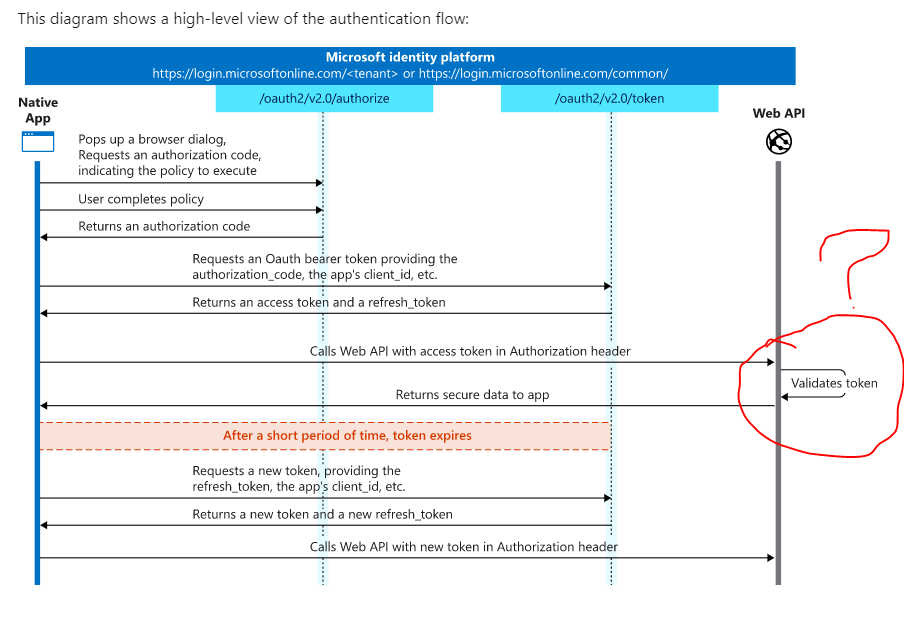
How do we/you do the validation of the token in the web-api ?
The first 2 urls are ok, we are able to get the token from /oauth2/v2.0/token , but then with this token/string placed in Authorization header, what endpoint do we hit ?
We were hoping to hit /oauth2/v2.0/authorize and to get a 200-OK if token is valid, or get a rejection in case the string(token) is not valid. But we always get a 200 OK , no matter what we put in the token, or even if we don't put the token !
Just checking in to see if below information provided by @Shweta Mathur was helpful or not. If you have any further updates on this issue, please feel free to post back.
If you find the below answer useful, please remember to "Accept Answer" so that others in the community facing similar issues can easily find the solution.
' cx='32' cy='32' r='32' /%3E%3Ctext x='50%25' y='55%25' dominant-baseline='middle' text-anchor='middle' fill='%23FFF' %3ESM%3C/text%3E%3C/svg%3E)
Hi @Bogdan Carjac ,
Thanks for reaching out.
I understood, you are able to get the access token using Authorization code flow and now using this access token you can call any protected API/WebAPI or Microsoft Graph API.
Here, first need to understand two different validations of Access Token:
1.Access token is a JWT that contains claims that you can use to identify the granted permissions to your APIs. .An access token contains claims such as scopes, roles and audience that you can use in Azure Active Directory to identify the granted permissions to your APIs. Your application/API must validate claims in the token to prove that it is valid.
There are different flows to get the access token based on application types and their scenarios. The flow you mentioned above is Authorization Code Flow and there are two steps to get the access token in this flow.
a. Authorize Endpoint- to acquire the code
b. Token Endpoint - to acquire the token in exchange of the code
and then this access token can be used to call the Web API . eg You can use the access token to call Graph API endpoint provided by Microsoft Identity Provider https://graph.microsoft.com/v1.0/me to get the user details. To get the user's details token must have User.Read scope with Graph API audience.
Access token should have valid scopes or audience to call any API. Access token with Graph API scopes User.Read cannot be used to call API which is reading user's email. These scopes we need to define while registering the application based on the scenario. Refer here
Refer :https://learn.microsoft.com/en-us/azure/active-directory/develop/scenario-web-app-call-api-overview
2.Another validation is access tokens are signed by Azure Active Directory.
When your internal application receives an access token, it must validate the signature to prove that the token is authentic.
To Verify the JWT token that it has not been tampered by an attacker.
Verify that the JWT contains three segments, separated by two period ('.') characters.
Parse the JWT to extract its three components. The first segment is the Header, the second is the Payload, and the third is the Signature. Each segment is base64url encoded.
Signature contains the digital signature of the token that was generated by Azure AD’s private key and verify that the token was signed by the sender.
To validate the authenticity of the JWT token’s data is by using Azure AD’s public key to verify the signature.
You can obtain public key by calling the public Azure AD OpenID configuration endpoint:
https://login.microsoftonline.com/{tenant_id}/discovery/keys?appid={client_id} and verify against the private key generated by Azure AD token. For validation, developers can decode JWTs using jwt.ms and verify against "kid" claim.
If it works, you know the contents were signed with the private key. If not, you can’t be sure of it so you should treat the JWT token as an invalid token.
Hope this will help.
Thanks,
Shweta
-------------------------------------
Please remember to "Accept Answer" if answer helped you.
' cx='32' cy='32' r='32' /%3E%3Ctext x='50%25' y='55%25' dominant-baseline='middle' text-anchor='middle' fill='%23FFF' %3ELW%3C/text%3E%3C/svg%3E)
Hi, may i know any c# code exmaple for below ?
assuming we need get "x5c" value from discovery/keys url for particular "kid" from JWT
then how to use that "x5c" value do validation ?
===================================
To validate the authenticity of the JWT token’s data is by using Azure AD’s public key to verify the signature.
You can obtain public key by calling the public Azure AD OpenID configuration endpoint:
https://login.microsoftonline.com/{tenant_id}/discovery/keys?appid={client_id} and verify against the private key generated by Azure AD token. For validation, developers can decode JWTs using jwt.ms and verify against "kid" claim.
===================================