
PowerShell: Ctrl+space won't work in any code declared within a function

Markus Johnsson 21 Reputation points
2022-09-26T08:38:16.58+00:00

Hello, friends!

This is my first post on this forum and I am fairly new to PowerShell and have been experimenting with it on and off in the past and I have recently started doing a bit of scripting so my knowledge isn't that solid yet so, please, bare with me. (However, please know that I've read all relevant documentation I could find without finding any answers to my little problem.)

My problem is very trivial but oh so disturbing: I like the PowerShell feature Ctrl+Space and when I write scripts with parameters but where the code is not declared within a function, Ctrl+Space works just fine. However, when I wrap the code in a function body then simply nothing at all happens when I press Ctrl+Space. No parameter options show up any longer. I mean surely this should work in functions?

I take a most minimal example that works with Ctrl+Space just to make clear what works and not, while sticking to the simplest possible (almost):

param (  
    [Parameter()]  
    [string]  
    $Var = "Test"  
)  
    $ParamValue = $Var  
    $ParamValue  
  

But as soon as this snippet is wrapped in a function...

Function FunctionName {  
    param (  
        [Parameter()]  
        [string]  
        $Var = "Test"  
    )  
        $ParamValue = $Var  
        $ParamValue  
}  
FunctionName  

...Ctrl+Space will simply not show any parameters. Also, this means that my parameter variables are NOT recognized either so I can't complete or cycle through mine and the systems parameter names with TAB either, which is a horrible ordeal! :D

On Windows 10 and Server 2019 I am working with PowerShell Version 7.2.6 as my standard engine but I also use the latest Preview build and Windows PowerShell 5.1 for testing purposes. I have the same issues in all of these environments when it comes to this issue.

Have any of you experienced this behavior as well and do you know what I'm doing wrong?

I understand that this is not a significant problem but I felt it is still a feature that simply should work - no matter who wrote the script - since the feature is there for a reason, right? And it should work in any case.

I'm prepared for that, whatever the cause for this issue may be, it is most certainly located on my side but I'm at a total loss as to what it may be, but I would really like to know why this won't work and I would really appreciate any kind of helping hands here: links to or names of documents that will explain why it won't work in functions (which is extremely disturbing) or that will treat the subject so I can get some sleep tonight ; )

(note: I'm couldn't provide the tags I wanted because I was forced to choose among existing ones but sure this question must be valid even here?)

Windows for business | Windows Server | User experience | PowerShell
Windows for business | Windows Client for IT Pros | User experience | Other
0 comments No comments
{count} votes

Answer accepted by question author
  1. Rich Matheisen 48,026 Reputation points
    2022-10-04T18:56:14.16+00:00

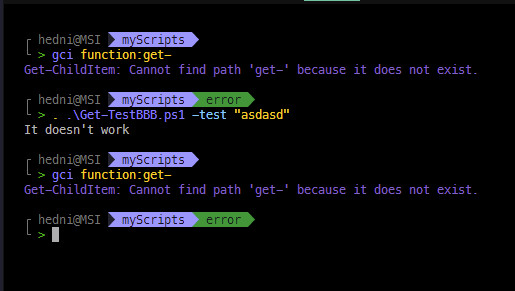
    Well, yes, the Ctrl+Space works with a script that contains no functions. But consider this: if the SCRIPT file contains a function, the FUNCTIONS parameters aren't exposed until the function is loaded into the session. Thus, the need to use dot-sourcing unless it's you intention to use the function in the current PowerShell session.

    But if your intention is to run a script and not pollute your PowerShell sessions memory with functions that make no sense to retain (e.g., they specific the script in which they reside and are of no use outside the script), then you don't dot-source the script.

    #This using the file Get-TestBBB which contains a function  
    #  
    #  
    # When run as a script (without dot-sourcing), the parameter is passed,  
    # but within the script the function Get-TestBBB is invoked with no parameter.  
    # The result? The default value of the Test parameter (an empty string)  
    # is used.  
    PS C:\junk> .\get-testbbb.ps1 -Test "Blah"  
    It doesn't work  
    PS C:\junk>  
      
    # The same thing happens because the function is invoked with no value  
    # from within the ps1 file.  
    PS C:\junk> . .\get-testbbb.ps1 -Test "Blah"  
    It doesn't work  
      
    # But NOW, becasue the script was dot-sourced, the funtion Get-TestBBB  
    # is preserved in this session's "memory"  
      
    PS C:\junk> gci function:get-*  
      
    CommandType     Name                                               Version    Source  
    -----------     ----                                               -------    ------  
    Function        Get-Verb  
    Function        Get-FileHash                                       3.1.0.0    Microsoft.PowerShell.Utility  
    Function        Get-TestBBB  
      
    # NOW, we only have to invoke the function. The function invokation WITHIN  
    # the script isn't part of the function.  
      
    PS C:\junk> get-testbbb -test "It Works!"  
    It Works!  
      
    # And, so does Ctrl+Space  
    PS C:\junk> get-testbbb -Test  
    Test                 Debug                WarningAction        ErrorVariable        InformationVariable  OutBuffer  
    Verbose              ErrorAction          InformationAction    WarningVariable      OutVariable          PipelineVariable  
      
    [string] Test  
    

11 additional answers

Sort by: Most helpful
  1. Rich Matheisen 48,026 Reputation points
    2022-10-02T21:30:48.567+00:00

    If you're trying to use Ctrl+Space from VS Code's Terminal there' no need to dot-source your function. All you need to do is place the cursor in the Editor (where the code for your function should be) and use Ctrl+F5.

    You only need to dot-source the function if you're loading the script that contains your function into a PWSH session.

    Dot-Source your function's .ps1 file into a PWSH session and then type in "get-physicaladapter -<Ctrl+Space>" -- that should work.

    However, in order to do the same thing in VS Code's Terminal, you'll have to install the PSReadline module, version 2.2.6, and then exit and reload VS Code (to have stand-alone PWSH use the new version you'll have to exit any PWSH sessions and restart them, too).

    Install-Module psreadline -Force  
    

    If you're asked to trust the repository, answer "Y".

    0 comments No comments

  2. Markus Johnsson 21 Reputation points
    2022-10-03T08:46:15.173+00:00

    (Reply still won't work!!)

    Thanks yet again, RichMatheisen-8856,

    but honestly, I don't really care much whether Ctrl + Space works in VS Code or not, even though it's handy (and all the other functions work the way they should there.) I just want the same functionality that you get when you write a function and are able to run the script from a console window and feed the function's parameter values through the command line while containing the code inside a Function! i.e. .\script.ps1 -Param1 Value1 -Param2 Value2

    That's all I really need to work and it seems to me that it should work right out of the box, without any special fixing of any sort. (Not that I mind doing some fixing. I'd do anything!) Having that working is what is most important to me but the two go hand in hand because if Ctrl + Space won't work then nor will my parameters work from the command line in any host on any of my two computers - and all because I wrote Function FunctionName { #Code here }? I mean, you are not dot-sourcing or anything in order to make it play for you, right? It just works. Ctrl + Space is more of a flag to me indicating that "Hey! NOW your parameters will work!" or the total opposite when Ctrl + Space won't work.

    So I constantly go back to square one just to end up having to write everything without the use of functions, which is a pain. I don't know whether the good old Filter Name { } works like a function internally or not but that works for me with parameters and Ctrl + Space but not Function, oh no. I sit literally doomed here and it's all darkness around me, haha :D

    Any other thoughts on why this might be?


  3. Markus Johnsson 21 Reputation points
    2022-10-04T10:08:01.27+00:00

    [Yet again the reply function won't take my post. Sorry about that]

    Alright, I get the dot-sourcing thing now but it still doesn't solve my original issue. Please, let me try to show how my system works ( or doesn't work ) with some simple code and pictures a bit more graphic this time. I hope it will make things clearer.

    I will run two scripts, one with its code outside any function, and another which has the same code as the first but that has its code wrapped inside a function. The first will take my parameters but the second will not (and consequently it will show or not show the Ctrl + Space menu.) The code is awkward but it will show you my problem clearly. Here we go:

    # Get-TestAAA - NO FUNCTION  
    [CmdletBinding()]  
        param (  
                [string]$Test = ""  
            )  
      
        If ($Test -eq "") {  
            Write-host "It doesn't work"  
        }  
        else {  
            Write-host $Test  
        }  
    

    And here are the results when I feed it a parameter value. (And just for the sake of it and since you mentioned it, I will dot-source the scripts when I run them even if it won't affect the situation for me in this case. I realize that the functions will be available in memory of the session when I dot-source.)

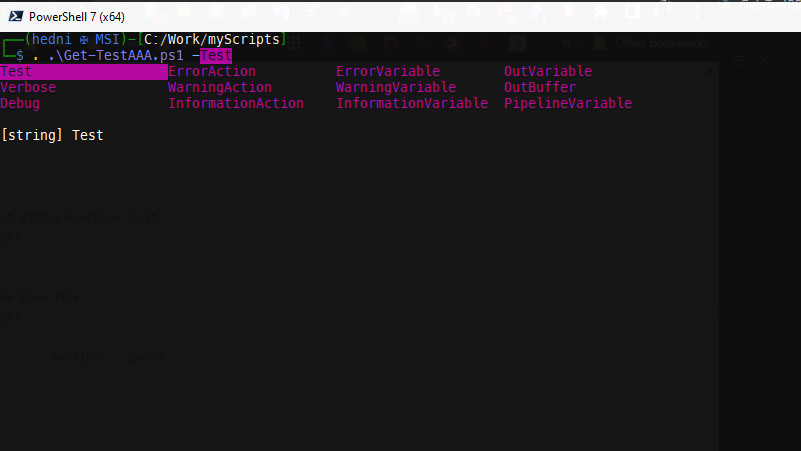
    First, you see that Ctrl + Space works fine here:

    247240-testaaa-ctrlspace.jpg

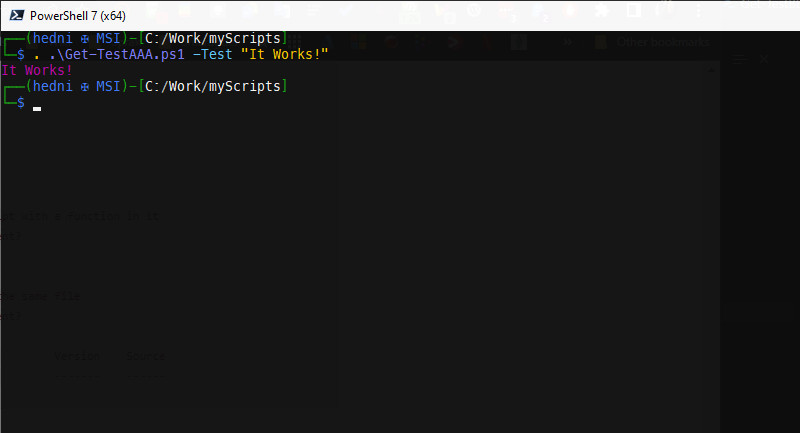
    Then I run the script with a parameter value:

    247337-testaaa.jpg

    Then we have the second script - the one that is contained inside a function:

    # Get-TestBBB - NO FUNCTION  
    Function Get-TestBBB {  
        [CmdletBinding()]  
        param (  
                [string]$Test = ""  
            )  
      
        If ($Test -eq "") {  
            Write-host "It doesn't work"  
        }  
        else {  
            Write-host $Test  
        }  
    } Get-TestBBB  
    

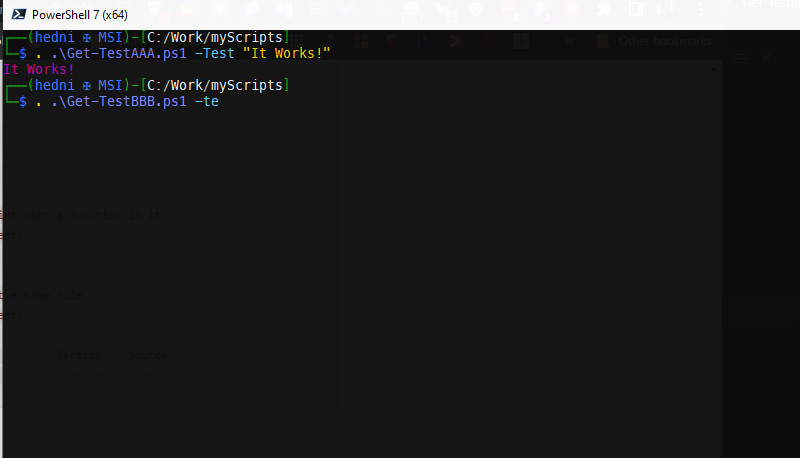
    And Ctrl + Space won't work here:

    247289-testbbb-ctrlspace.jpg

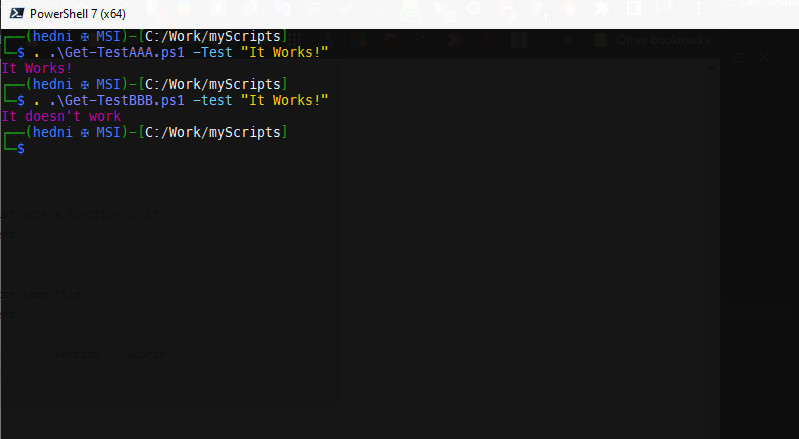
    And the results of running the script with parameter value:

    247268-testbbb.jpg

    This is as clear as I can make it. It shows what my problem has been all along.

    BUT, I can apparntly write other functions and successfully call them within my scripts, I noticed yesterday. I've been so wrapped up in why it won't work when I wrap the Param()-statements inside a function that I didn't think to mention that other functions work but not when I contain [CmdletBinding] Param() inside a function. It should work, shouldn't it? Or can you see any obvious mega-mistake on my behalf?

    I'm so grateful for all the feedback you have provided me with so far and just for sticking with me and trying to make me understand but I feel stupid here now. Why won't it work? I want it to be an error but I am not able to locate any myself. This will be my last shot on this subject, I suppose, because I can't be much more explicit than this. Hope you'll notice something obvious that I am missing.

    Thanks again for tagging along on this little trip, RichMatheisen-8856 : ) I'm much obliged.

    0 comments No comments

Your answer

Answers can be marked as 'Accepted' by the question author and 'Recommended' by moderators, which helps users know the answer solved the author's problem.