Azure Synapse Analytics
An Azure analytics service that brings together data integration, enterprise data warehousing, and big data analytics. Previously known as Azure SQL Data Warehouse.
This browser is no longer supported.
Upgrade to Microsoft Edge to take advantage of the latest features, security updates, and technical support.
' cx='32' cy='32' r='32' /%3E%3Ctext x='50%25' y='55%25' dominant-baseline='middle' text-anchor='middle' fill='%23FFF' %3ERK%3C/text%3E%3C/svg%3E)
Hello Team,
I am using df.write command and the table is getting created.
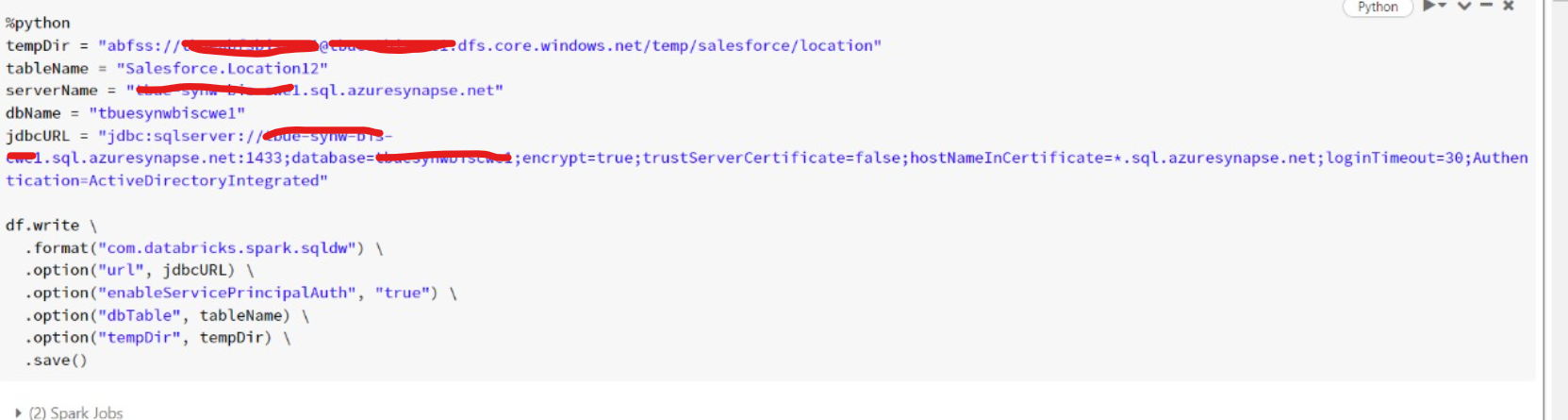
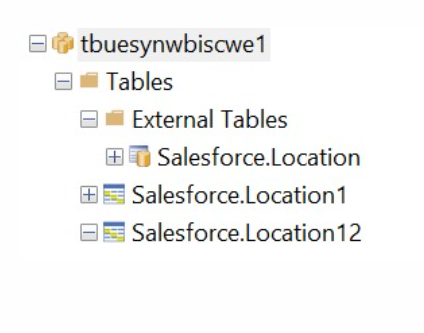
If you refer the below screenshot the table got created in Tables folder in dedicated sql pool. But i required in the External Tables folder.
The script is used :
%python
tempDir = "abfss://*****@Storagename.dfs.core.windows.net/temp/salesforce/location"
tableName = "Salesforce.Location120"
serverName = "xyz.sql.azuresynapse.net"
dbName = "tbuesynwbiscwe1"
jdbcURL = "jdbc:sqlserver://xyz.sql.azuresynapse.net:1433;database=abc;encrypt=true;trustServerCertificate=true;hostNameInCertificate=.sql.azuresynapse.net;loginTimeout=30;Authentication=ActiveDirectoryIntegrated;external.table.purge=true;DataSource=tbueabfsbiscwe1_tbuestbiscwe1_dfs_core_windows_net;FileFormat=SynapseParquetFormat"
df.write \
.format("com.databricks.spark.sqldw") \
.option("url", jdbcURL) \
.option("enableServicePrincipalAuth", "true") \
.mode("overwrite") \
.option("dbTable", tableName) \
.option("tempDir", tempDir) \
.save()
Regards
Rk
' cx='32' cy='32' r='32' /%3E%3Ctext x='50%25' y='55%25' dominant-baseline='middle' text-anchor='middle' fill='%23FFF' %3EH%3C/text%3E%3C/svg%3E)
Hello @Rohit Kulkarni ,
Thanks for the question and using MS Q&A platform.
As we understand the ask here is how to create a EXTERNAL table from databricks on a SQL dedicated instance , please do let us know if its not accurate.
I dont think if there is any API in databricks which will allow you to create external table on Synapse , but since you can use the Synapse studio to create one .
https://learn.microsoft.com/en-us/azure/synapse-analytics/sql/develop-tables-external-tables?tabs=hadoop
Please do let me if you have any queries.
Thanks
Himanshu
 or upvote
  button whenever the information provided helps you. Original posters help the community find answers faster by identifying the correct answer. Here is how
Now i am not able to find the connector between Databricks and synapse analytics : com.microsoft.spark.sqlanalytics.utils.Constants.
Please let me know which is the connector available now.
Regards
Rohit