Microsoft Security | Microsoft Graph
An API that connects multiple Microsoft services, enabling data access and automation across platforms

This browser is no longer supported.
Upgrade to Microsoft Edge to take advantage of the latest features, security updates, and technical support.
' cx='32' cy='32' r='32' /%3E%3Ctext x='50%25' y='55%25' dominant-baseline='middle' text-anchor='middle' fill='%23FFF' %3EHT%3C/text%3E%3C/svg%3E)
Hi,
I try to add a file ( Untitled Section.one ), which has already exist, to an onenote folder.
When I create an upload session by
   POST /drives/{driveId}/items/{itemId}:/Untitled Section.one:/createUploadSession
   {
     "item": {
       "@microsoft.graph.conflictBehavior": "replace"
     }
   }
I get the error like this
   {
       "error": {
           "code": "notSupported",
           "message": "Operation not supported",
           "innerError": {
               "date": "2022-10-04T09:21:52",
               "request-id": "55e80bf0-2800-45f5-9bf7-92d9172bfbdd",
               "client-request-id": "55e80bf0-2800-45f5-9bf7-92d9172bfbdd"
           }
       }
   }
I expect the new file can overwirte the old one without any error. I wonder if there is a way to do it.
Thank you.

Hi @howard tseng ,
As per my test, using driveitem-createuploadsession on user OneDrive is working fine for .one file extentions.
POST /me/drive/{file-relative-path}:/createUploadSession
{
"item": {
"@microsoft.graph.conflictBehavior": "replace"
}
}

Usage of the is returning 400 Operation not supported error when using with SharePoint libraries.
POST /sites/{site-id}/drive/{file-relative-path}:/createUploadSession
{
"item": {
"@microsoft.graph.conflictBehavior": "replace"
}
}
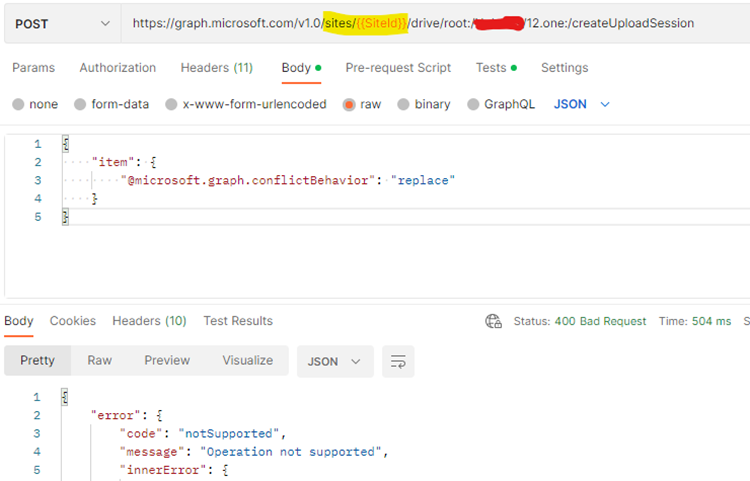
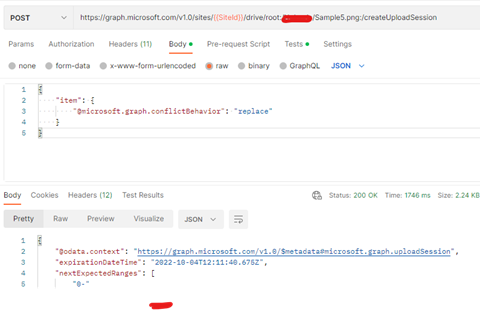
It appears there is some issue with POST /sites/{siteId}/drive/items/{itemId}/createUploadSession for SharePoint libraries is not working with OneNote(.one) files only. Below is a test with .png files
As it additional troubleshooting, request you to report this by raising a support case a specialized support engineer will assist you better on this.
You can raise technical support request from
https://portal.azure.com/#view/Microsoft_Azure_Support/HelpAndSupportBlade/~/overview or https://admin.microsoft.com/#/support/requests.
Hope this helps.
If the answer is helpful, please click "Accept Answer" and kindly upvote it. If you have extra questions about this answer, please click "Comment".
The relative-path is not work for me.
I only have this problem when I try to overwrite OneNote file (.one) under OneNote folder.
Is '12.one', in above example, added to the OneNote folder?
Does the file (12.one) already exist ?
Thank you
Hi @howard tseng ,
This appears to be specific with when replace an existing OneNote files in SharePoint libraries.
Hope this helps.
If the answer is helpful, please click "Accept Answer" and kindly upvote it. If you have extra questions about this answer, please click "Comment".

Hi @howard tseng ,
Is your problem solved? if you still need further assistance, please feel free to post back.