Microsoft 365 and Office | Office Online Server
Microsoft on-premises server product that runs Office Online.

This browser is no longer supported.
Upgrade to Microsoft Edge to take advantage of the latest features, security updates, and technical support.
' cx='32' cy='32' r='32' /%3E%3Ctext x='50%25' y='55%25' dominant-baseline='middle' text-anchor='middle' fill='%23FFF' %3ESM%3C/text%3E%3C/svg%3E)
Hi,
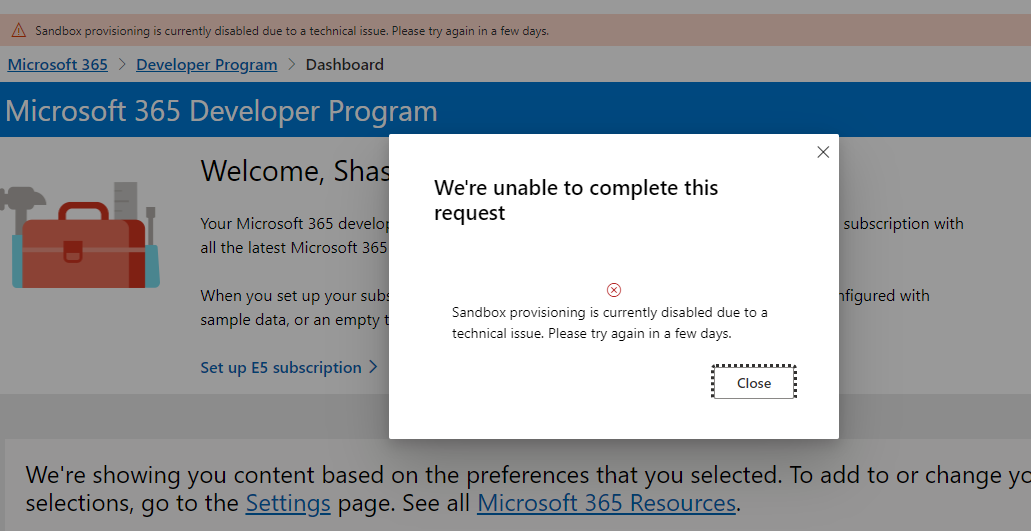
I tried to set up E5 subscription in Microsoft 365 Developer program. But a message came up saying that sandbox provisioning is currently disabled due to a technical issue. Hw can I sort out this?
thanks.

When did this message start appearing?

This question suggests that you visit the Microsoft 365 Dev Center: https://developer.microsoft.com/en-us/microsoft-365
' cx='32' cy='32' r='32' /%3E%3Ctext x='50%25' y='55%25' dominant-baseline='middle' text-anchor='middle' fill='%23FFF' %3EWC%3C/text%3E%3C/svg%3E)
It has now been showing (down) all week, anyone know if this is a frequent occurrence?
' cx='32' cy='32' r='32' /%3E%3Ctext x='50%25' y='55%25' dominant-baseline='middle' text-anchor='middle' fill='%23FFF' %3EFC%3C/text%3E%3C/svg%3E)
Same issue here.
I'm trying to setup the subscription since sep 30.
' cx='32' cy='32' r='32' /%3E%3Ctext x='50%25' y='55%25' dominant-baseline='middle' text-anchor='middle' fill='%23FFF' %3EDG%3C/text%3E%3C/svg%3E)
My E5 Developer tenancy expired on 30 Sept suddenly. No warning. Even got a recurring subscription notification back in July that the expiry had been extended to 27th Nov 2022. That tenancy is my primary so has been renewed quite a few times. Just annoying that it was all so sudden.
Congratulations!
Your Microsoft 365 trial developer subscription has been renewed. Your new expiration date is 11/27/2022 (UTC).
I've been trying since 30th Sept to sign up for a new E5 dev tenancy but keep getting the same error.
' cx='32' cy='32' r='32' /%3E%3Ctext x='50%25' y='55%25' dominant-baseline='middle' text-anchor='middle' fill='%23FFF' %3EHK%3C/text%3E%3C/svg%3E)
I tried to set up E5 subscription in Microsoft 365 Developer program. But a message came up saying that sandbox provisioning is currently disabled due to a technical issue. Hw can I sort out this?

Similar issue here. We have multiple tenants that expired on us, despite active developer usage. Microsoft has effed something up royaly here...
I noted that the tenancies that suddenly expired had references to the E3 Developer license that has not been around for a couple of years. Maybe MS is retiring old architecture. The free tenancy setup page is definitely different with the new sandbox options.
Unfortunately, I needed email on one of the tenancies so have had to cough up for a couple of paid licenses to continue working.
Here's hoping that the delay is due to Microsoft launching something huge in the SharePoint space that is requiring the develop tenancies to be offline. It is the week if Ignite after all. but a little warning would have been appreciated. Got an email this morning from Chris McNulty about introducing Microsoft Syntex.
' cx='32' cy='32' r='32' /%3E%3Ctext x='50%25' y='55%25' dominant-baseline='middle' text-anchor='middle' fill='%23FFF' %3ERB%3C/text%3E%3C/svg%3E)
Also have tried for several days, still broken.....
' cx='32' cy='32' r='32' /%3E%3Ctext x='50%25' y='55%25' dominant-baseline='middle' text-anchor='middle' fill='%23FFF' %3EAA%3C/text%3E%3C/svg%3E)
All of a sudden my development tenant is deactivated on October 3rd.
Microsoft support gives me a lot of solutions, the visual studio platform !!! or buy paid E3 licenses through the tenant for a test environment...
Pay licenses to test!!! . Why ??
Microsoft, do something for the community. Without a test environment in MS365, a specialist will not be able to progress in these projects, training...
Do you think the developer 365 program is not profitable for Microsoft???
thanks
' cx='32' cy='32' r='32' /%3E%3Ctext x='50%25' y='55%25' dominant-baseline='middle' text-anchor='middle' fill='%23FFF' %3ET%3C/text%3E%3C/svg%3E)
Update. It is partially WORKING now as of 4.01am Oct 14, 2022. I was just able to create the M365 Developer E5 account and admin account. Sandbox creation is good! HOWEVER, I'm getting this error message when I tried to logon as that admin account. I even tried it Incognito mode. Anyone have the workaround or solution to the error below?
You don't have access to this
Your sign-in was successful but you don't have permission to access this resource.
' cx='32' cy='32' r='32' /%3E%3Ctext x='50%25' y='55%25' dominant-baseline='middle' text-anchor='middle' fill='%23FFF' %3ECX%3C/text%3E%3C/svg%3E)
Same issue here, and the troubleshooting details:
Error Code: 53003
Request Id: 00d3dc7c-6f72-4aef-8040-a5d1aab30a00
Correlation Id: a8f3de0d-0cdd-41a8-804b-0163416b41e4
Timestamp: 2022-10-14T14:40:25.020Z
App name: OfficeHome
App id: 4765445b-32c6-49b0-83e6-1d93765276ca
IP address: 45.30.187.205
Device identifier: Not available
Device platform: macOS
Device state: Unregistered
' cx='32' cy='32' r='32' /%3E%3Ctext x='50%25' y='55%25' dominant-baseline='middle' text-anchor='middle' fill='%23FFF' %3EM%3C/text%3E%3C/svg%3E)
Same issue for me. I was able to get the Sandbox creation completed, but not able to login to the subscription with the admin account.
' cx='32' cy='32' r='32' /%3E%3Ctext x='50%25' y='55%25' dominant-baseline='middle' text-anchor='middle' fill='%23FFF' %3EOU%3C/text%3E%3C/svg%3E)
This MS Set up E5 subscription error has not been fixed as at 2022-10-17
' cx='32' cy='32' r='32' /%3E%3Ctext x='50%25' y='55%25' dominant-baseline='middle' text-anchor='middle' fill='%23FFF' %3EBW%3C/text%3E%3C/svg%3E)
I was able to add the E5 subscription. I haven't tried setting up anything yet though. I'm hopeful it will be ok.
It seems to be back. I was able to create a Microsoft 365 E5 Dev subscription using the "instant sandbox" option yesterday. It's working well so far
' cx='32' cy='32' r='32' /%3E%3Ctext x='50%25' y='55%25' dominant-baseline='middle' text-anchor='middle' fill='%23FFF' %3ELK%3C/text%3E%3C/svg%3E)
Nov 10... Same here I saw this issue for like 10 days already. Before I was able to complete this form but I couldn't confirm my phone number. I thought it was issue waiting for repair. And now it's worse issue :D
' cx='32' cy='32' r='32' /%3E%3Ctext x='50%25' y='55%25' dominant-baseline='middle' text-anchor='middle' fill='%23FFF' %3EF%3C/text%3E%3C/svg%3E)
HEY, so I was getting the same error but just as I reloaded the page, the error disappeared and I could proceed successfully, maybe try doing that. It could've been luck but something that simple worked for me.
' cx='32' cy='32' r='32' /%3E%3Ctext x='50%25' y='55%25' dominant-baseline='middle' text-anchor='middle' fill='%23FFF' %3ELC%3C/text%3E%3C/svg%3E)
Microsoft sends an e-mail confirming the acceptance on the program. Maybe check your e-mail box and follow the instructions they give you.
' cx='32' cy='32' r='32' /%3E%3Ctext x='50%25' y='55%25' dominant-baseline='middle' text-anchor='middle' fill='%23FFF' %3EMA%3C/text%3E%3C/svg%3E)
I am not able to start Microsoft 365 Developer Program : E5 Subscription
the problem is NO SMS received to completed the setup,
I tried also to report the issue on service hup but also I am not able to login :(
' cx='32' cy='32' r='32' /%3E%3Ctext x='50%25' y='55%25' dominant-baseline='middle' text-anchor='middle' fill='%23FFF' %3EWD%3C/text%3E%3C/svg%3E)
Got the same error today. I opened the developer tools (F12) to lookout for any errors, I clicked on Set up E5 Subscription link again and as expected the error popped up. Console had logged some errors mentioning something about Graphs and stuff. I clicked on the Cog and from preferences I unchecked Microsoft Graph and then it WORKED!
' cx='32' cy='32' r='32' /%3E%3Ctext x='50%25' y='55%25' dominant-baseline='middle' text-anchor='middle' fill='%23FFF' %3EMA%3C/text%3E%3C/svg%3E)
I don't know if this is the right solution or it's just luck.
However here's what I did: I tried to setup the sandbox like everyone else, then I got that error, so after searching online I found out that a lots of users had the same issue and the solutions weren't logical at all, so I opened developer tools in Chrome, and I noticed that the website tries to get my profile picture, and because I don't have a profile picture it returns 404 error, so I uploaded a profile picture and it just worked.
Again this might just be pure luck, or right timing, but I just thought to share maybe it could help someone.
' cx='32' cy='32' r='32' /%3E%3Ctext x='50%25' y='55%25' dominant-baseline='middle' text-anchor='middle' fill='%23FFF' %3EAB%3C/text%3E%3C/svg%3E)
Strangely enough, adding the profile picture solved the issue for me today! Thank you!
' cx='32' cy='32' r='32' /%3E%3Ctext x='50%25' y='55%25' dominant-baseline='middle' text-anchor='middle' fill='%23FFF' %3EDA%3C/text%3E%3C/svg%3E)
In your Dashboard, go to Settings, then go to "Account Preferences" then under "What is your primary focus as a developer? * (Choose only one)" check the box "Applications for internal use at my company" or "Personal projects" ans hit Save. This may solve your issue.
' cx='32' cy='32' r='32' /%3E%3Ctext x='50%25' y='55%25' dominant-baseline='middle' text-anchor='middle' fill='%23FFF' %3ESS%3C/text%3E%3C/svg%3E)
step 1:-- delete your profile
step2 :-- sing out
step 3:- sing in again (but use your email insted of mobile no)
your are good to go
I created a new dev subscription today. When I selected the option to "Set up E5 subscription" I was greeted the same message "Sandbox provisioning is currently disabled due to a technical issue..."
Update. It is partially WORKING now as of 4.01am Oct 14, 2022. I was just able to create the M365 Developer E5 account and admin account. Sandbox creation is good! HOWEVER, I'm getting this error message when I tried to logon as that admin account. I even tried it Incognito mode. Anyone have the workaround or solution to the error below?
You don't have access to this
Your sign-in was successful but you don't have permission to access this resource.
' cx='32' cy='32' r='32' /%3E%3Ctext x='50%25' y='55%25' dominant-baseline='middle' text-anchor='middle' fill='%23FFF' %3ESA%3C/text%3E%3C/svg%3E)
I had to install Teams first then sign in to it as admin, that sorted my issue
Thank you so much Microsoft for sorting this out, much appreciated!!!!
Nope. Still broken for me here in Australia.
For those that were able to create the M365 E5 Sandbox successfully and have the login error when trying to logon as admin like me, please see below. Thanks for SalamAlhakami-9410 for letting me know about Teams. This is what I had to do to login correctly as admin.
Symptom:
When trying to log onto your new xxxxxxxx.onmicrosoft.com site. You don't have access to this.
Your sign-in was successful but you don't have permission to access this resource.
Solution:
Install Teams for work/company. Sign in with the new admin n password of the new M365 site you just created. Set up Microsoft security Authenticator. Download app to phone. Add account. Scan the QR code. Only after I had added the account to my Authenticator app was I able to log as admin into my new Sandbox E5 account.
' cx='32' cy='32' r='32' /%3E%3Ctext x='50%25' y='55%25' dominant-baseline='middle' text-anchor='middle' fill='%23FFF' %3EBS%3C/text%3E%3C/svg%3E)
Thanks ,this worked

Thanks
Still not working.
The first step is working to specify an account and tenant name but the 'Add phone number for security' form is generating the following error.
We're unable to send the code to that number. Please provide a valid cell phone number and try again. MS-CorrelationId: 49875dca-8288-40c1-9c4a-399c54cce3d3
I've already got MFA setup on the outlook.com account with both SMS and Microsoft Authenticator. The phone number is post-paid as well. Not sure what more I can do. I'm about to lose access to multiple tenancies and vital test and demo data when by existing tenancies shift from expired to deleted.
Microsoft! Please fix this.
If you are getting the SMS number is not valid, it may be due to the number being associated with another account, previously used or an unknown issue. That happened to me as well. I had to use another spare mobile phone number. That worked great. So try another phone number from a family member or friend.