Azure Data Lake Storage
An Azure service that provides an enterprise-wide hyper-scale repository for big data analytic workloads and is integrated with Azure Blob Storage.
This browser is no longer supported.
Upgrade to Microsoft Edge to take advantage of the latest features, security updates, and technical support.
' cx='32' cy='32' r='32' /%3E%3Ctext x='50%25' y='55%25' dominant-baseline='middle' text-anchor='middle' fill='%23FFF' %3E8%3C/text%3E%3C/svg%3E)
My source is a parquet file (created from a CSV file via data flow), my sink is a stored procedure with user defined table type.
I have fault tolerance and logging enabled on the Copy Data activity and when I run the pipeline in debug the Copy Data activity reports:
"rowsRead": 53303,
"rowsCopied": 53303,
"rowsSkipped": 0
The stored procedure has a simple truncate and insert (from the UDTT) for debug purposes as I am only seeing 4953 rows returned from the UDTT, it it appears that the records may be the last 4953 in the file.
I have tried altering the data types in the UDTT but see no difference. I have added an alternate Copy Data activity with the same sink to just insert the data into new table, this returns the complete file.
We are using SQL procedures as a sink as the processing of the file (bulk\Net etc) is based on other parameters.
We have multiple feeds (>200) using this process (with different source systems) the majority have no issue, so far I have identified 3 with this issue but cannot find the cause.
Any help would be appreciated.
Update for anyone experiencing the same issue.
The ADF Copy Data activity is dynamically setting the "Write Batch Size" setting, so where the source file is over a certain size it is processing in batches, i.e. 75k records is processed as 8 10k batches.
What is not apparent when you run the pipeline is the fact that the Copy Data activity will pass the data to the SQL Procedure and call the procedure 8 time, this is not reflected in the activity logs or the input output logs for the activity, it feeds back as one single run, i.e. RowsRead & RowsCopied read as 75 k not 8 entries totally 75k.
This means that if the SQL procedure you are passing through has a delete or truncate step or contains logic that includes derivation on the whole dataset you will get unexpected or incorrect results.
I have altered our pipeline to copy the data to a transient table, I then call another SQL procedure that acts as a wrapper to pass the data from that table to my original load procedures so that they can operate as designed.
Regards
Nigel
' cx='32' cy='32' r='32' /%3E%3Ctext x='50%25' y='55%25' dominant-baseline='middle' text-anchor='middle' fill='%23FFF' %3EH%3C/text%3E%3C/svg%3E)
Hello @NigelMcDonnell-5219,
Thanks for the question and using MS Q&A platform.
As we understand the ask here is to know as to why the logs says that the whole tabl eis copied , but in the sick table you see lss records , please do let us know if its not accurate.
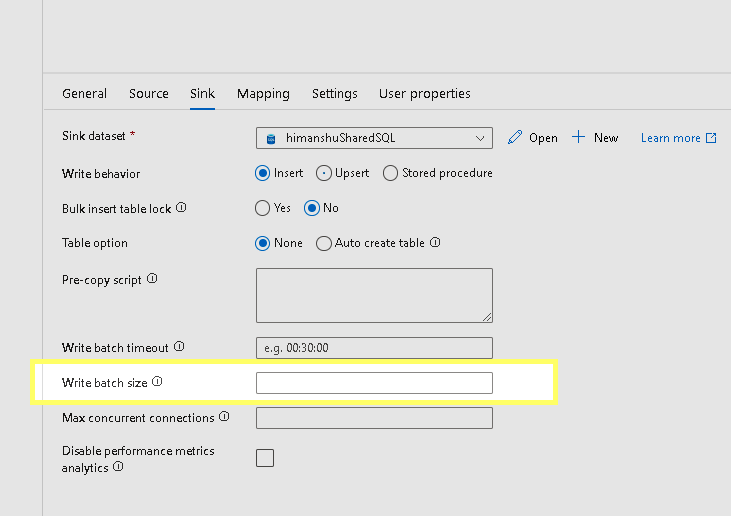
I think you have already tried the second option where you copy the records to a different table , all records get copied ( in this case the SP with truncate is not in play) . I think the way your proc is called is the issues , it is truncating the table and so you only have the data from the last ieration . Are you using a foreach loop ? What is the batch size set ?
Please do let me if you have any queries.
Thanks
Himanshu
 or upvote
  button whenever the information provided helps you. Original posters help the community find answers faster by identifying the correct answer. Here is how
Himanshu,
Thank you for the reply. In the procedure I added debug code that checks the record count of the User Defined Table Type by doing a simple count and by dumping the contents into a table.
This has shown that the UDTT does not contain all the expected data, the UDTT is defined as READONLY so the procedure cannot alter its contents.
I can confirm that the setting for "Write batch size" is blank.
The procedure is called by the ADF Copy Data activity, and the Copy Data Activity is passing the populated UDTT to the procedure, there is nothing in between that I have control of, so I believe that the issue is with the ADF Copy Data Activity or it is somehow sensitive to a data issue in the particular data sets.
As an additional test I have created a PowerBI dashboard and loaded the entire dataset from the Parquet file into the dashboard.
The ADF pipeline that contains the Copy Data activity has a ForEach loop which loops through multiple files\procedures only a small number have the issue but the source files are all Parquet and the SQL procedures are all constructed in the same manner with the same parameters, only the definition of the UDTT changes (to match the source file).
Thanks
Nigel
Update for anyone experiencing the same issue.
The ADF Copy Data activity is dynamically setting the "Write Batch Size" setting, so where the source file is over a certain size it is processing in batches, i.e. 75k records is processed as 8 10k batches.
What is not apparent when you run the pipeline is the fact that the Copy Data activity will pass the data to the SQL Procedure and call the procedure 8 time, this is not reflected in the activity logs or the input output logs for the activity, it feeds back as one single run, i.e. RowsRead & RowsCopied read as 75 k not 8 entries totally 75k.
This means that if the SQL procedure you are passing through has a delete or truncate step or contains logic that includes derivation on the whole dataset you will get unexpected or incorrect results.
I have altered our pipeline to copy the data to a transient table, I then call another SQL procedure that acts as a wrapper to pass the data from that table to my original load procedures so that they can operate as designed.
Regards
Nigel
Hello @81972119 ,
It was great to know that you were able to get to a resolution . We expect you to keep using this forum and also motivate others to do that same . You can always help other community members by answering to their queries ..
If yiou think , my reply was helpful , please go and ahead and accept that as an 'Answer'
Thanks
Himanshu