Developer technologies | Visual Studio | Debugging
A core feature of Visual Studio that allows developers to inspect, analyze, and troubleshoot code during execution.
This browser is no longer supported.
Upgrade to Microsoft Edge to take advantage of the latest features, security updates, and technical support.
' cx='32' cy='32' r='32' /%3E%3Ctext x='50%25' y='55%25' dominant-baseline='middle' text-anchor='middle' fill='%23FFF' %3EJ%3C/text%3E%3C/svg%3E)
I'm tring to run a Javascript React project.
I believe the debugger is trying to open Chrome.
I'm getting an error.
Failed to launch debug adapter 'pwa-chrome'.
The system cannot find the file specified
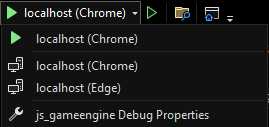
I'll like to use Firefox. How do I get my Javascript project to open in a portable Firefox browser?
' cx='32' cy='32' r='32' /%3E%3Ctext x='50%25' y='55%25' dominant-baseline='middle' text-anchor='middle' fill='%23FFF' %3ETS%3C/text%3E%3C/svg%3E)
Hi @JWG ,
Welcome to Microsoft Q&A forum.
Firefox is not supported in this case. Please check this similar thread: VS 2022: Firefox not listed in browsers for debug.
At the moment we still don’t have any plans to add support to debug JavaScript in Firefox from VisualStudio. We will keep your feedback in mind when we are deciding which features to implement next for the JavaScript debuggers in VisualStudio.
And see this document: Debug JavaScript in dynamic files using Razor(ASP .NET)
Starting in Visual Studio 2019, Visual Studio provides debugging support for Chrome and Microsoft Edge (Chromium) only.
BTW, you can try to set Firefox as default browse and see if this works, just in case. But I guess it may not work.
Best Regards,
Tianyu
Thanks for your reply.
If not Firefox, how about a portable Chromium browser, or Opera, or other?
I'm really trying to figure out how do I get my Javascript project to open in a portable browser.
Internet Explorer 11 is set as my default browser, and I don't have Chrome or Edge installed... at least not system wise. I have portable Chrome, and a portable Chromium browser, which supports webgl.
Is there a configuration file I can edit, which would allow me to add a portable browser, or is what I want to achieve not possible?
Hi @JWG ,
I understand, but I’m afraid only Chrome and Microsoft Edge(Chromium) are available and supported. Other web browsers are not supported, and what you want to achieve is not possible. I would suggest you raise a suggestion ticket on our Developer Community for your requirement.
Best Regards,
Tianyu