Developer technologies | Transact-SQL
A Microsoft extension to the ANSI SQL language that includes procedural programming, local variables, and various support functions.
This browser is no longer supported.
Upgrade to Microsoft Edge to take advantage of the latest features, security updates, and technical support.
' cx='32' cy='32' r='32' /%3E%3Ctext x='50%25' y='55%25' dominant-baseline='middle' text-anchor='middle' fill='%23FFF' %3EG%3C/text%3E%3C/svg%3E)
Hi all,
I would like to update a table column based on the stored procedure output result and this stored procedure will be taking parameter values as below table column values. Is this possible ?
Here is the situation:
Declare @temp table
(workdate datetime,
employeeid int,
fileid int,
category varchar(2),
rate money
)
insert @temp
Select '2020-08-01',20,1230,'PE',null
union
Select '2020-08-04',40,5210,'TY',null
union
Select '2020-08-12',80,7530,'RD',null
union
Select '2020-08-28',90,2250,'KF',null
Select * from @temp
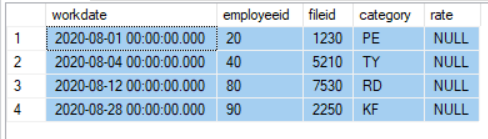
So, I would like to update the rate column in the above table based on a stored procedure usp_GetPFDetails output result. I initially thought i can get the sql code from this stored procedure and write a simple update statement accordingly. But I noticed that this stored procedure is a complex one and uses 4 nested stored procedures (i.e stored procedure inside another stored procedure inside another stored procedure) etc.
This stored procedure accepts the above table column values as parameters i.e when you execute the stored procedure 4 times with the above values you will get the column rate values:
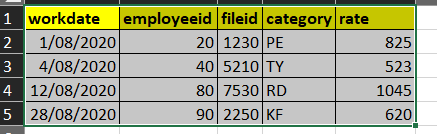
exec usp_GetPFDetails '2020-08-01',20,1230,'PE' -- when this is executed i get 825.00
exec usp_GetPFDetails '2020-08-04',40,5210,'TY' -- when this is executed i get 523.00
exec usp_GetPFDetails '2020-08-12',80,7530,'RD' -- when this is executed i get 1045.00
exec usp_GetPFDetails '2020-08-28',90,2250,'KF' -- when this is executed i get 620.00
The rate column in the @temp table should get updated with the above above stored procedure results as below:
Any ideas how to do the above update ?
Thanks,
grkanth81

Hi,
Is this a one time job?
Meaning you need to update the table as it is now
If not, when do you need to update the table? Do you need to update the each row when it is inserted or updated in the table (in this case it sound like you need to use trigger)
Note!
in both cases, you should not deal with each row separately if possible but update the table as SET of rows.
Executing the SP for each row make no sense. You can use scalar function instead of the SP but this is usually not performant well as well.
If you can illustrate the scenario with a single simple SP then we can discuss that specific scenario better.
Hi pituach,
No this would not be a one time job and this will be needed on a regular basis.
So here is the scenario:
They want a report built which is easy (except for rate column) and this report output result is in the @temp table format with a input parameter of Invoice Number.
So what they run the report with any invoice number value entered as parameter value - it should show all the employee details worked on that invoice along with the rate. So there may be 10 records, 20 records, 30 records etc depending on who has worked on that invoice.
And on doing investigation, I noticed that to get the value for the rate column is very complicated in the database and we can only get the rate value from the stored procedure usp_GetPFDetails and this stored procedure accepts parameter values as @temp table result values.
So I would like to know how to update that rate column in @temp table from that stored procedure output for all the records in the @temp table result.
Thanks
grkanth81
' cx='32' cy='32' r='32' /%3E%3Ctext x='50%25' y='55%25' dominant-baseline='middle' text-anchor='middle' fill='%23FFF' %3EEM%3C/text%3E%3C/svg%3E)
I also agree with pituach's point .
We need to understand what is your real goal and what is your real source data,and provide corresponding tables and data.
Echo
Please remember to accept the answers if they helped. Your action would be helpful to other users who encounter the same issue and read this thread.
Echo

Hi,
I strongly recommend to use a scalar function or even C# external function, if needed. It is the most elegant way to solve your problem. I use both of them and have no performance issues even if they are run on not so fast VM's and execute quite complex queries.
Hi,
Using Scalar function in SQL Server (especially before sql server 2019 which had improvement in this specific point) is usually a very bad idea which might imply poor design of the system.
More information bellow since the comments are limited for 1000 char....
Welcome to the QnA forums. I searched your name and found out that you are "Senior Software Developer at Ericsson" which explain a lot. I am sure that you will be a top contributor in our community 👍
First of all let me thanks you for helping others. It is a huge contribution to the technical community.
I do have a small tip for developers: I HIGHLY recommend to change your line of thinking when you use databases in compare to what you usually do using languages like C#. You should remember that you are using a tool and what you command the tool to do is not necessarily what the tool do directly. Understand more about the internals of the tools which you choose to work with (like SQL Server in this case) is highly recommended.
Have a great day
Hi @Damir Padavić ,
Using Scalar function in SQL Server (especially before sql server 2019 which had improvement in this specific point) is usually a very bad idea which might imply poor design of the system. The main reason is that the Scalar Function is not executed or analyzed as part of the query that call it. SQL Server does not execute queries as we write them but instead it always create execution plan (choosing from many that he build and compare) and for best execution plan the server should analyzed the full query and not having a black box. In addition when we are using a non-inline function then the server probably had to execute the function for each row separately.
For the reason you should try to avoid using multi-statement table valued function in most cases and prefer to use inline table valued function. Unfortunately before SQL Server 2019 there was no inline scalar valued function.
In addition! Tabular databases like SQL Server are designed to work with SET of rows and for this they uses advance algorithm which are best for this task. These ability to work with SET of data usually coming at the expense of working against individual values by using loops.
In general as a golden rule, we should try to avoid using loops and we should try to avoid using scalar functions and multi-statement table valued function.
Note! As mentioned above SQL Server 2019 introduced new ability to support inline scalar function. This is a game changer in cases that this feature fits,