
Agreed thanks for quick response !
This browser is no longer supported.
Upgrade to Microsoft Edge to take advantage of the latest features, security updates, and technical support.
' cx='32' cy='32' r='32' /%3E%3Ctext x='50%25' y='55%25' dominant-baseline='middle' text-anchor='middle' fill='%23FFF' %3EMN%3C/text%3E%3C/svg%3E)
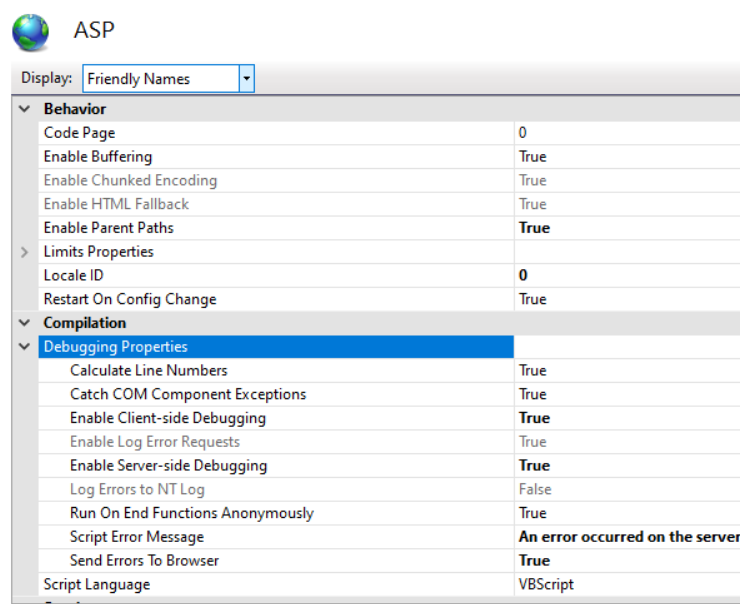
How to enable classic ASP debugging. No matter what setting I use in Site > ASP > Debugging properties... I get 500 error in my webbrowser (chrome).
' cx='32' cy='32' r='32' /%3E%3Ctext x='50%25' y='55%25' dominant-baseline='middle' text-anchor='middle' fill='%23FFF' %3ESW%3C/text%3E%3C/svg%3E)
I get 500 error in my webbrowser
It is difficult to reproduce your problem based on your description, you can also use failed request tracking to view detailed error information, it will provide the key error and warning.
This link provide the method to enable failed request tracing to capture the detailed error:
Agreed thanks for quick response !
Just for the record. It IS possible to send 500 code errors to external webbrowsers. Possibly not best practice...
1) Enable "Send errors to browser"

2) Change the behavior of the 500 error page.
