Azure Synapse Analytics
An Azure analytics service that brings together data integration, enterprise data warehousing, and big data analytics. Previously known as Azure SQL Data Warehouse.
This browser is no longer supported.
Upgrade to Microsoft Edge to take advantage of the latest features, security updates, and technical support.
' cx='32' cy='32' r='32' /%3E%3Ctext x='50%25' y='55%25' dominant-baseline='middle' text-anchor='middle' fill='%23FFF' %3EA%3C/text%3E%3C/svg%3E)
Hi,
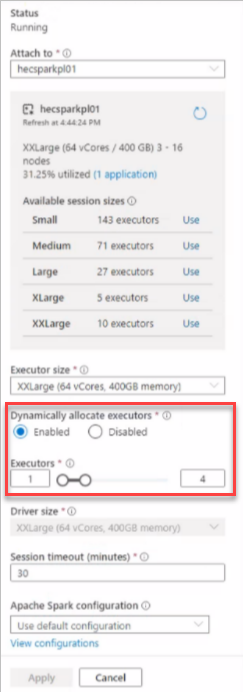
I am running an Azure Synapse and Where I am using XXLarge session size I want to assign these resources to single node executors but I am not able to set it as it's showing the 31.25% utilized, kindly suggest how to set the complete session size to a single node executor.
 Thank you.
An Azure analytics service that brings together data integration, enterprise data warehousing, and big data analytics. Previously known as Azure SQL Data Warehouse.
' cx='32' cy='32' r='32' /%3E%3Ctext x='50%25' y='55%25' dominant-baseline='middle' text-anchor='middle' fill='%23FFF' %3EBM%3C/text%3E%3C/svg%3E)
Hello @Anonymous ,
Welcome to the MS Q&A platform.
From your screenshot, I see you have XXLarge spark pool (64 Gb and 3 to 16 nodes)
So the total available V cores are 64* 16 = 1024 on the spark pool.
For your question: how to set the complete session size to a single node executor?
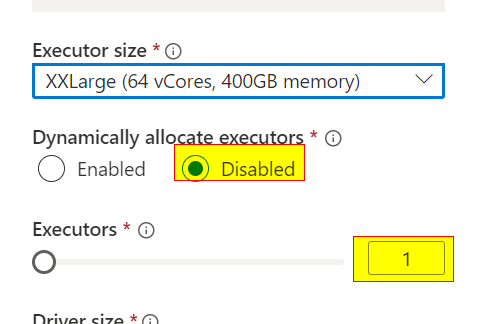
When you enable 'Dynamically Allocate Executors', sparkpool will Dynamically allocate executors between the min and max values.
If you want to allocate one executor, you can choose 'Dynamically Allocate Executors' to disable and set it to '1'
(or) enable "Dynamically allocate executors" and set the min 1 to max 1
meaning, your Notebook session will use = 1*64 + (1 driver) --( 1 executor *64 + 1 driver)
= 64+ 64
----------------
128 V cores will be available on the Notebook session
--------------
If you choose 2 executors then, the max available v-cores on the notebook session will be = 2*64+ (1 driver ) = 128 +64 = 192 Vcores
Here, the driver size is equal to executor size
(or)

I hope this helps. In case if you have any further questions, please let me know.
------------------------------
 and upvote
  button whenever the information provided helps you. Original posters help the community find answers faster by identifying the correct answer. Here is how
Thank you for the support and clarification, It really helped us.
I have another query and kindly help on the same.
We have an optimized query which is calculating aggregations based on custom conditions on crores of records. We have set the spark pool capacity to a maximum of XXLarge 64vCores, 3-16 nodes and 14 executors. However, the query is not distributing properly, and not utilizing the maximum capacity. We would like to run 3 notebooks in parallel for each country.
How to set all the capacity settings through pyspark notebook in synapse analytics to forcefully allocate specific cores/number of executors for each notebook we are running in parallel?
Hello @Anonymous ,
Nodes and Autoscale: If enable based on the workload requirement it will scale up or down the number of nodes according to the configuration defined:
When the following conditions are detected, Autoscale will issue a scale request:
Scale-up
The total pending CPU is greater than the total free CPU for more than 1 minute.
The total pending memory is greater than the total free memory for more than 1 minute.
Scale-down:
The total pending CPU is less than the total free CPU for more than 2 minutes.
The total pending memory is less than the total free memory for more than 2 minutes.
At the session level, Executors Dynamically allocation:
If enabled the executors will be allocated between the maximum and the minimum configured. So, if the Spark Job requires only 2 executors for example it will only use 2, even if the maximum is 4. If requires more it will scale up to the maximum defined on the configuration.
In the end, the dynamic allocation, if enabled will allow the number of executors to fluctuate according to the number configured as it will scale up and down.
<continution>
Example:
A Spark pool is created with Autoscale and set the min node to 3 and the max node to 6. When the session starts or a job is submitted with 2 executors, this will use 3 nodes (1 node will be used by the driver), if necessary(based on the load), it can scale up to 6 nodes and dynamically allocate the executors as configured/enabled. When the job does not need the executors, it will decommission them and if it does need the node it will free up the node. Once the node is in decommission state no executors can be launched on that node. It can take 1 to 5 minutes for a scaling operation to complete.
For your question:
You can’t forcefully allocate specific cores. They will dynamically allocate depending on the workload.
Ex: if my notebook can finish the job with only 2 executors, I can’t force the job to use 4 nodes.
But we can limit the number of nodes(number of vcores) that can use on the notebook session.
Your spark pool configuration:
xxlarge 64/512 GB, 3 to 16 nodes and 14 executors
Based on the above spark pool configuration,
To configure 3 notebooks to run in parallel, please use the below session-level setting on each notebook( To use the max available vcores).
Executor size XXLarge
Executors – 4( so total 4 nodes + 1 driver) = 5 nodes (driver size = node size)
each notebook will use 5 nodes= 320 Vcores
If Sparkpool runs out of capacity, an error like this will be displayed:
Failed to start session: [User] MAXIMUM_WORKSPACE_CAPACITY_EXCEEDED
I hope this helps. Please let me know if you have any further questions.
Hello @Anonymous ,
I am checking to see if you have any further questions.
----
If this answers your question, please consider accepting the answer by hitting the Accept answer button, as it helps the community.
Hello @Anonymous ,
I am checking to see if you got a chance to look into my above response. Please let me know if you have any further questions.
Hello @Anonymous ,
I am checking to see if you got a chance to look into my above response. Please let me know if you have any further questions.
' cx='32' cy='32' r='32' /%3E%3Ctext x='50%25' y='55%25' dominant-baseline='middle' text-anchor='middle' fill='%23FFF' %3EJ%3C/text%3E%3C/svg%3E)