Microsoft 365 and Office | SharePoint | For business | Windows
A group of Microsoft Products and technologies used for sharing and managing content, knowledge, and applications.

This browser is no longer supported.
Upgrade to Microsoft Edge to take advantage of the latest features, security updates, and technical support.
' cx='32' cy='32' r='32' /%3E%3Ctext x='50%25' y='55%25' dominant-baseline='middle' text-anchor='middle' fill='%23FFF' %3EDW%3C/text%3E%3C/svg%3E)
Hi,
I have a list that has a colums that contains a hyperlink.
When I click on it in the 'all items' view, it opens the link in a new tab.
However, when I use the board view, I can't click the link. It opens the details of my item. And even from there, I can't click the link.
Is there a workaround, so I can open the link in board view?
Thx,
Koen

Hi @De Winter Koen (DGA)
I'm glad to hear you solve the problem ,if you have any issue about SharePoint, you are welcome to raise a ticket in this forum.
By the way, since the Microsoft Q&A community has a policy that "The question author cannot accept their own answer. They can only accept answers by others.". and according to the scenario introduced here: Answering your own questions on Microsoft Q&A, I would make a brief summary of this thread:
Issue Symptom:
I have a list that has a colums that contains a hyperlink.
When I click on it in the 'all items' view, it opens the link in a new tab.
However, when I use the board view, I can't click the link. It opens the details of my item. And even from there, I can't click the link.
Current status:
I think I found the cause. My link is stored in a calculated column. So it is not considered as a link in the other views.
I made a new column, which is populated with power automate, so it contains the correct link.
When I create a board view, the link is displayed correctly, but it is not clickable.
If I click, it opens a card, where the link is clickable.
You could click the "Accept Answer" button for this summary to close this thread, and this can make it easier for other community member's to see the useful information when reading this thread. Thanks for your understanding!
If the answer is helpful, please click "Accept Answer" and kindly upvote it. If you have extra questions about this answer, please click "Comment".
Note: Please follow the steps in our documentation to enable e-mail notifications if you want to receive the related email notification for this thread.
Hi @De Winter Koen (DGA)
I have not reproduced your problem in my site. When I use board view, the link in hyperlink column is also clickable:
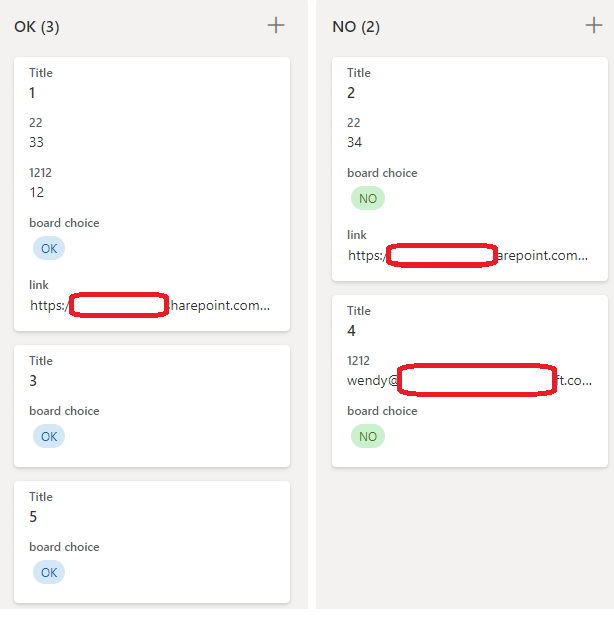
And the link in item edit form is clickable too:
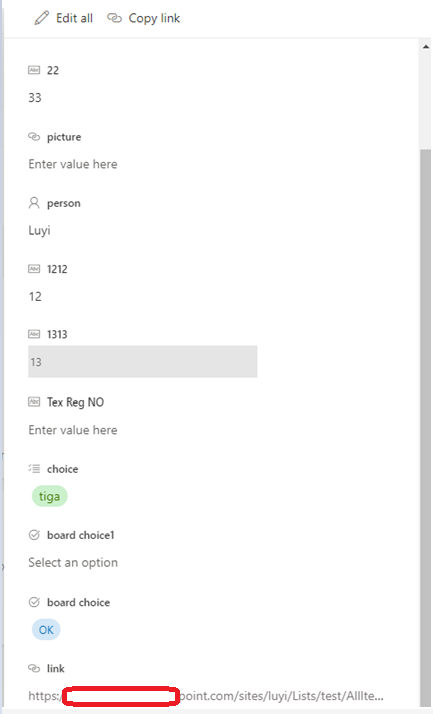
You could try to create a new board view to see if this issue persists or check whether this problem happen in other lists/sites.
If the answer is helpful, please click "Accept Answer" and kindly upvote it. If you have extra questions about this answer, please click "Comment".
Note: Please follow the steps in our documentation to enable e-mail notifications if you want to receive the related email notification for this thread.
@Yi Lu_MSFT
Hi,
I think i found the cause. My link is stored in a calculated column. So it is not considered as a link in the other views.
Now I have to find a way to copy the value to a hyperlink column.
Hi @Yi Lu_MSFT ,
I made a new column, which is populated with power automate, so it contains the correct link.
When I create a board view, the link is displayed correctly, but it is not clickable.
If I click, it opens a card, where the link is clickable.
I noticed that when I hover the mouse cursor on the board view, it changes to a hand (even above the link). That is why it doesn't open the link?
Thanks for the help!