create office365 user automatically in a group

Maxime Verron 6 Reputation points
2022-11-23T10:36:00.733+00:00

Hello,

Is it possible that, when I create a user in office365, it automatically adds it to an already existing group ?

Instead of doing it manually at each user creation ?

thanks !

Windows for business | Windows 365 Enterprise
Microsoft 365 and Office | Install, redeem, activate | For business | Windows
Microsoft Security | Microsoft Entra | Other
0 comments No comments
{count} vote

3 answers

Sort by: Most helpful
  1. Davy Aerts 161 Reputation points
    2022-11-23T12:16:11.827+00:00

    You can use dynamic membership to a group so when you create a user with specific attributes (ie department/office/location/...) the user gets added to the designated group.

    https://learn.microsoft.com/en-us/azure/active-directory/enterprise-users/groups-dynamic-membership

    1 person found this answer helpful.
    0 comments No comments

  2. Maxime Verron 6 Reputation points
    2022-11-23T12:36:32.137+00:00

    I don't see "dynamic membership rules"


  3. Akshay-MSFT 18,011 Reputation points Microsoft Employee Moderator
    2022-12-08T10:22:00.043+00:00

    Hello @Maxime Verron ,

    Yes, could have a user added based upon the user property defined.

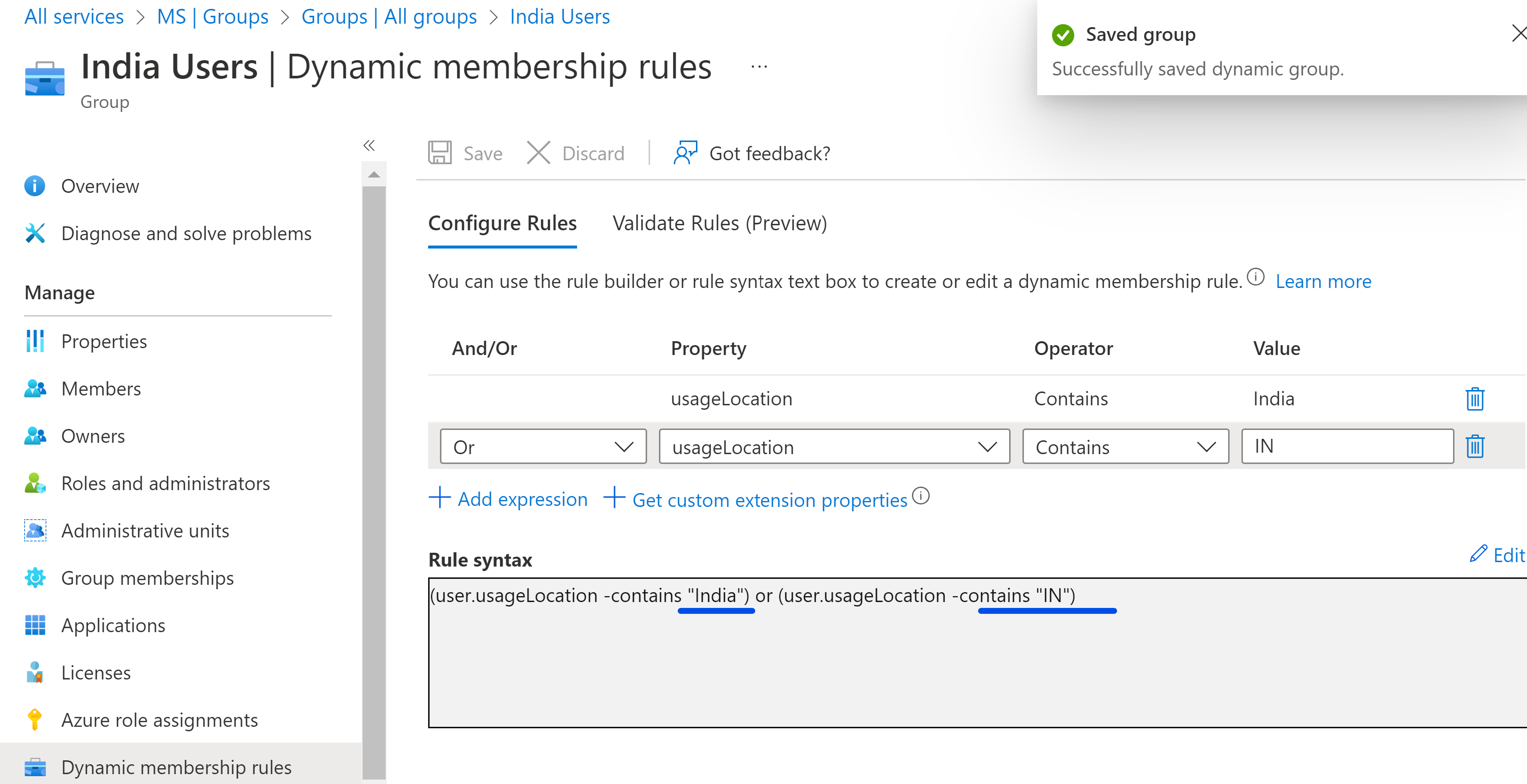
    For example, I created a user Group based upon usage location:

    268518-image.png

    Kindly refer to given doc for list of supported properties and operations https://learn.microsoft.com/en-us/azure/active-directory/enterprise-users/groups-dynamic-membership#supported-properties.

    Please do let me know if you have any queries in the comments section.

    Thanks,
    Akshay Kaushik

    Please "Accept the answer", "Upvote" and rate your experience if the suggestion works as per your business need. This will help us and others in the community as well.

    0 comments No comments

Your answer

Answers can be marked as 'Accepted' by the question author and 'Recommended' by moderators, which helps users know the answer solved the author's problem.
