Azure Storage
Globally unique resources that provide access to data management services and serve as the parent namespace for the services.
This browser is no longer supported.
Upgrade to Microsoft Edge to take advantage of the latest features, security updates, and technical support.
' cx='32' cy='32' r='32' /%3E%3Ctext x='50%25' y='55%25' dominant-baseline='middle' text-anchor='middle' fill='%23FFF' %3ENN%3C/text%3E%3C/svg%3E)
0
I am getting blank files (files with null values) with size of 3MB.while creating it through Logic APP after copying from blob and create file using create file trigger using File Share connector. the file shows size after creating in fileshare location but while opens nothing is there and all contents are empty. How to overcome this issue. any alternatives.

Hi @Nikhil Nair
Thank you for asking this question on the **Microsoft Q&A Platform. **
If the process of coping the files is a one-time job, you can use AzCopy
If this is a recurring task you can use an Automation Account with a PowerShell Runbook In this last scenario, if you don't what that the process run at a specific time, you can use a Logic App as a trigger to the Automation Account (Using webhook)
Hope this helps!
----------
Accept Answer and Upvote, if any of the above helped, this thread can help others in the community looking for remediation for similar issues.
NOTE: To answer you as quickly as possible, please mention me in your reply.
This is not happening all the times. It is happening randomly. most of he times the files created successfully in the Fileshare. Can you please help me with a sample Logic app workflow to copy a file from blob location and paste that to a FileShare location?

@Nikhil Nair Thanks for reaching out. Please share your workflow and configuration. To troubleshoot the issue, I will suggest you to verify that you are passing the content bytes (File content parameter) correctly to your action Create File of your Azure File share connector along with the name and file extension is passed correctly (File name parameter) on your action.
**Note: ** You should pass the binary content.
Simple flow to copy single file from storage to file store:
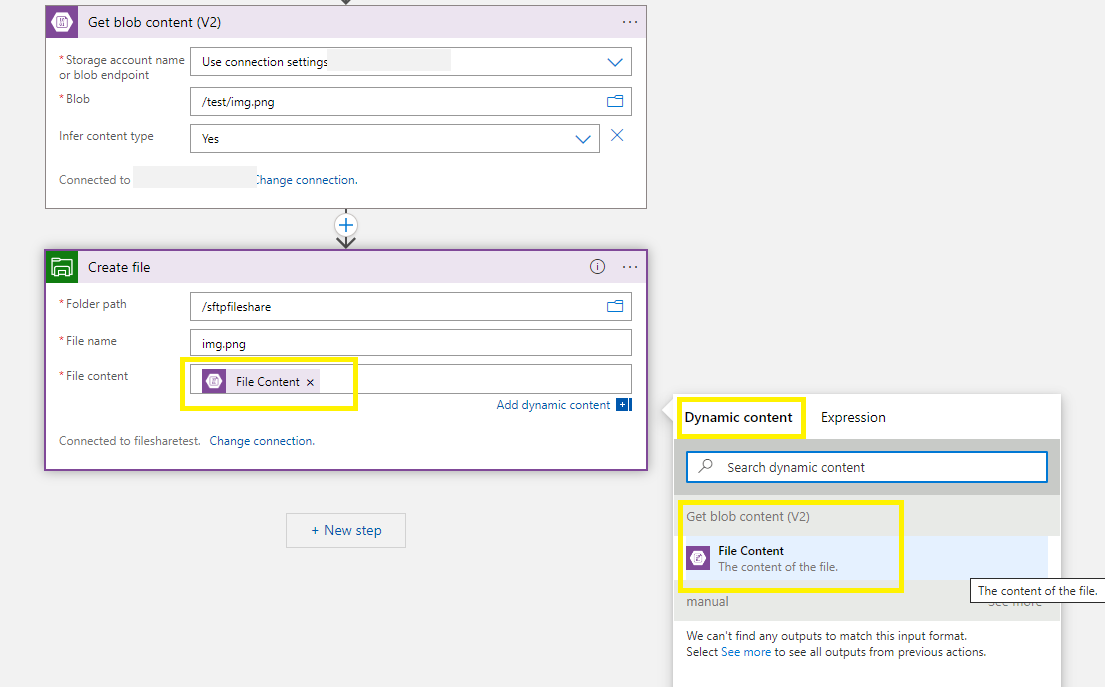
Copy all the files from storage folder to file store:

The above is just for reference and you can update the workflow as per your business needs along with passing the dynamics values.
This is not happening all the times. It is happening randomly. most of he times the files created successfully in the Fileshare. Can you please help me with a sample Logic app workflow to copy a file from blob location and paste that to a FileShare location?
@Nikhil Nair I have updated my answer and you can refer to the workflow for your reference. Let me know if you need any assistance.