Azure Maps
An Azure service that provides geospatial APIs to add maps, spatial analytics, and mobility solutions to apps.
588 questions
This browser is no longer supported.
Upgrade to Microsoft Edge to take advantage of the latest features, security updates, and technical support.
' cx='32' cy='32' r='32' /%3E%3Ctext x='50%25' y='55%25' dominant-baseline='middle' text-anchor='middle' fill='%23FFF' %3ES%3C/text%3E%3C/svg%3E)
I tried infobox sample to display the tooltip on hovering the polygons. But the tooltip is hiding when we hover the region on the edge as we can see in the second image.
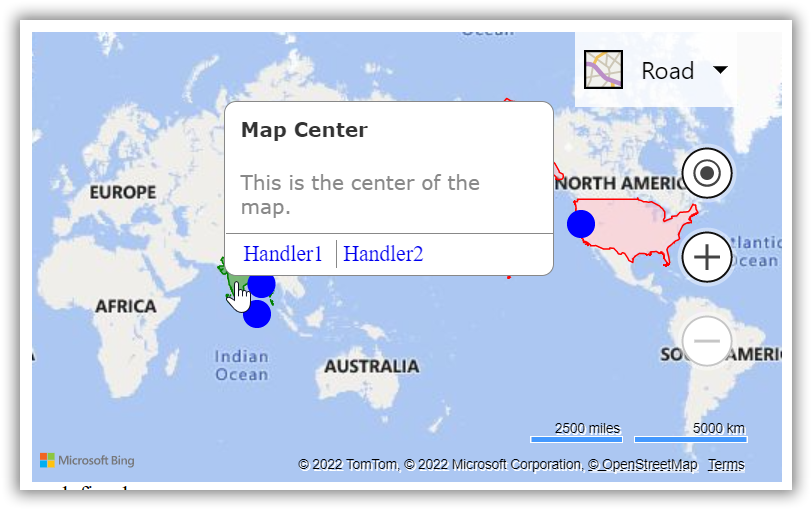
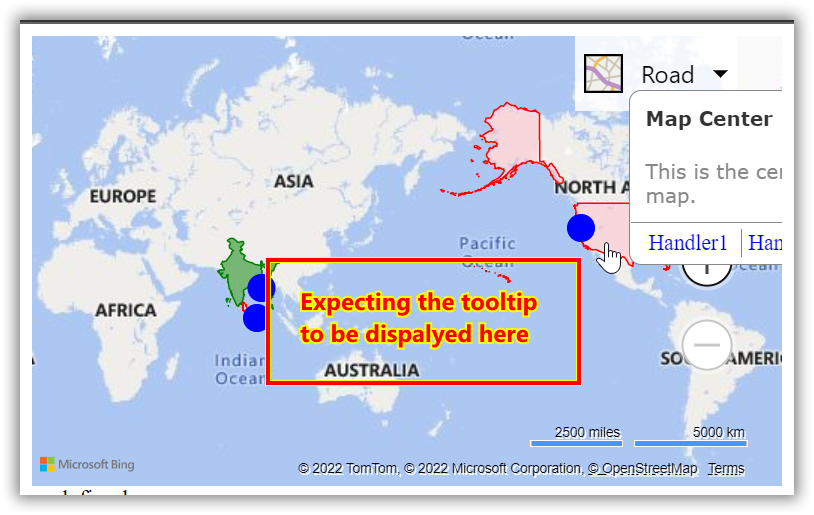
Code Snippet:
infobox = new Microsoft.Maps.Infobox(center, {
            title: 'Map Center',
            description: 'This is the center of the map.',
            showPointer: false,
            showCloseButton: false,
 visible: false,
            actions: [{
                label: 'Handler1',
                eventHandler: function () {
                    alert('Handler1');
                }
            }, {
                label: 'Handler2',
                eventHandler: function () {
                    alert('Handler2');
                }
            }]
        });

function showTooltip(e) {
//polygon hover event
 if (e.target.metadata) {

            infobox.setOptions({
                location: e.location,
                title: e.target.metadata.title,
                description: e.target.metadata.description,
                visible: true
            });
        }

 }
Do we have any option to adjust the tooltip position dynamically.?

Hi @Surya ,
Greetings! I am following up to check if the response below has helped you with addressing the issue you face. Please find the following resources that will help you with positioning the info box/pop up on Azure Maps
Display and infobox
Add pop u to Azure Maps
Let us know if you have any issues implementing the steps outlined in the shared resources and we would be glad to assist you.
----------
Kindly accept answer or upvote if the response is helpful so that it would benefit other community members facing the same issue. I highly appreciate your contribution to the community.

Hi @Surya ,
Have you looked at the view changed event in Bing Maps? You could move the dialog to the new map center when that event occurs. See https://www.bing.com/api/maps/sdkrelease/mapcontrol/isdk/addeventhandler
Sincerely,
IoTGirl
Hi @Surya ,
Greetings! I am following to see if you need any further assistance with this issue. Please let us know if the below response provided you with the answer, you are looking for.
----------
Kindly accept answer or upvote if the response is helpful so that it would benefit other community members facing the same issue. I highly appreciate your contribution to the community.

The Bing Maps control does not reposition the infobox to keep it in view, it anchors on a consistent point on the infobox as defined by you. Azure Maps however does support allowing the infobox to automatically reposition itself to stay within the map view.