Microsoft Entra ID
A Microsoft Entra identity service that provides identity management and access control capabilities. Replaces Azure Active Directory.
21,902 questions
This browser is no longer supported.
Upgrade to Microsoft Edge to take advantage of the latest features, security updates, and technical support.
' cx='32' cy='32' r='32' /%3E%3Ctext x='50%25' y='55%25' dominant-baseline='middle' text-anchor='middle' fill='%23FFF' %3EEJ%3C/text%3E%3C/svg%3E)
My IT department is trying to configure an Azure AD certificate to enable SSO for a SaaS service. However, when user's log in for the first time, their user name is of the form:
https://sts.windows.net/######-####-####-####-#########/:login[@](/users/na/?userId=b86545af-0000-0003-0000-000000000000).com
How does one configure AD so that SAML gets the correct user name, e.g. First Last?

@Ed Jobe
Thank you for your post and I apologize for the delayed response!
From your issue, I understand that when a user logs in for the first time, their username is in the form of - https://sts.windows.net/######-####-####-####-#########/:login@company.com, and you'd like to configure Azure AD so that SAML gets the correct username - i.e. First and Last Name.
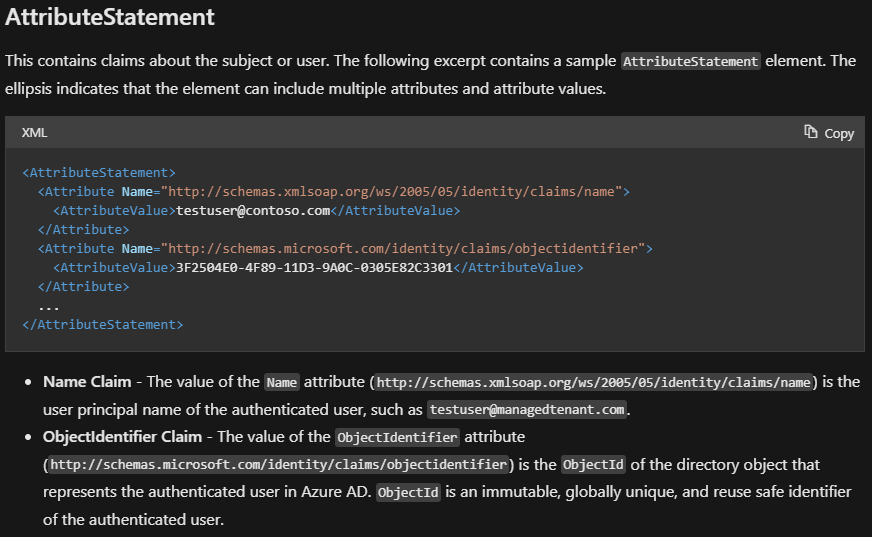
https://sts.windows.net/######-####-####-####-#########/:login@company.com, are you able to confirm if this is your Tenant ID (Issuer)? When it comes to having Azure AD get the correct names or mapping the correct values to attributes, have you looked into the AttributeStatement?
Single sign-on SAML protocol
I hope this helps!
If you have any other questions, please let me know.
Thank you for your time and patience throughout this issue.
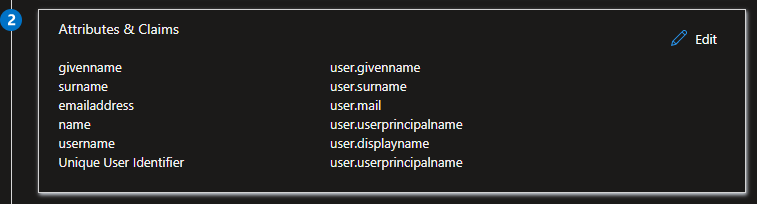
Thank you, We were finally able to find the place to configure the user name that gets transmitted to SAML. During certificate setup, it was under the Attributes & Claims section. We set the username to user.displayname.
@Ed Jobe
I'm glad that you were able to resolve your issue and thank you for posting your solution so that others experiencing the same thing can easily reference this! Since the Microsoft Q&A community has a policy that "The question author cannot accept their own answer. They can only accept answers by others", I'll repost your solution in case you'd like to "Accept" the answer.
Issue:
When a user logs in for the first time, their username is in the form of - https://sts.windows.net/######-####-####-####-#########/:login[@](/users/na/?userId=b86545af-0000-0003-0000-000000000000).com, and you'd like to configure Azure AD so that SAML gets the correct username - i.e. First and Last Name.
Solution:
You were able to configure the username during the certificate setup under the Attributes & Claims section (setting the username to user.displayname).
Thank you again for your time and patience throughout this issue.
----------
Please remember to "Accept Answer" if any answer/reply helped, so that others in the community facing similar issues can easily find the solution.