Azure Data Lake Storage
An Azure service that provides an enterprise-wide hyper-scale repository for big data analytic workloads and is integrated with Azure Blob Storage.
This browser is no longer supported.
Upgrade to Microsoft Edge to take advantage of the latest features, security updates, and technical support.
' cx='32' cy='32' r='32' /%3E%3Ctext x='50%25' y='55%25' dominant-baseline='middle' text-anchor='middle' fill='%23FFF' %3EM%3C/text%3E%3C/svg%3E)
Hi,
I am working to copy data from Azure Synapse link to Az SQL. I have data in the datalake including model.json.
I am using the ADF template as suggested on this page tutorial
https://learn.microsoft.com/en-us/power-apps/maker/data-platform/azure-synapse-link-pipelines?tabs=data-factory
I am facing an issue while creating the trigger for storage event.
The page tutorial is asking to put "/model.json" in the field called Blob Path ends with
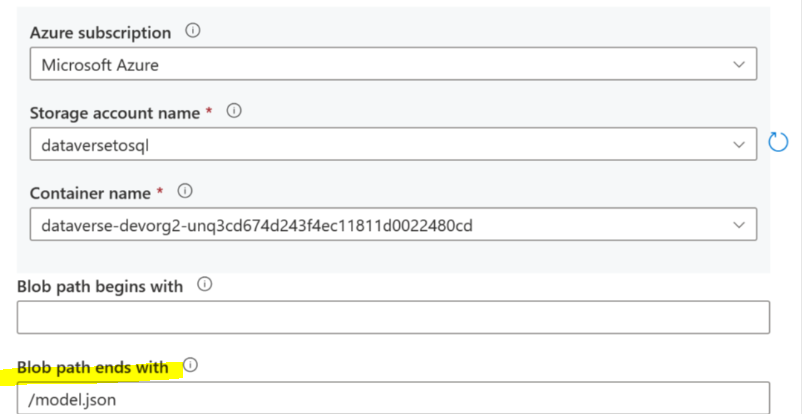
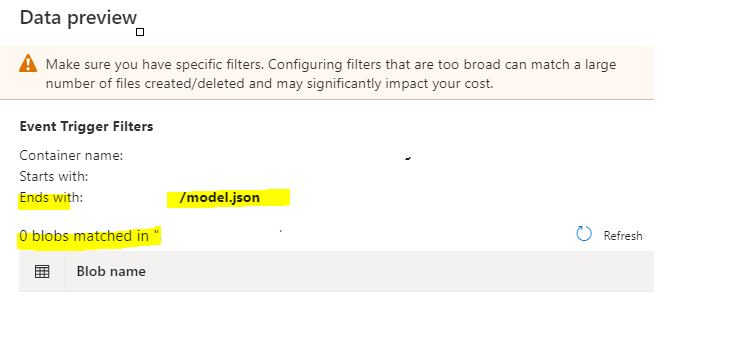
However, when I do that, on the next page, I am not getting any matching Blob
I tried putting "model.json" instead of "/model.json"
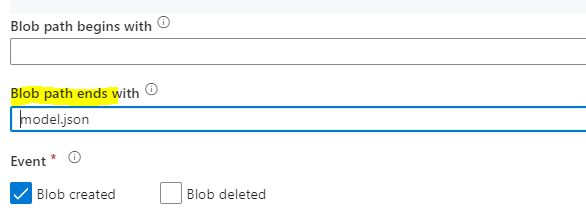
It matched "model.json" but it shows all other model.json for other entities and I am unable to unselect that. I only want trigger for any change in model.json
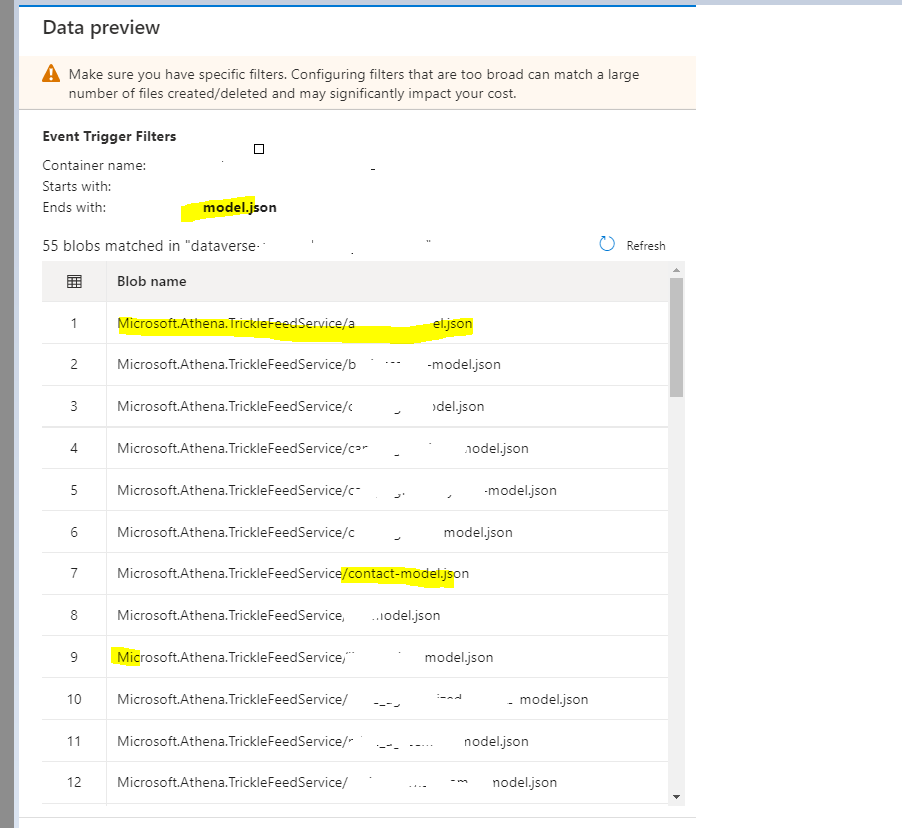
I went ahead and created trigger with all these model.json files as it included my "model.json" too. Trigger was created but it threw error
ErrorCode=UserErrorFileNotFound,'Type=Microsoft.DataTransfer.Common.Shared.HybridDeliveryException,Message=ADLS Gen2 operation failed for: Operation returned an invalid status code 'NotFound'. Account: ''. FileSystem: '. Path: 'Microsoft.Athena.TrickleFeedService/model.json'. ErrorCode: 'PathNotFound'. Message: 'The specified path does not exist.'.
Could you advise how can I just select my model.json and not select the entity based files. As mentioned I tried using /model.json but it matched no Blob for trigger

Hi @Mav ,
Just checking in to see if the below answer helped. Please do consider clicking Accept Answer and Up-Vote for the same as accepted answers help community as well. If you have any further query do let us know.
Hi AnnuKumari
No it has not worked. I had left my comment to your answer 3-4 days ago. Could you check that. Adding the same response here
Hi
Just correcting your interpretation.
I am trying to create an event based trigger which executes the pipeline when only 1 blob file named 'model.json' is changed. It is the main model.json file and it is present in container and not any subfolder.
I dont want to create trigger based on other model.json files like account_model.json
When I provide '/model.json' it is not showing me any BLOB file . I expect it to show me just my main "model.json"
Please check my first two screenshots again from the first post.
' cx='32' cy='32' r='32' /%3E%3Ctext x='50%25' y='55%25' dominant-baseline='middle' text-anchor='middle' fill='%23FFF' %3EAA%3C/text%3E%3C/svg%3E)
Did you find any solution to this problem?
Hi @Mav ,
Thankyou for using Microsoft Q&A platform and thanks for posting your question here.
As I understand your issue, you are trying to create an event based trigger which executes the pipeline when the blob file ending with 'model.json' gets created/deleted. Please correct me if my interpretation of your query is incorrect.
If you want to filter out few of the files which ends with 'model.json' under 'Microsoft.Athena.TrickleFeedService' folder, I would recommend you to create a subfolder and place all the needed files within that and configure like this:
Blob path begins with : "Microsoft.Athena.TrickleFeedService/subfoldername"
Blob path ends with : "model.json"
For more details, kindly check out Examples of storage event triggers
Hope this will help. Please let us know if any further queries.
------------------------------
 or upvote
  button whenever the information provided helps you.
Hi
Just correcting your interpretation.
I am trying to create an event based trigger which executes the pipeline when only 1 blob file named 'model.json' is changed. It is the main model.json file and it is present in container and not any subfolder.
I dont want to create trigger based on other model.json files like account_model.json
When I provide '/model.json' it is not showing me any BLOB file . I expect it to show me just my main "model.json"
Please check my first two screenshots again from the first post.
Can you guide further
Hi
Just correcting your interpretation.
I am trying to create an event based trigger which executes the pipeline when only 1 blob file named 'model.json' is changed. It is the main model.json file and it is present in container and not any subfolder.
I dont want to create trigger based on other model.json files like account_model.json
When I provide '/model.json' it is not showing me any BLOB file . I expect it to show me just my main "model.json"
Please check my first two screenshots again from the first post.
Hi @Mav ,
Apologies for delay in response. Could you please share the screenshot of the file 'model.json' in your storage account .
Kindly make sure if the file is empty, then 'Ignore Empty blobs' option should be turned to 'No' . By default the option is selected as 'Yes'.
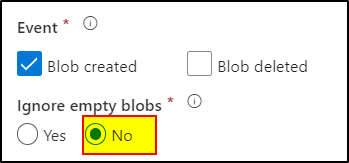
--------------
Hope it helps. Please consider accepting the answer if it was helpful. Thanks.
Can you guide further
Hi
Just correcting your interpretation.
I am trying to create an event based trigger which executes the pipeline when only 1 blob file named 'model.json' is changed. It is the main model.json file and it is present in container and not any subfolder.
I dont want to create trigger based on other model.json files like account_model.json
When I provide '/model.json' it is not showing me any BLOB file . I expect it to show me just my main "model.json"
Please check my first two screenshots again from the first post.