Troubleshoot SIEM tool integration issues

12980401 0 Reputation points
2023-05-02T21:05:42.3033333+00:00

we have followed the docs to collect data from Microsoft Azure Event Hub, for Microsoft Defender integration on elastic stack. for some reason we're not receiving the data?

Microsoft Security | Microsoft Defender | Microsoft Defender for Cloud
Microsoft Security | Microsoft Defender | Microsoft Defender for Identity
Microsoft Security | Microsoft Defender | Microsoft Defender for Cloud Apps
{count} votes

2 answers

Sort by: Most helpful
  1. David Broggy 6,696 Reputation points MVP Volunteer Moderator
    2023-05-03T03:27:32.36+00:00

    Hi 12980401,

    I appreciate the challenge in getting Azure Event Hub working with 3rd party collection tools like Elastic Stack.

    A common thing to forget is to point your data at the event hub.

    The documentation often explains how to configure the event hub but it may forget to mention that you need to point one or more data sources at the event hub.

    Here's a link that shows how to validate you have data in your event hub.

    If this is working then your issue is more likely with the event hub connector so please reply back with more details if that is the case.

    https://learn.microsoft.com/en-us/azure/event-hubs/process-data-azure-stream-analytics


  2. JamesTran-MSFT 37,211 Reputation points Microsoft Employee Moderator
    2023-05-15T19:25:57+00:00

    @12980401

    Thank you for your post and I apologize for the delayed response!

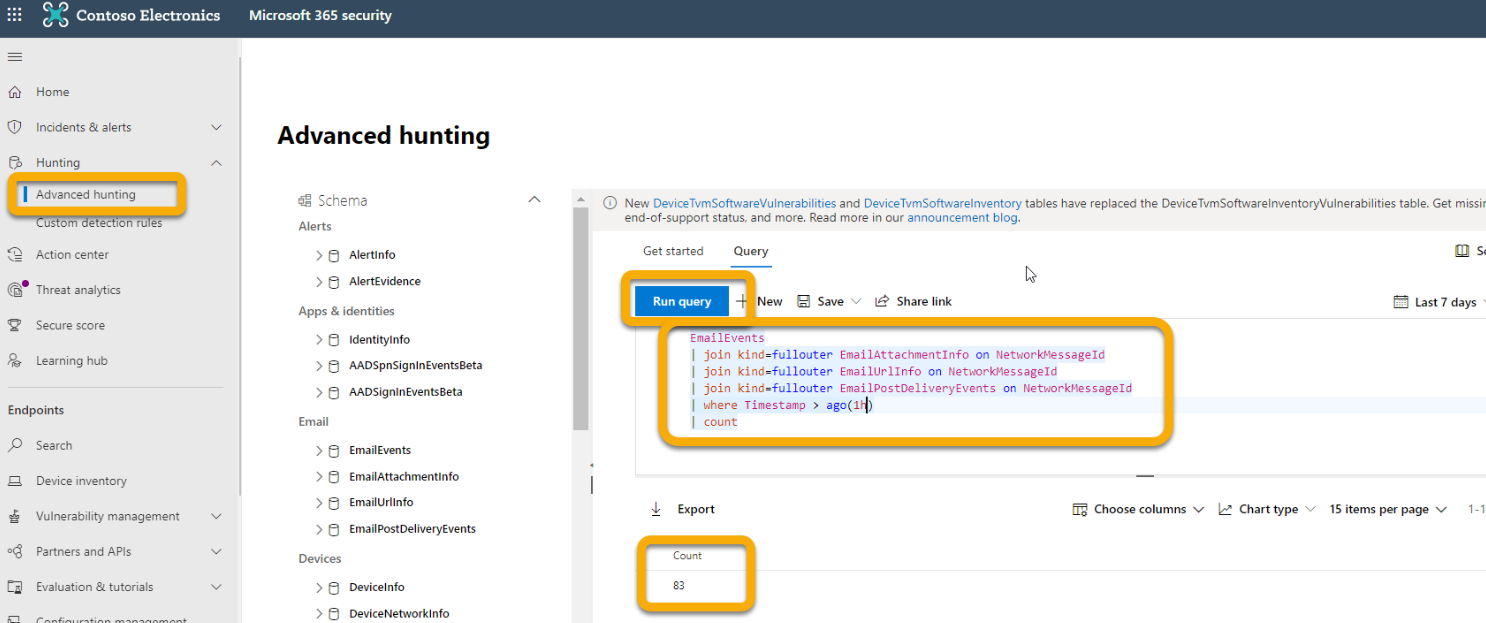
    When looking more into your issue, I understand that you're having troubles collecting data from Microsoft Azure Event Hub after integrating it with Microsoft Defender. Please keep in mind that after integration, the data collection could take some time (~1hr) and if you're still having issues after waiting, you should be able to verify that the events are being exported to the Event Hubs by running the Advanced Hunting query below.

    Select Hunting > Advanced Hunting > Query and enter the following query:

    //This query will show you how many emails were received in the last hour joined across all the other tables.
    EmailEvents
    |join kind=fullouter EmailAttachmentInfo on NetworkMessageId
    |join kind=fullouter EmailUrlInfo on NetworkMessageId
    |join kind=fullouter EmailPostDeliveryEvents on NetworkMessageId
    |where Timestamp > ago(1h)
    |count


    For more info: Verify that the events are being exported to the Event HubsUser's image
    Additional Links:

    I hope this helps!

    If you're still having issues and would like to work closely with our support team, please let me know.

    Thank you for your time and patience throughout this issue.


    If the information helped address your question, please Accept the answer. This will help us and also improve searchability for others in the community who might be researching similar information.


Your answer

Answers can be marked as 'Accepted' by the question author and 'Recommended' by moderators, which helps users know the answer solved the author's problem.