Hello,
I have a problem with my domain controller (Windows Server 2019).
Before I had a problem with synchronization between two domain controllers WS2019=WS2012.
I removed old domain controller(WS2012) and now I had only one.
When I tried to add a computer to the domain I had it:
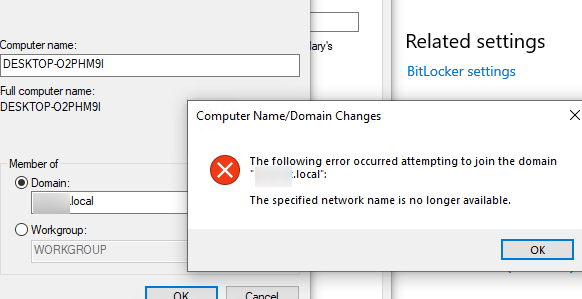
The domain controller and this computer are in the same network.
They can ping together and DNS on the computer is set on DC.
When I run on DC dcdiag almost all services are passed.
On DFSREvent I have got:
There are warning or error events within the last 24 hours after the SYSVOL has been shared.  Failing SYSVOL
         replication problems may cause Group Policy problems.
On SystemLog I have it:
An error event occurred.  EventID: 0x0000272C
            Time Generated: 06/13/2023   13:37:25
            Event String:
            DCOM was unable to communicate with the computer 172.0.0.1 using any of the configured protocols; requested by PID      820 (C:\Windows\system32\dcdiag.exe), while activating CLSID {8BC3F05E-D86B-11D0-A075-00C04FB68820}.
         An error event occurred.  EventID: 0x0000272C
            Time Generated: 06/13/2023   13:38:22
            Event String:
            DCOM was unable to communicate with the computer 8.8.4.4 using any of the configured protocols; requested by PID      820 (C:\Windows\system32\dcdiag.exe), while activating CLSID {8BC3F05E-D86B-11D0-A075-00C04FB68820}.
         An error event occurred.  EventID: 0x0000272C
            Time Generated: 06/13/2023   13:38:32
            Event String:
            DCOM was unable to communicate with the computer 172.0.0.1 using any of the configured protocols; requested by PID     21a0 (C:\Windows\system32\dcdiag.exe), while activating CLSID {8BC3F05E-D86B-11D0-A075-00C04FB68820}.
         An error event occurred.  EventID: 0x0000272C
            Time Generated: 06/13/2023   13:38:43
            Event String:
            DCOM was unable to communicate with the computer 8.8.8.8 using any of the configured protocols; requested by PID      820 (C:\Windows\system32\dcdiag.exe), while activating CLSID {8BC3F05E-D86B-11D0-A075-00C04FB68820}.
And
An error event occurred.  EventID: 0x80000025
            Time Generated: 06/13/2023   13:50:02
            Event String:
            The Key Distribution Center (KDC) encountered a ticket that did not contain information about the account that requested the ticket while processing a request for another ticket. This prevented security checks from running and could open security vulnerabilities. See https://go.microsoft.com/fwlink/?linkid=2173051 to learn more.
An error event occurred.  EventID: 0x40000004
            Time Generated: 06/13/2023   13:59:57
            Event String:
            The Kerberos client received a KRB_AP_ERR_MODIFIED error from the server ad$. The target name used was cifs/AD. This indicates that the target server failed to decrypt the ticket provided by the client. This can occur when the target server principal name (SPN) is registered on an account other than the account the target service is using. Ensure that the target SPN is only registered on the account used by the server. This error can also happen if the target service account password is different than what is configured on the Kerberos Key Distribution Center for that target service. Ensure that the service on the server and the KDC are both configured to use the same password. If the server name is not fully qualified, and the target domain (contoso.LOCAL) is different from the client domain (contoso.LOCAL), check if there are identically named server accounts in these two domains, or use the fully-qualified name to identify the server.
On Event Viewer I have got this:
The Key Distribution Center (KDC) encountered a ticket that did not contain information about the account that requested the ticket while processing a request for another ticket. This prevented security checks from running and could open security vulnerabilities. See https://go.microsoft.com/fwlink/?linkid=2173051 to learn more.

  Ticket PAC constructed by: SRV-OLD
  Client: CONTOSO.LOCAL\\a.smith
  Ticket for: krbtgt
Where SRV-OLD is my old DC(WS2012) and it's not in domain.
When I deleted SRV-OLD as DC I cleaned up all metadata.
Does anyone have some ideas on how to fix it?
' cx='32' cy='32' r='32' /%3E%3Ctext x='50%25' y='55%25' dominant-baseline='middle' text-anchor='middle' fill='%23FFF' %3ED%3C/text%3E%3C/svg%3E)

' cx='32' cy='32' r='32' /%3E%3Ctext x='50%25' y='55%25' dominant-baseline='middle' text-anchor='middle' fill='%23FFF' %3EA%3C/text%3E%3C/svg%3E)