Hello @Saar Barel,
Welcome to Microsoft Q&A forum.
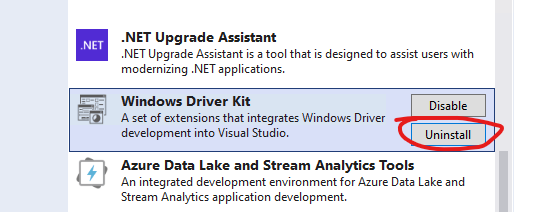
Probably, it’s caused by Windows Driver Kit extension. Please try to uninstall this extension from Extension > Manage Extensions > Installed > Uninstall, check if this error disappears, if it disappears, try to reinstall the WDK extension.
Sincerely,
Tianyu
If the answer is the right solution, please click "Accept Answer" and kindly upvote it. If you have extra questions about this answer, please click "Comment".
Note: Please follow the steps in our documentation to enable e-mail notifications if you want to receive the related email notification for this thread.
' cx='32' cy='32' r='32' /%3E%3Ctext x='50%25' y='55%25' dominant-baseline='middle' text-anchor='middle' fill='%23FFF' %3ESB%3C/text%3E%3C/svg%3E)
' cx='32' cy='32' r='32' /%3E%3Ctext x='50%25' y='55%25' dominant-baseline='middle' text-anchor='middle' fill='%23FFF' %3ETS%3C/text%3E%3C/svg%3E)