Set Static IP Address On SSID With Powershell

Just A Network Guy 1 Reputation point
2020-10-28T19:10:15.457+00:00

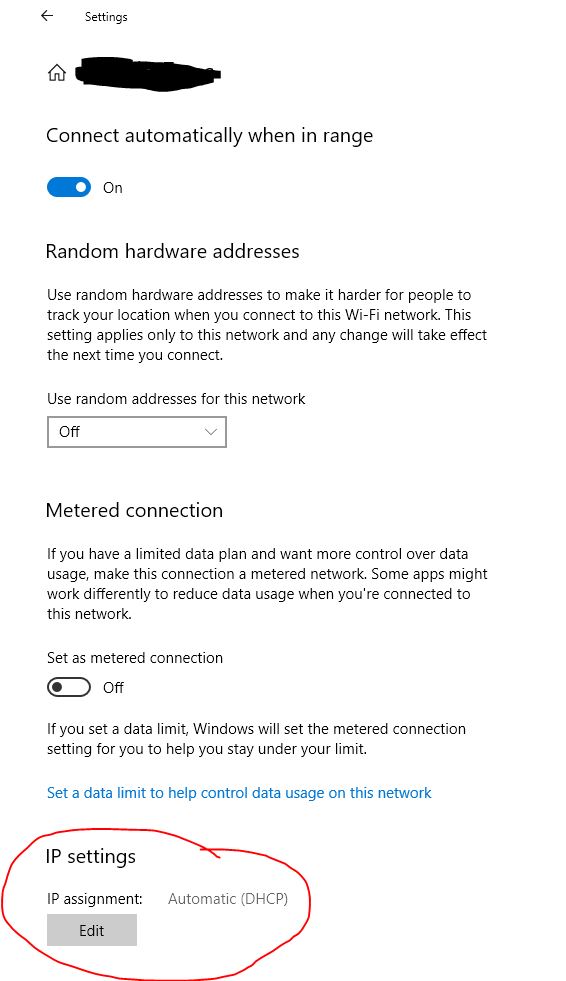
I need to set a static IP address for a specific SSID on Windows 10 via Powershell and can't seem to find a way to do it. I can do it via the Settings app but I need to script it. I can't set the IP address on the wireless NIC as I need it to still use DHCP on all wireless networks with the exception of the one I specify. I don't really care what the script is written in (Just thought Powershell would be easiest.), I just need to do it programmatically. Any help is much appreciated.

35835-wifi-ip-address.jpg

Windows for business | Windows Client for IT Pros | User experience | Other
0 comments No comments
{count} votes

6 answers

Sort by: Most helpful
  1. Just A Network Guy 1 Reputation point
    2020-10-29T20:47:37.79+00:00

    I can do it via the GUI in the Settings App on Windows 10 so no custom application is needed. If you look in the image above, you can see where you can set the IP settings. Those settings are for the wireless profile/SSID only, not the wireless NIC as a whole. I just need to do that via Powershell.

    0 comments No comments

Your answer

Answers can be marked as 'Accepted' by the question author and 'Recommended' by moderators, which helps users know the answer solved the author's problem.