Hello @Eugene,
Welcome to Microsoft Q&A forum.
No direct way to let the code display in the center of the Text Editor, but you can keep the Text Editor display in the center of the screen by adjusting the width of the window docked on the left.
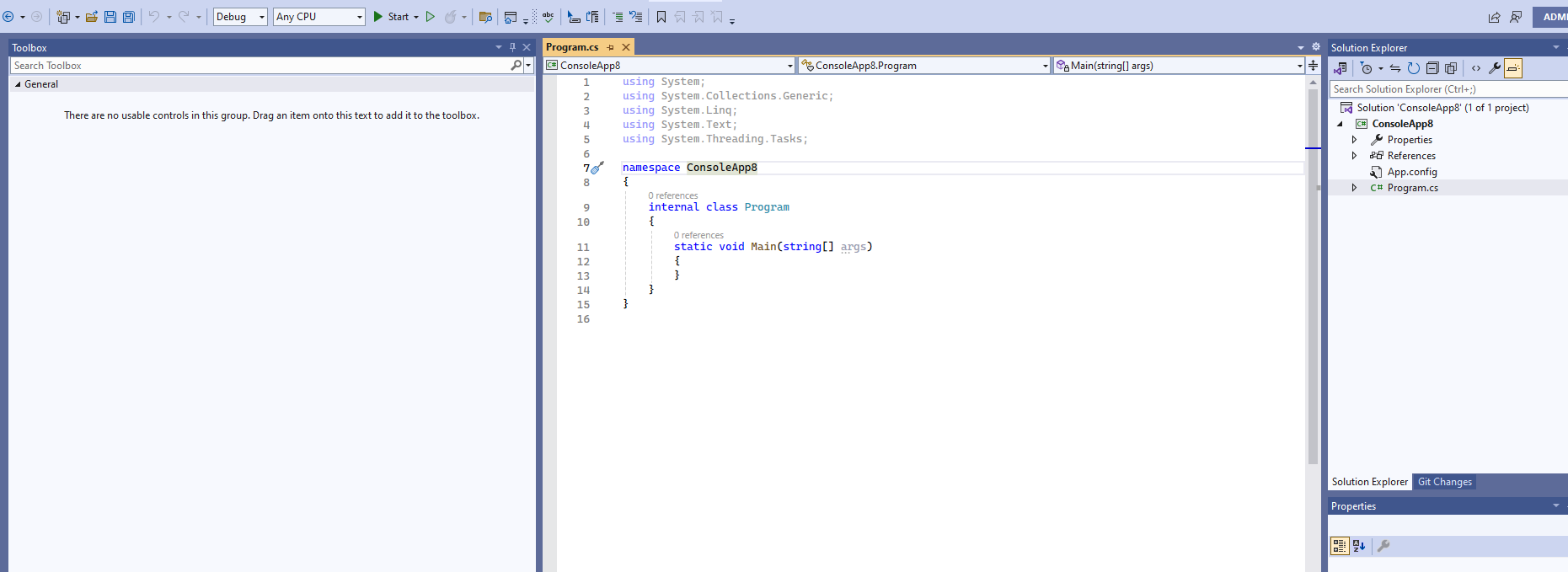
BTW, to open any window, you can click View menu. To reset the layout, follow the instructions here: Reset all settings.
Sincerely,
Tianyu
If the answer is the right solution, please click "Accept Answer" and kindly upvote it. If you have extra questions about this answer, please click "Comment".
Note: Please follow the steps in our documentation to enable e-mail notifications if you want to receive the related email notification for this thread.
' cx='32' cy='32' r='32' /%3E%3Ctext x='50%25' y='55%25' dominant-baseline='middle' text-anchor='middle' fill='%23FFF' %3EE%3C/text%3E%3C/svg%3E)

' cx='32' cy='32' r='32' /%3E%3Ctext x='50%25' y='55%25' dominant-baseline='middle' text-anchor='middle' fill='%23FFF' %3ETS%3C/text%3E%3C/svg%3E)