Developer technologies | Universal Windows Platform (UWP)
A Microsoft platform for building and publishing apps for Windows devices.
This browser is no longer supported.
Upgrade to Microsoft Edge to take advantage of the latest features, security updates, and technical support.
' cx='32' cy='32' r='32' /%3E%3Ctext x='50%25' y='55%25' dominant-baseline='middle' text-anchor='middle' fill='%23FFF' %3ENS%3C/text%3E%3C/svg%3E)
Hi,
I want to customize the default titlebar. I followed this tutorial.
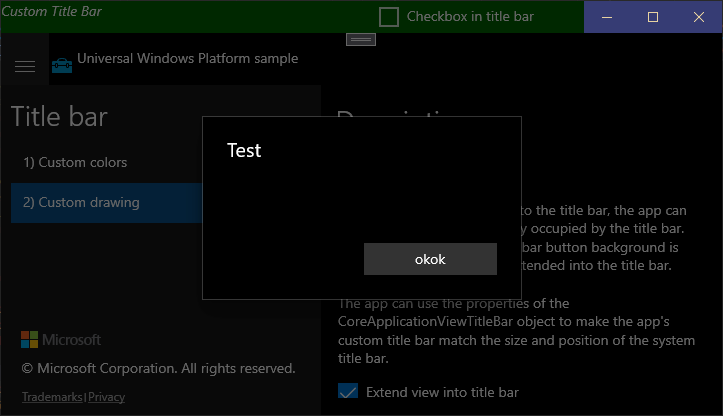
However when I try to open a ContentDialog the titlebar gets dimmed (greyed out) and is not clickable for draging the window.
I got a very simple reproduceable example just by adding a contentdialog to the official microsoft example. Check the screenshot below.
How can I fix the dimming as well as the drag issue?
https://github.com/microsoft/Windows-universal-samples/tree/master/Samples/TitleBar

Hello @Nico Schulz Welcome to Microsoft Q&A
Please check Dialog controls document, this behavior is normal by-design.
Dialog controls are modal UI overlays that provide contextual app information. They block interactions with the app window until being explicitly dismissed. They often request some kind of action from the user.
If you do want to click click custom title bar when contentdialog is opened, we suggest use Popup to replace Dialog control. For more detail please refer this document .
<Popup VerticalOffset="10" HorizontalOffset="200" x:Name="StandardPopup">
        <Border BorderBrush="{StaticResource ApplicationForegroundThemeBrush}"
                Background="{StaticResource ApplicationPageBackgroundThemeBrush}"
                BorderThickness="2" Width="200" Height="200">
            <StackPanel HorizontalAlignment="Center" VerticalAlignment="Center">
                <TextBlock Text="Simple Popup" FontSize="24.667" HorizontalAlignment="Center"/>
                <Button Content="Close" Click="ClosePopupClicked" HorizontalAlignment="Center"/>
            </StackPanel>
        </Border>
 </Popup>
update 1
if you want to grey out the the controls but not titlebar, you could use LoadingControl control to implement
For example:
<controls:Loading x:Name="LoadingControl">
    <controls:Loading.Background>
        <SolidColorBrush Opacity="0.7" Color="Black" />
    </controls:Loading.Background>
    <ContentControl x:Name="LoadingContentControl">
        <DataTemplate>
            <TextBlock Text="Hello" />
        </DataTemplate>
    </ContentControl>
</controls:Loading>
If the response is helpful, please click "Accept Answer" and upvote it.
Note: Please follow the steps in our documentation to enable e-mail notifications if you want to receive the related email notification for this thread.
Hi,
Thanks for your suggestion.
I guess the Popup will not solve my issue. The contentdialog works fine, unless you are using a custom titlebar. The issue is, that the custom titlebar will be placed in the background, while a default titlebar is not placed into background.
The popup will not grey out the title bar, but it will also not grey out the other controls. So this does not help me either. I guess there should be a way to specify a zindex for the titlebar that is larger than the contentdialog modal.
I have update the case reply please check.