


' cx='32' cy='32' r='32' /%3E%3Ctext x='50%25' y='55%25' dominant-baseline='middle' text-anchor='middle' fill='%23FFF' %3ERV%3C/text%3E%3C/svg%3E)
Thank you for contacting Microsoft Support!
To push the Microsoft Authenticator app for bulk users, you can utilize the Registration campaign feature in Azure Active Directory.
To enable the registration campaign policy, you must use the Authentication Methods Policy using Graph APIs. Those assigned at least the Authentication Policy Administrator role can update the policy.
To configure the policy using Graph Explorer:
- Sign in to Graph Explorer and ensure you've consented to the Policy.Read.All and Policy.ReadWrite.AuthenticationMethod permissions. To open the Permissions panel:

- Retrieve the Authentication methods policy: JSONCopy
GET https://graph.microsoft.com/v1.0/policies/authenticationmethodspolicy - Update the registrationEnforcement and authenticationMethodsRegistrationCampaign section of the policy to enable the nudge on a user or group.
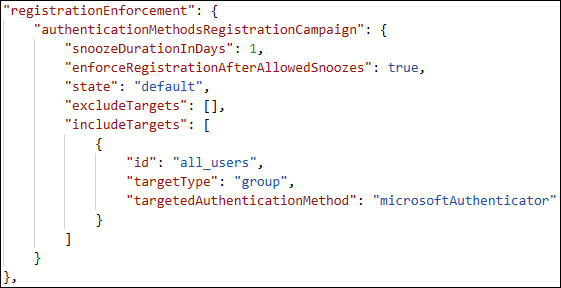 To update the policy, perform a PATCH on the Authentication Methods Policy with only the updated registrationEnforcement section: JSONCopy
PATCH https://graph.microsoft.com/v1.0/policies/authenticationmethodspolicy
In addition to using the Graph Explorer, you can also enable the registration campaign policy using the Microsoft Entra admin center. Please refer to the article below for more details.
https://learn.microsoft.com/en-us/entra/identity/authentication/how-to-mfa-registration-campaign
Hope this helps.
If the answer is helpful, please click Accept Answer and kindly upvote it. If you have any further questions about this answer, please click Comment.