

I am unable to connect to my LocalDB instance in SQL Server. The error message I receive is:
Unable to connect to target server '(localdb)\MSSQLLocalDB'. Please verify the connection information such as the server name, login credentials, and firewall rules for the target server.
Problem 2: Errors Updating SQL Server
When attempting to update SQL Server, I encounter the following error messages:
The patch installer has failed to update the following instance: SQLEXPRESS SQLEXPRESS01 MSSQLSERVER. To determine the reason for failure, review the log files.
Exit code (Decimal): -2061893565
Here is a summary of the failed instances:
- SQLEXPRESS
- SQLEXPRESS01
- MSSQLSERVER
Here is the overall summary:
Final result: The patch installer has failed to update the following instance: SQLEXPRESS SQLEXPRESS01 MSSQLSERVER. To determine the reason for failure, review the log files.
Exit code (Decimal): -2061893565
Start time: 2024-06-01 10:14:07
End time: 2024-06-01 10:16:06
Requested action: Patch
Instance SQLEXPRESS overall summary:
Final result: The patch installer has failed to update the shared features. To determine the reason for failure, review the log files.
Exit code (Decimal): -2061893565
Start time: 2024-06-01 10:14:32
End time: 2024-06-01 10:15:17
Requested action: Patch
Instance SQLEXPRESS01 overall summary:
Final result: The patch installer has failed to update the shared features. To determine the reason for failure, review the log files.
Exit code (Decimal): -2061893565
Start time: 2024-06-01 10:15:19
End time: 2024-06-01 10:15:32
Requested action: Patch
Instance MSSQLSERVER overall summary:
Final result: The patch installer has failed to update the shared features. To determine the reason for failure, review the log files.
Exit code (Decimal): -2061893606
Start time: 2024-06-01 10:15:33
End time: 2024-06-01 10:16:04
Requested action: Patch
Machine Properties:
Machine name: FRACTALG
Machine processor count: 12
OS version: Microsoft Windows 11 Home (10.0.22621)
OS service pack:
OS region: United States
OS language: English (United States)
OS architecture: x64
Process architecture: 64 Bit
OS clustered: No
Product features discovered:
Product Instance Instance ID Feature Language Edition Version Clustered Configured
SQL Server 2022 SQLEXPRESS MSSQL16.SQLEXPRESS Database Engine Services 1033 Express Edition 16.0.1000.6 No Yes
SQL Server 2022 SQLEXPRESS01 MSSQL16.SQLEXPRESS01 Database Engine Services 1033 Express Edition 16.0.1000.6 No Yes
SQL Server 2022 MSSQLSERVER MSSQL16.MSSQLSERVER Database Engine Services 1033 Express Edition 16.0.1115.1 No Yes
SQL Server 2022 MSSQLSERVER MSSQL16.MSSQLSERVER SQL Server Replication 1033 Express Edition 16.0.1115.1 No Yes
SQL Server 2022 MSSQLSERVER MSSQL16.MSSQLSERVER Full-Text and Semantic Extractions for Search 1033 Express Edition 16.0.1000.6 No Yes
SQL Server 2022 MSSQLSERVER MSSQL16.MSSQLSERVER Machine Learning Services and Language Extensions 1033 Express Edition 16.0.1115.1 No Yes
SQL Server 2022 LocalDB 1033 Express Edition 16.0.1115.1 No Yes
Package properties:
Description: Microsoft SQL Server 2022
ProductName: SQL Server 2022
Type: RTM
Version: 16
SPLevel: 0
KBArticle: KB5036432
KBArticleHyperlink: https://support.microsoft.com/?kbid=5036432
PatchType: QFE
AssociatedHotfixBuild: 0
Platform: x64
PatchLevel: 16.0.4125.3
ProductVersion: 16.0.1000.6
GDRReservedRange: 16.0.1100.0:16.0.3999.0
Installation location: D:\7aa0aa4a3c96d0821a0b4e\x64\setup\
Updated product edition:
Instance Edition
SQLEXPRESS Express
SQLEXPRESS01 Express
MSSQLSERVER Express
User Input Settings:
ACTION: Patch
ALLINSTANCES: false
CLUSTERPASSIVE: false
CONFIGURATIONFILE:
ENU: true
HELP: false
IACCEPTSQLSERVERLICENSETERMS: true
IACKNOWLEDGEENTCALLIMITS: false
INDICATEPROGRESS: false
INSTANCEID: <empty>
INSTANCENAME: <empty>
QUIET: false
QUIETSIMPLE: false
SUPPRESSPAIDEDITIONNOTICE: false
SUPPRESSPRIVACYSTATEMENTNOTICE: false
UIMODE: Normal
Rules with failures or warnings:
Rules report file: C:\Program Files\Microsoft SQL Server\160\Setup Bootstrap\Log\20240601_101407\SystemConfigurationCheck_Report.htm
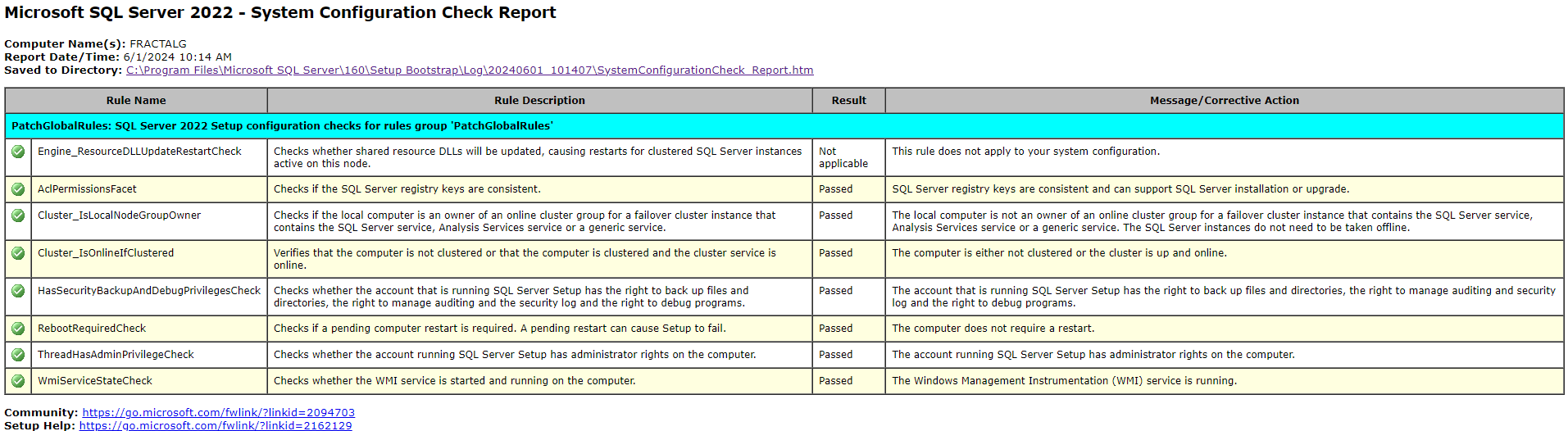
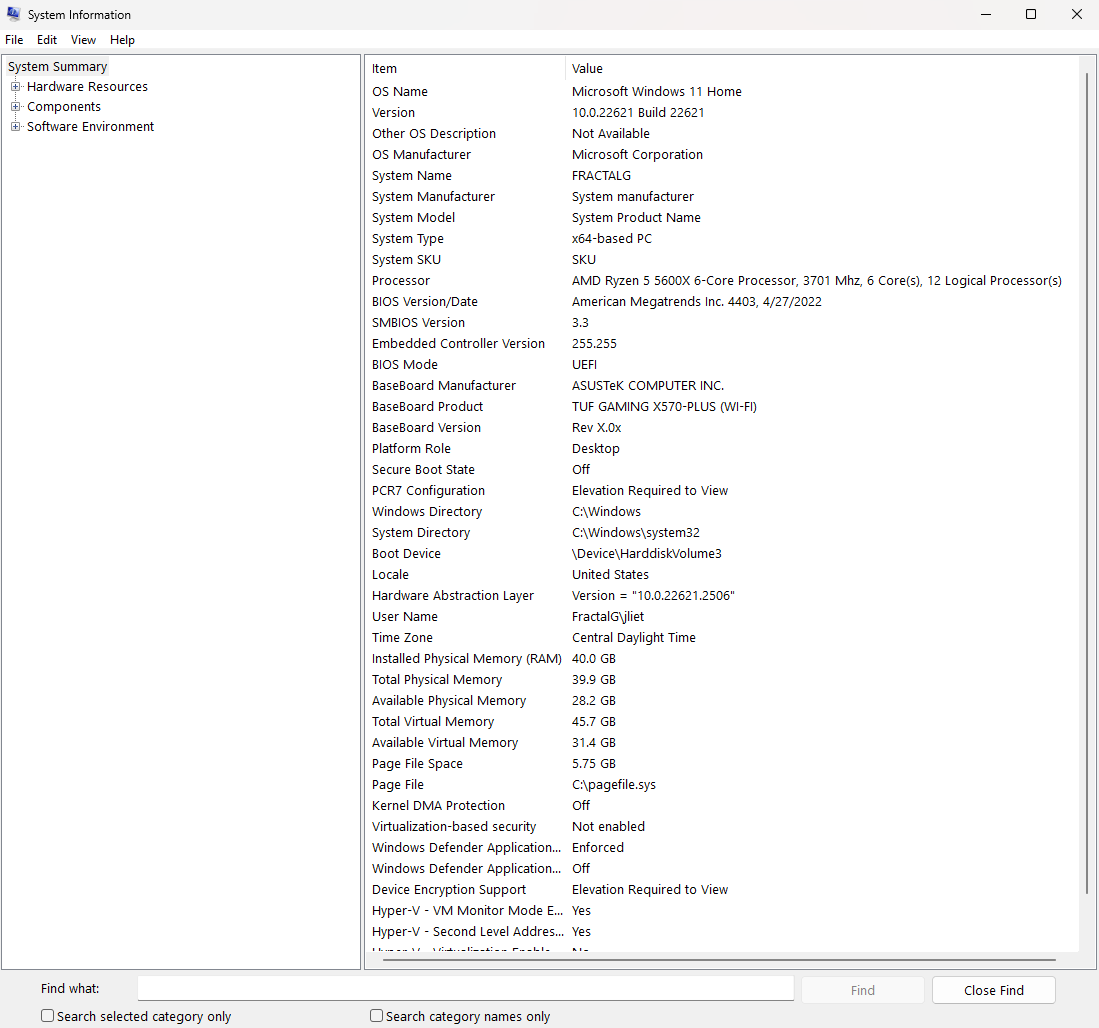
System Information:
- Machine Name: FRACTALG
- OS Version: Microsoft Windows 11 Home (10.0.22621)
- OS Architecture: x64
-
SQL Server Instances and Features:
- SQL Server 2022 Express Edition (multiple instances)
- LocalDB
Steps Taken:
- Attempted to update SQL Server using the patch from these URLs:
- Ran
sfc /scannow to check for system file integrity, which found no issues.
Results:
C:\Windows\System32>sfc /scannow
Beginning system scan.  This process will take some time.

Beginning verification phase of system scan.

Verification 100% complete.

Windows Resource Protection did not find any integrity violations.

C:\Windows\System32>
- Ran
chkdsk /f /r, which completed without finding bad sectors.
Here are the results of that operation:
Checking file system on C:
The type of the file system is NTFS.

A disk check has been scheduled.

Windows will now check the disk.

Stage 1: Examining basic file system structure ...

Cleaning up instance tags for file 0x31460.

Cleaning up instance tags for file 0x39302.

  1548800 file records processed.

File verification completed.

 Phase duration (File record verification): 8.99 seconds.

  29258 large file records processed.

 Phase duration (Orphan file record recovery): 9.68 milliseconds.

  0 bad file records processed.

 Phase duration (Bad file record checking): 0.60 milliseconds.

Stage 2: Examining file name linkage ...

  89499 reparse records processed.

  2129810 index entries processed.

Index verification completed.

 Phase duration (Index verification): 28.77 seconds.

  0 unindexed files scanned.

 Phase duration (Orphan reconnection): 3.51 seconds.

  0 unindexed files recovered to lost and found.

 Phase duration (Orphan recovery to lost and found): 831.50 milliseconds.

  89499 reparse records processed.

 Phase duration (Reparse point and Object ID verification): 126.40 milliseconds.

Stage 3: Examining security descriptors ...

Cleaning up 4355 unused index entries from index $SII of file 0x9.

Cleaning up 4355 unused index entries from index $SDH of file 0x9.

Cleaning up 4355 unused security descriptors.

Security descriptor verification completed.

 Phase duration (Security descriptor verification): 53.09 milliseconds.

  290506 data files processed.

 Phase duration (Data attribute verification): 0.63 milliseconds.

CHKDSK is verifying Usn Journal...

Usn Journal verification completed.

Stage 4: Looking for bad clusters in user file data ...

  1548784 files processed.

File data verification completed.

 Phase duration (User file recovery): 8.46 minutes.

Stage 5: Looking for bad, free clusters ...

  37466886 free clusters processed.

Free space verification is complete.

 Phase duration (Free space recovery): 15.45 seconds.

Windows has made corrections to the file system.

No further action is required.

 487625727 KB total disk space.

 335420612 KB in 1106092 files.

    713056 KB in 290507 indexes.

         0 KB in bad sectors.

   1624511 KB in use by the system.

     65536 KB occupied by the log file.

 149867548 KB available on disk.

      4096 bytes in each allocation unit.

 121906431 total allocation units on disk.

  37466887 allocation units available on disk.

Total duration: 9.43 minutes (565968 ms).

Internal Info:

00 a2 17 00 8a 3b 15 00 39 db 23 00 00 00 00 00  .....;..9.#.....

fe 07 00 00 9d 55 01 00 00 00 00 00 00 00 00 00  .....U..........
Results XML View:
- <Event xmlns="http://schemas.microsoft.com/win/2004/08/events/event">

- <System>

  <Provider Name="Microsoft-Windows-Wininit" Guid="{206f6dea-d3c5-4d10-bc72-989f03c8b84b}" EventSourceName="Wininit" />

  <EventID Qualifiers="16384">1001</EventID>

  <Version>0</Version>

  <Level>4</Level>

  <Task>0</Task>

  <Opcode>0</Opcode>

  <Keywords>0x80000000000000</Keywords>

  <TimeCreated SystemTime="2024-06-01T16:06:01.5125068Z" />

  <EventRecordID>123152</EventRecordID>

  <Correlation />

  <Execution ProcessID="1088" ThreadID="0" />

  <Channel>Application</Channel>

  <Computer>FractalG</Computer>

  <Security />

  </System>

- <EventData>

  <Data>Checking file system on C: The type of the file system is NTFS. A disk check has been scheduled. Windows will now check the disk. Stage 1: Examining basic file system structure ... Cleaning up instance tags for file 0x31460. Cleaning up instance tags for file 0x39302. 1548800 file records processed. File verification completed. Phase duration (File record verification): 8.99 seconds. 29258 large file records processed. Phase duration (Orphan file record recovery): 9.68 milliseconds. 0 bad file records processed. Phase duration (Bad file record checking): 0.60 milliseconds. Stage 2: Examining file name linkage ... 89499 reparse records processed. 2129810 index entries processed. Index verification completed. Phase duration (Index verification): 28.77 seconds. 0 unindexed files scanned. Phase duration (Orphan reconnection): 3.51 seconds. 0 unindexed files recovered to lost and found. Phase duration (Orphan recovery to lost and found): 831.50 milliseconds. 89499 reparse records processed. Phase duration (Reparse point and Object ID verification): 126.40 milliseconds. Stage 3: Examining security descriptors ... Cleaning up 4355 unused index entries from index $SII of file 0x9. Cleaning up 4355 unused index entries from index $SDH of file 0x9. Cleaning up 4355 unused security descriptors. Security descriptor verification completed. Phase duration (Security descriptor verification): 53.09 milliseconds. 290506 data files processed. Phase duration (Data attribute verification): 0.63 milliseconds. CHKDSK is verifying Usn Journal... Usn Journal verification completed. Stage 4: Looking for bad clusters in user file data ... 1548784 files processed. File data verification completed. Phase duration (User file recovery): 8.46 minutes. Stage 5: Looking for bad, free clusters ... 37466886 free clusters processed. Free space verification is complete. Phase duration (Free space recovery): 15.45 seconds. Windows has made corrections to the file system. No further action is required. 487625727 KB total disk space. 335420612 KB in 1106092 files. 713056 KB in 290507 indexes. 0 KB in bad sectors. 1624511 KB in use by the system. 65536 KB occupied by the log file. 149867548 KB available on disk. 4096 bytes in each allocation unit. 121906431 total allocation units on disk. 37466887 allocation units available on disk. Total duration: 9.43 minutes (565968 ms). Internal Info: 00 a2 17 00 8a 3b 15 00 39 db 23 00 00 00 00 00 .....;..9.#..... fe 07 00 00 9d 55 01 00 00 00 00 00 00 00 00 00 .....U..........</Data>

  </EventData>

  </Event>
- Repaired SQL Server components using the provided installers.
These are what I repaired using the Application Manager:
Repaired Microsoft SQL Server 2022 LocalDB
Repaired Microsoft SQL Server 2019 LocalDB
Repaired Microsoft OLE DB Driver for SQL Server
Repaired Microsoft System CLR Types for SQL Server 2019
Repaired Microsoft ODBC Driver 17 for SQL Server
Repaired Microsoft VSS Writer for SQL Server 2022
- Encountered issues with Windows Update not completing successfully, specifically:
 Security Update for SQL Server 2022 RTM GDR (KB5035432)
 Install error - 0x80070643
- Tried various commands and services to reset Windows Update components and re-register DLLs, but the issue persists.
Here are the results of using the update troubleshooter:
| Windows Update | Publisher details |
| --- | --- |
| Issues found |
|
|
|
|
|
|
|
|
|
|
|
|
|
|
|
Check for Windows Update issues |
Detected |
|
|
|
|
|
|
|
|
|
|
|
|
|
|
Resolve Windows Update issues |
Completed |
<br> |
--- |
--- |
|
|
|
|
Potential issues that were checked |
|
|
|
|
--- |
--- |
|
|
|
|
|
|
|
|
|
|
|
|
|
Some security settings are missing or have been changed |
Issue not present |
|
|
|
|
|
|
|
|
|
|
|
|
|
Check for missing or corrupt files |
Issue not present |
|
|
|
|
|
|
|
|
|
|
|
|
|
Service registration is missing or corrupt |
Issue not present |
|
Issues found |
Detection details |
|
|
|
|
|
|
|
|
|
|
--- |
--- |
|
|
6 |
Check for Windows Update issues |
Detected |
|
<br> |
--- |
--- |
--- |
--- |
|
|
--- |
|
|
|
|
|
|
|
|
|
|
|
|
|
|
Detects issues related to Windows Update. |
|
Potential issues that were checked |
Detection details |
|
|
|
|
|
|
|
|
|
|
|
--- |
--- |
|
|
Some security settings are missing or have been changed |
Issue not present |
<br> |
--- |
--- |
|
|
|
|
|
|
--- |
|
|
Check for missing or corrupt files |
Issue not present |
<br> |
--- |
--- |
|
|
|
|
|
|
|
--- |
|
Service registration is missing or corrupt |
Issue not present |
|
|
|
|
|
|
|
|
|
|
|
--- |
--- |
|
Detection details |
|
|
|
|
|
|
|
|
|
|
|
--- |
--- |
|
IsPostback_RC_PendingUpdates |
|
|
|
|
|
|
|
|
|
|
|
--- |
|
|
|
|
|
|
|
|
|
|
|
|
|
|
IsPostback: False |
|
WaaSMedicService |
|
|
|
|
|
|
|
|
|
|
|
|
--- |
|
|
|
|
|
|
|
|
|
|
|
|
|
|
Issue found by:BinaryHealthPlugin;DynamicProtectionPlugin |
|
IsPostback_RC_PendingUpdates |
|
|
|
|
|
|
|
|
|
|
|
|
--- |
|
|
|
|
|
|
|
|
|
|
|
|
|
|
IsPostback: True |
|
Service Status |
|
|
|
|
|
|
|
|
|
|
|
|
--- |
|
|
|
|
|
|
|
|
|
|
|
|
|
|
Problem with BITS service : The requested service has already been started. System.Management.Automation.RemoteException More help is available by typing NET HELPMSG 2182. System.Management.Automation.RemoteException |
|
Service Status |
|
|
|
|
|
|
|
|
|
|
|
|
--- |
|
|
|
|
|
|
|
|
|
|
|
|
|
|
Problem with BITS service : The requested service has already been started. System.Management.Automation.RemoteException More help is available by typing NET HELPMSG 2182. System.Management.Automation.RemoteException |
|
Collection information |
|
|
|
|
|
|
|
|
|
|
|
|
--- |
--- |
|
|
|
|
|
|
|
|
|
|
|
|
|
Computer Name: |
FRACTALG |
|
|
|
|
|
|
|
|
|
|
|
|
|
Windows Version: |
10.0 |
|
|
|
|
|
|
|
|
|
|
|
|
|
Architecture: |
x64 |
|
|
|
|
|
|
|
|
|
|
|
|
|
Time: |
Saturday, June 1, 2024 10:27:46 AM |
|
Publisher details |
|
|
|
|
|
|
|
|
|
|
|
--- |
--- |
|
Background Intelligent Transfer Service |
|
|
|
|
|
|
|
|
|
|
|
--- |
--- |
|
|
|
|
|
|
|
|
|
|
|
|
|
Find and fix problems that may prevent background downloads from working |
|
|
|
|
|
|
|
|
|
|
|
|
|
|
Package Version: |
3.5 |
|
|
|
|
|
|
|
|
|
|
|
|
|
Publisher: |
Microsoft Windows |
|
Windows Network Diagnostics |
|
|
|
|
|
|
|
|
|
|
|
--- |
--- |
|
|
|
|
|
|
|
|
|
|
|
|
|
Detects problems with network connectivity. |
|
|
|
|
|
|
|
|
|
|
|
|
|
|
Package Version: |
4.0 |
|
|
|
|
|
|
|
|
|
|
|
|
|
Publisher: |
Microsoft Windows |
|
Windows Update |
|
|
|
|
|
|
|
|
|
|
|
--- |
--- |
|
|
|
|
|
|
|
|
|
|
|
|
|
Resolve problems that prevent you from updating Windows. |
|
|
|
|
|
|
|
|
|
|
|
|
|
|
Package Version: |
9.3 |
|
|
|
|
|
|
|
|
|
|
|
|
|
Publisher: |
Microsoft Windows |
|
Windows Update |
|
|
|
|
|
|
|
|
|
|
|
--- |
--- |
|
|
|
|
|
|
|
|
|
|
|
|
|
Resolve problems that prevent you from updating Windows. |
|
|
|
|
|
|
|
|
|
|
|
|
|
|
Package Version: |
9.2 |
|
|
|
|
|
|
|
|
|
|
|
|
|
Publisher: |
Microsoft Corporation |
|
|
|
|
|
|
|
|
|
|
|
|
- I tried recovering to a recovery point before I started working on the assignment. No luck.
Windows Update Troubleshooter Report:
I have attached screenshots of the error messages and steps taken for reference. This problem originated while working on an assignment for my C# class in Visual Studio where I was creating a publish script to connect to localdb. I wasn't able to connect on my main computer and had to complete the assignment on my laptop (a less than ideal situation for me).
This is a big problem for me, since I need to be able to use localdb for future assignments in school.
I have tried these things listed as well as others that I can't remember at the moment. I have tried uninstalling and reinstalling SQL Server, as well as deleting every SQL Server related program and reinstalling. I have tried using the Visual Studio installer to repair, uninstall, and reinstall Visual Studio itself as well as the SQL extension.
I've skimmed through these forums as well as Microsoft Documentation and have been unable to find a solution.
I have also done a full system scan using Windows Defender, which took a few hours and found 0 issues.
Photos: (these are the same photos referenced earlier in the post)
Publish Script
VS Connect Interface
Resource Integrity
Windows Update Troubleshooter
Windows Update Error Message
SQL Server 2022 Update
' cx='32' cy='32' r='32' /%3E%3Ctext x='50%25' y='55%25' dominant-baseline='middle' text-anchor='middle' fill='%23FFF' %3EA%3C/text%3E%3C/svg%3E)
