Azure Active Directory Connect error after upgrading Windows Server 2012R2 to 2019
I have upgraded my Windows server from 2012R2 to 2019 and am trying to get the Azure AD Connect V1.6 upgraded to it can sync with Azure AD (Entra ID) again.
What I have done:
I downloaded the Entra Connect sync tool, from the link in Directory sync status page on Office365 portal. After installing, I launch Azure AD Connect, I must click on Upgrade as it prompts me to, then I get an error: "Upgrade cannot proceed because the Azure Active Directory is missing."
Is anyone able to provide some insight and a way forward to this?
I tried to follow the Microsoft documentation for this upgrade and within a few minutes I had 10 or more tabs open with all different information and guides - This is not helpful.
I was recommended (from the learn.microsoft.com forum) to:
- Uninstall the existing Azure AD Connect.
- Perform a clean install of recent version of Azure AD Connect.
I did it.
.......
I uninstalled Azure AD Connect. That was version 2.2.8.
I still see version 1.6.16.0 "Microsoft Azure AD Connect synchronization services" is still showing in Apps & Features. The Uninstall & Modify buttons are greyed out.
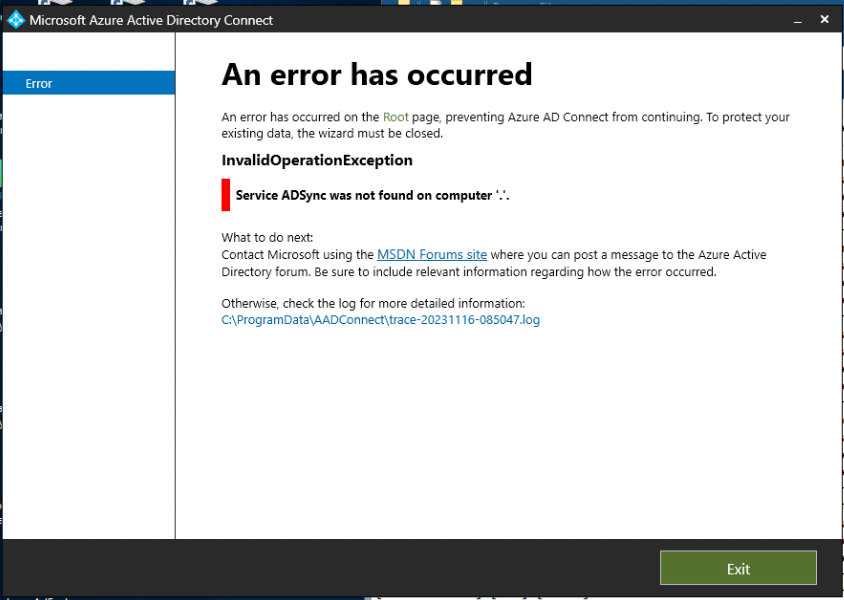
I tried to reinstall Azure AD Connect, Version 2.2.8, got a new error:
"An error has occurred on the Root page, preventing Azure AD Connect from continuing. To protect your existing data, the wizard must be closed."
InvalidOperationException
Service ADSync was not found on computer .*
What to do next:
Contact Microsoft using the MSDN Forums site where you can post a message to the Azure Active
Directory forum. Be sure to include relevant information regarding how the error occurred.
Otherwise, check the log for more detailed information:
Log File Contents:
[12:09:02.586] [ 1] [INFO ] Setting default logger for MSAL provider..
[12:09:02.602] [ 1] [INFO ] Default logger set successfully.
[12:09:02.743] [ 1] [INFO ]
[12:09:02.743] [ 1] [INFO ] ================================================================================
[12:09:02.743] [ 1] [INFO ] Application starting
[12:09:02.743] [ 1] [INFO ] ================================================================================
[12:09:02.743] [ 1] [INFO ] Start Time (Local): Thu, 16 Nov 2023 12:09:02 GMT
[12:09:02.743] [ 1] [INFO ] Start Time (UTC): Thu, 16 Nov 2023 17:09:02 GMT
[12:09:02.758] [ 1] [INFO ] Application Version: 2.2.8.0
[12:09:02.774] [ 1] [INFO ] Application Build Date: 1951-09-18 07:20:07Z
[12:09:05.165] [ 1] [INFO ] Telemetry session identifier: ID REMOVED
[12:09:05.165] [ 1] [INFO ] Telemetry device identifier: ID REMOVED
[12:09:05.165] [ 1] [INFO ] Application Build Identifier: AD-IAM-HybridSync master ID REMOVED
[12:09:05.540] [ 1] [INFO ] machine.config path: C:\Windows\Microsoft.NET\Framework64\v4.0.30319\Config\machine.config.
[12:09:05.555] [ 1] [INFO ] Default Proxy [ProxyAddress]: <Unspecified>
[12:09:05.555] [ 1] [INFO ] Default Proxy [UseSystemDefault]: Unspecified
[12:09:05.555] [ 1] [INFO ] Default Proxy [BypassOnLocal]: Unspecified
[12:09:05.555] [ 1] [INFO ] Default Proxy [Enabled]: True
[12:09:05.555] [ 1] [INFO ] Default Proxy [AutoDetect]: Unspecified
[12:09:05.555] [ 1] [INFO ] Default Proxy [UseDefaultCredentials]: False
[12:09:05.868] [ 1] [VERB ] Scheduler wizard mutex wait timeout: 00:00:05
[12:09:05.868] [ 1] [INFO ] AADConnect changes ALLOWED: Successfully acquired the configuration change mutex.
[12:09:05.915] [ 1] [INFO ] RootPageViewModel.GetInitialPages: Beginning detection for creating initial pages.
[12:09:05.930] [ 1] [INFO ] Checking if machine version is 6.1.7601 or higher
[12:09:05.993] [ 1] [INFO ] The current operating system version is 10.0.17763, the requirement is 6.1.7601.
[12:09:05.993] [ 1] [INFO ] Password Hash Sync supported: 'True'
[12:09:06.055] [ 1] [INFO ] DetectInstalledComponents stage: The installed OS SKU is 7
[12:09:06.055] [ 1] [INFO ] Detected .NET release 528049
[12:09:06.055] [ 1] [INFO ] TLS 1.2 is properly configured.
[12:09:06.055] [ 1] [INFO ] DetectInstalledComponents stage: Checking install context.
[12:09:06.071] [ 1] [INFO ] Performing direct lookup of upgrade codes for: Microsoft Visual C++ 2019 Redistributable Package
[12:09:06.071] [ 1] [VERB ] Getting list of installed packages by upgrade code
[12:09:06.086] [ 1] [INFO ] GetInstalledPackagesByUpgradeCode {36f68a90-239c-34df-b58c-64b30153ce35}: verified product code {a6d3f752-bf11-4d7c-b19c-f6f96a35cf50}.
[12:09:06.086] [ 1] [VERB ] Package=Microsoft Visual C++ 2019 X64 Minimum Runtime - 14.29.30139, Version=14.29.30139, ProductCode=a6d3f752-bf11-4d7c-b19c-f6f96a35cf50, UpgradeCode=36f68a90-239c-34df-b58c-64b30153ce35
[12:09:06.086] [ 1] [INFO ] Determining installation action for Microsoft Visual C++ 2019 Redistributable Package (36f68a90-239c-34df-b58c-64b30153ce35)
[12:09:06.086] [ 1] [INFO ] Product Microsoft Visual C++ 2019 Redistributable Package (version 14.29.30139) is installed.
[12:09:06.086] [ 1] [INFO ] Performing direct lookup of upgrade codes for: Microsoft Directory Sync Tool
[12:09:06.086] [ 1] [VERB ] Getting list of installed packages by upgrade code
[12:09:06.086] [ 1] [INFO ] GetInstalledPackagesByUpgradeCode {bef7e7d9-2ac2-44b9-abfc-3335222b92a7}: no registered products found.
[12:09:06.086] [ 1] [INFO ] GetInstalledPackagesByUpgradeCode {dc9e604e-37b0-4efc-b429-21721cf49d0d}: no registered products found.
[12:09:06.086] [ 1] [INFO ] GetInstalledPackagesByUpgradeCode {545334d7-13cd-4bab-8da1-2775fa8cf7c2}: verified product code {7d3cbe05-1a45-4fea-8f15-284fe3e7b334}.
[12:09:06.086] [ 1] [VERB ] Package=Microsoft Azure AD Connect synchronization services, Version=1.6.16.0, ProductCode=7d3cbe05-1a45-4fea-8f15-284fe3e7b334, UpgradeCode=545334d7-13cd-4bab-8da1-2775fa8cf7c2
[12:09:06.102] [ 1] [INFO ] Determining installation action for Microsoft Directory Sync Tool UpgradeCodes {bef7e7d9-2ac2-44b9-abfc-3335222b92a7}, {dc9e604e-37b0-4efc-b429-21721cf49d0d}
[12:09:06.118] [ 1] [INFO ] DirectorySyncComponent: Product Microsoft Directory Sync Tool is not installed.
[12:09:06.118] [ 1] [INFO ] Performing direct lookup of upgrade codes for: Azure AD Sync Engine
[12:09:06.118] [ 1] [VERB ] Getting list of installed packages by upgrade code
[12:09:06.118] [ 1] [INFO ] GetInstalledPackagesByUpgradeCode {545334d7-13cd-4bab-8da1-2775fa8cf7c2}: verified product code {7d3cbe05-1a45-4fea-8f15-284fe3e7b334}.
[12:09:06.118] [ 1] [INFO ] GetInstalledPackagesByUpgradeCode {dc9e604e-37b0-4efc-b429-21721cf49d0d}: no registered products found.
[12:09:06.118] [ 1] [INFO ] GetInstalledPackagesByUpgradeCode {bef7e7d9-2ac2-44b9-abfc-3335222b92a7}: no registered products found.
[12:09:06.118] [ 1] [VERB ] Package=Microsoft Azure AD Connect synchronization services, Version=1.6.16.0, ProductCode=7d3cbe05-1a45-4fea-8f15-284fe3e7b334, UpgradeCode=545334d7-13cd-4bab-8da1-2775fa8cf7c2
[12:09:06.118] [ 1] [INFO ] Determining installation action for Azure AD Sync Engine (545334d7-13cd-4bab-8da1-2775fa8cf7c2)
[12:09:08.196] [ 1] [VERB ] Check product code installed: {4e67cad2-d71b-4f06-a7ae-bb49c566bb93}
[12:09:08.196] [ 1] [INFO ] GetProductInfoProperty({4e67cad2-d71b-4f06-a7ae-bb49c566bb93}, VersionString): unknown product
[12:09:08.196] [ 1] [INFO ] AzureADSyncEngineComponent: Product Azure AD Sync Engine (version 1.6.16.0) is installed, needs to be upgraded to version 2.2.8.0.
[12:09:08.196] [ 1] [INFO ] Performing direct lookup of upgrade codes for: Azure AD Connect Synchronization Agent
[12:09:08.196] [ 1] [VERB ] Getting list of installed packages by upgrade code
[12:09:08.196] [ 1] [INFO ] GetInstalledPackagesByUpgradeCode {3cd653e3-5195-4ff2-9d6c-db3dacc82c25}: no registered products found.
[12:09:08.196] [ 1] [INFO ] Determining installation action for Azure AD Connect Synchronization Agent (3cd653e3-5195-4ff2-9d6c-db3dacc82c25)
[12:09:08.196] [ 1] [INFO ] Product Azure AD Connect Synchronization Agent is not installed.
[12:09:08.196] [ 1] [INFO ] Performing direct lookup of upgrade codes for: Azure AD Connect Health agent for sync
[12:09:08.196] [ 1] [VERB ] Getting list of installed packages by upgrade code
[12:09:08.196] [ 1] [INFO ] GetInstalledPackagesByUpgradeCode {114fb294-8aa6-43db-9e5c-4ede5e32886f}: no registered products found.
[12:09:08.196] [ 1] [INFO ] Determining installation action for Azure AD Connect Health agent for sync (114fb294-8aa6-43db-9e5c-4ede5e32886f)
[12:09:08.196] [ 1] [INFO ] Product Azure AD Connect Health agent for sync is not installed.
[12:09:08.196] [ 1] [INFO ] Performing direct lookup of upgrade codes for: Microsoft Azure AD Connect Authentication Agent
[12:09:08.196] [ 1] [VERB ] Getting list of installed packages by upgrade code
[12:09:08.196] [ 1] [INFO ] GetInstalledPackagesByUpgradeCode {0c06f9df-c56b-42c4-a41b-f5f64d01a35c}: no registered products found.
[12:09:08.196] [ 1] [INFO ] Determining installation action for Microsoft Azure AD Connect Authentication Agent (0c06f9df-c56b-42c4-a41b-f5f64d01a35c)
[12:09:08.196] [ 1] [INFO ] Product Microsoft Azure AD Connect Authentication Agent is not installed.
[12:09:08.196] [ 1] [INFO ] Performing direct lookup of upgrade codes for: Azure AD Connect Administration Agent
[12:09:08.196] [ 1] [VERB ] Getting list of installed packages by upgrade code
[12:09:08.196] [ 1] [INFO ] GetInstalledPackagesByUpgradeCode {886051ec-1165-4df8-a492-19d1e0ff57ee}: no registered products found.
[12:09:08.196] [ 1] [INFO ] Determining installation action for Azure AD Connect Administration Agent (886051ec-1165-4df8-a492-19d1e0ff57ee)
[12:09:08.196] [ 1] [INFO ] Product Azure AD Connect Administration Agent is not installed.
[12:09:08.196] [ 1] [INFO ] Performing direct lookup of upgrade codes for: Microsoft Command Line Utilities 15 for SQL Server
[12:09:08.196] [ 1] [VERB ] Getting list of installed packages by upgrade code
[12:09:08.196] [ 1] [INFO ] GetInstalledPackagesByUpgradeCode {11e5cc67-2eca-41a1-8775-5ea0b51ccbaa}: no registered products found.
[12:09:08.196] [ 1] [INFO ] Determining installation action for Microsoft Command Line Utilities 15 for SQL Server (11e5cc67-2eca-41a1-8775-5ea0b51ccbaa)
[12:09:08.196] [ 1] [INFO ] Product Microsoft Command Line Utilities 15 for SQL Server is not installed.
[12:09:08.196] [ 1] [INFO ] Performing direct lookup of upgrade codes for: Microsoft ODBC Driver 17 for SQL Server
[12:09:08.196] [ 1] [VERB ] Getting list of installed packages by upgrade code
[12:09:08.196] [ 1] [INFO ] GetInstalledPackagesByUpgradeCode {0123a210-9b73-46e7-b5ce-7f33630300e7}: verified product code {787f8536-654c-4dd4-ad3f-22b529f8f339}.
[12:09:08.196] [ 1] [VERB ] Package=Microsoft ODBC Driver 17 for SQL Server, Version=17.4.0.1, ProductCode=787f8536-654c-4dd4-ad3f-22b529f8f339, UpgradeCode=0123a210-9b73-46e7-b5ce-7f33630300e7
[12:09:08.196] [ 1] [INFO ] Determining installation action for Microsoft ODBC Driver 17 for SQL Server (0123a210-9b73-46e7-b5ce-7f33630300e7)
[12:09:08.196] [ 1] [INFO ] Product Microsoft ODBC Driver 17 for SQL Server (version 17.4.0.1) is installed.
[12:09:08.196] [ 1] [INFO ] Performing direct lookup of upgrade codes for: Microsoft SQL Server 2019 LocalDB
[12:09:08.196] [ 1] [VERB ] Getting list of installed packages by upgrade code
[12:09:08.196] [ 1] [INFO ] GetInstalledPackagesByUpgradeCode {f0176a51-908a-4240-8853-e229d0ae3f39}: no registered products found.
[12:09:08.196] [ 1] [INFO ] Determining installation action for Microsoft SQL Server 2019 LocalDB (f0176a51-908a-4240-8853-e229d0ae3f39)
[12:09:08.196] [ 1] [INFO ] Product Microsoft SQL Server 2019 LocalDB is not installed.
[12:09:08.196] [ 1] [INFO ] Performing direct lookup of upgrade codes for: Microsoft OLE DB Driver for SQL Server
[12:09:08.196] [ 1] [VERB ] Getting list of installed packages by upgrade code
[12:09:08.196] [ 1] [INFO ] GetInstalledPackagesByUpgradeCode {debb0805-202c-471d-a182-675ff32f65c2}: verified product code {9aa0affa-edb6-4b66-9fd7-bbc828d88b47}.
[12:09:08.196] [ 1] [VERB ] Package=Microsoft OLE DB Driver for SQL Server, Version=18.2.3.0, ProductCode=9aa0affa-edb6-4b66-9fd7-bbc828d88b47, UpgradeCode=debb0805-202c-471d-a182-675ff32f65c2
[12:09:08.196] [ 1] [INFO ] Determining installation action for Microsoft OLE DB Driver for SQL Server (debb0805-202c-471d-a182-675ff32f65c2)
[12:09:08.196] [ 1] [INFO ] Product Microsoft OLE DB Driver for SQL Server (version 18.2.3.0) is installed.
[12:09:08.196] [ 1] [INFO ] Performing direct lookup of upgrade codes for: Microsoft Azure AD Connect Authentication Agent
[12:09:08.196] [ 1] [VERB ] Getting list of installed packages by upgrade code
[12:09:08.196] [ 1] [INFO ] GetInstalledPackagesByUpgradeCode {fb3feca7-5190-43e7-8d4b-5eec88ed9455}: no registered products found.
[12:09:08.196] [ 1] [INFO ] Determining installation action for Microsoft Azure AD Connect Authentication Agent (fb3feca7-5190-43e7-8d4b-5eec88ed9455)
[12:09:08.196] [ 1] [INFO ] Product Microsoft Azure AD Connect Authentication Agent is not installed.
[12:09:08.196] [ 1] [INFO ] Determining installation action for Microsoft Azure AD Connection Tool.
[12:09:08.258] [ 1] [WARN ] Failed to read DisplayName registry key: An error occurred while executing the 'Get-ItemProperty' command. Cannot find path 'HKEY_LOCAL_MACHINE\SOFTWARE\Microsoft\Windows\CurrentVersion\Uninstall\MicrosoftAzureADConnectionTool' because it does not exist.
[12:09:08.258] [ 1] [INFO ] Product Microsoft Azure AD Connection Tool is not installed.
[12:09:08.258] [ 1] [INFO ] Performing direct lookup of upgrade codes for: Azure Active Directory Connect
[12:09:08.258] [ 1] [VERB ] Getting list of installed packages by upgrade code
[12:09:08.258] [ 1] [INFO ] GetInstalledPackagesByUpgradeCode {d61eb959-f2d1-4170-be64-4dc367f451ea}: verified product code {0ea0a5e9-119b-4612-8b0f-107c653d6fdd}.
[12:09:08.258] [ 1] [VERB ] Package=Microsoft Azure AD Connect, Version=2.2.8.0, ProductCode=0ea0a5e9-119b-4612-8b0f-107c653d6fdd, UpgradeCode=d61eb959-f2d1-4170-be64-4dc367f451ea
[12:09:08.258] [ 1] [INFO ] Determining installation action for Azure Active Directory Connect (d61eb959-f2d1-4170-be64-4dc367f451ea)
[12:09:08.258] [ 1] [INFO ] Product Azure Active Directory Connect (version 2.2.8.0) is installed.
[12:09:08.258] [ 1] [INFO ] DetectInstalledComponents stage: Verifying required DCOM registry keys are present.
[12:09:08.258] [ 1] [ERROR] DetectInstalledComponents::CheckBinaryRegistryValueContainsData : Registry value 'HKEY_LOCAL_MACHINE\SOFTWARE\Microsoft\Ole\MachineAccessRestriction' is not present.
[12:09:08.258] [ 1] [ERROR] DetectInstalledComponents::CheckBinaryRegistryValueContainsData : Registry value 'HKEY_LOCAL_MACHINE\SOFTWARE\Microsoft\Ole\MachineLaunchRestriction' is not present.
[12:09:08.258] [ 1] [INFO ] DetectInstalledComponents::CheckBinaryRegistryValueContainsData : Registry value 'HKEY_LOCAL_MACHINE\SOFTWARE\Microsoft\Ole\DefaultLaunchPermission' is present.
[12:09:08.493] [ 1] [INFO ] ServiceControllerProvider: GetServiceStartMode(seclogon) is 'Manual'.
[12:09:08.493] [ 1] [INFO ] ServiceControllerProvider: verifying EventLog is in state (Running)
[12:09:08.493] [ 1] [INFO ] ServiceControllerProvider: current service status: Running
[12:09:08.508] [ 1] [INFO ] DetectInstalledComponents stage: PowerShell version verified.
[12:09:08.508] [ 1] [INFO ] DetectInstalledComponents: customSD -
[12:09:08.508] [ 1] [INFO ] DetectInstalledComponents: No custom permissions!!
[12:09:08.508] [ 1] [INFO ] DetectInstalledComponents stage: Sync engine upgrade required.
[12:09:08.508] [ 1] [WARN ] MicrosoftOnlinePersistedStateProvider.Backup: unable to locate the persisted state file for backup. Path: C:\ProgramData\AADConnect\PersistedState.xml
[12:09:08.524] [ 1] [INFO ] CallExportSyncConfig: launching ExportSyncConfig.exe.
[12:09:13.711] [ 1] [INFO ] ServiceControllerProvider: verifying ADSync is in state (Running)
[12:09:13.711] [ 1] [ERROR] Caught an exception while creating the initial page set on the root page.
Exception Data (Raw): System.InvalidOperationException: Service ADSync was not found on computer '.'. ---> System.ComponentModel.Win32Exception: The specified service does not exist as an installed service
--- End of inner exception stack trace ---
at System.ServiceProcess.ServiceController.GenerateNames()
at System.ServiceProcess.ServiceController.get_ServiceName()
at System.ServiceProcess.ServiceController.GenerateStatus()
at System.ServiceProcess.ServiceController.get_Status()
at Microsoft.Online.Deployment.Framework.Providers.ServiceControllerProvider.IsServiceInState(String serviceName, ServiceControllerStatus desiredStatus)
at Microsoft.Online.Deployment.OneADWizard.Runtime.Stages.DetectInstalledComponents.Execute(String& message, GlobalContext globalWizardContext, Boolean& isPasswordSyncSupported)
at Microsoft.Online.Deployment.OneADWizard.UI.WizardPages.RootPageViewModel.GetInitialPagesCore()
at Microsoft.Online.Deployment.OneADWizard.UI.WizardPages.RootPageViewModel.GetInitialPages()
[12:10:15.489] [ 1] [INFO ] Opened log file at path C:\ProgramData\AADConnect\trace-20231116-120902.log
' cx='32' cy='32' r='32' /%3E%3Ctext x='50%25' y='55%25' dominant-baseline='middle' text-anchor='middle' fill='%23FFF' %3EA%3C/text%3E%3C/svg%3E)
