Microsoft Security | Microsoft Entra | Microsoft Entra ID
A cloud-based identity and access management service for securing user authentication and resource access

This browser is no longer supported.
Upgrade to Microsoft Edge to take advantage of the latest features, security updates, and technical support.
' cx='32' cy='32' r='32' /%3E%3Ctext x='50%25' y='55%25' dominant-baseline='middle' text-anchor='middle' fill='%23FFF' %3EOG%3C/text%3E%3C/svg%3E)
Hello
I am using "Microsoft Entra ID Free Subscription." I want to convert "Federated user accounts" to "Managed user accounts." I tried to follow these instructions in Power Shell to no Avail:
Install-Module MSOnline -Force
Install-PackageProvider -Name NuGet -Force
Connect-MsolService
Set-MsolDomainAuthentication -DomainName -Authentication Managed
' cx='32' cy='32' r='32' /%3E%3Ctext x='50%25' y='55%25' dominant-baseline='middle' text-anchor='middle' fill='%23FFF' %3EA%3C/text%3E%3C/svg%3E)
Hello Oatlhotse Gaborone
You need to take care of below considerations:
1.You must have domain added as a verified domain in your Azure AD tenant.
2.Users must be synced from on-premises AD to Azure AD with UPN like username with domain
3.Run Set-MsolDomainAuthentication -Authentication Managed -Domain Name <domain name> on ADFS Server to convert authentication from Federated to Managed.
If you are using a federation server other than ADFS, you will need to use Set-MsolDomainAuthentication cmdlet for this purpose.
Expected behavior once the above steps are done Users sign-in will no longer be redirected to on-premises federation server and UPN authentication will directly take place via Azure AD tenant where username with domain is added as verified domain.
Hope this helps. Do let us know if you have any further queries
I don't have an on-premises AD. I have recently created an Azure tenant so I am starting afresh. I am not migrating from on on-premises.
How exactly do add a verified Domain. Is adding a domain more expensive the than just running the Azure AD? I would like to minimize costs as much as possible
Hello Oatlhotse Gaborone
Based on your Previous comment to add a verified Domain Please follow the below steps.
Sign in to the Microsoft Entra admin center as a Global Administrator.Browse to Identity > Settings > Domain names
Select Custom domain names.
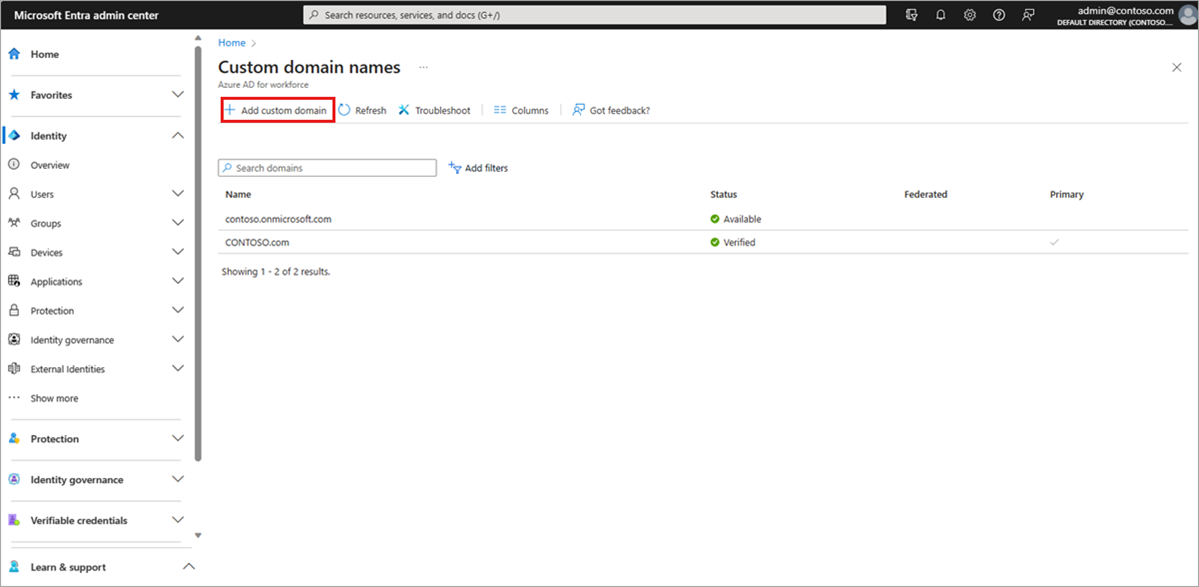
Select the name of the domain that you want to be the primary domain.
Select the Make primary command. Confirm your choice when prompted.
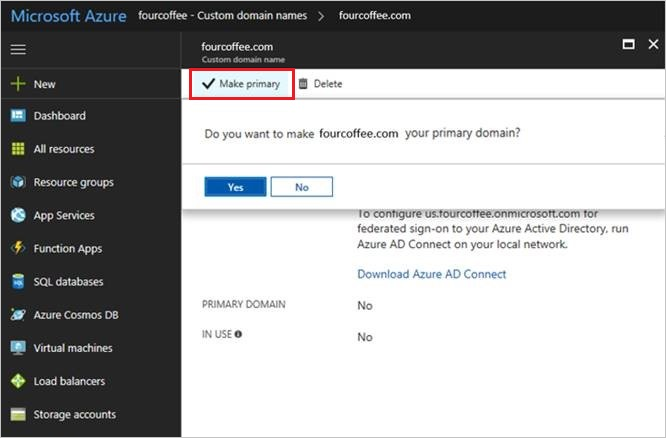
You can change the primary domain name for your organization to be any verified custom domain that isn't federated. Changing the primary domain for your organization doesn't change the user name for any existing users.
https://learn.microsoft.com/en-us/entra/identity/users/domains-manage
while adding a custom domain to Azure AD itself incurs no direct charges, the overall costs depend on domain registration, DNS services, and any optional Azure services you choose to implement. Therefore, it's essential to consider these factors when planning to use a custom domain in Azure AD.
Hope this helps. Do let us know if you have any further queries
Hello Oatlhotse Gaborone
Just checking in to see if above information was helpful. If you have any further updates on this issue, please feel free to post back
Thank you Vigneshwar Duvva
I have two custom domains domains: [domainname] and the other one is [xxxx]. I have registered for the MS startup program & Azure tenant with [xxxx] but I use the [xxxx] for my website and email. Microsoft has also generated a domain for me xxxxxx which one should use & how do I get them verified?
Hello Oatlhotse Gaborone
Just checking in to see if above information was helpful. If you have any further updates on this issue, please feel free to post back
Hope this helps. Do let us know if you have any further queries
Hello Oatlhotse Gaborone
Just checking in to see if above information was helpful. If you have any further updates on this issue, please feel free to post back
Hope this helps. Do let us know if you have any further queries
Hello Oatlhotse Gaborone
To verify your custom domain name, follow these steps:
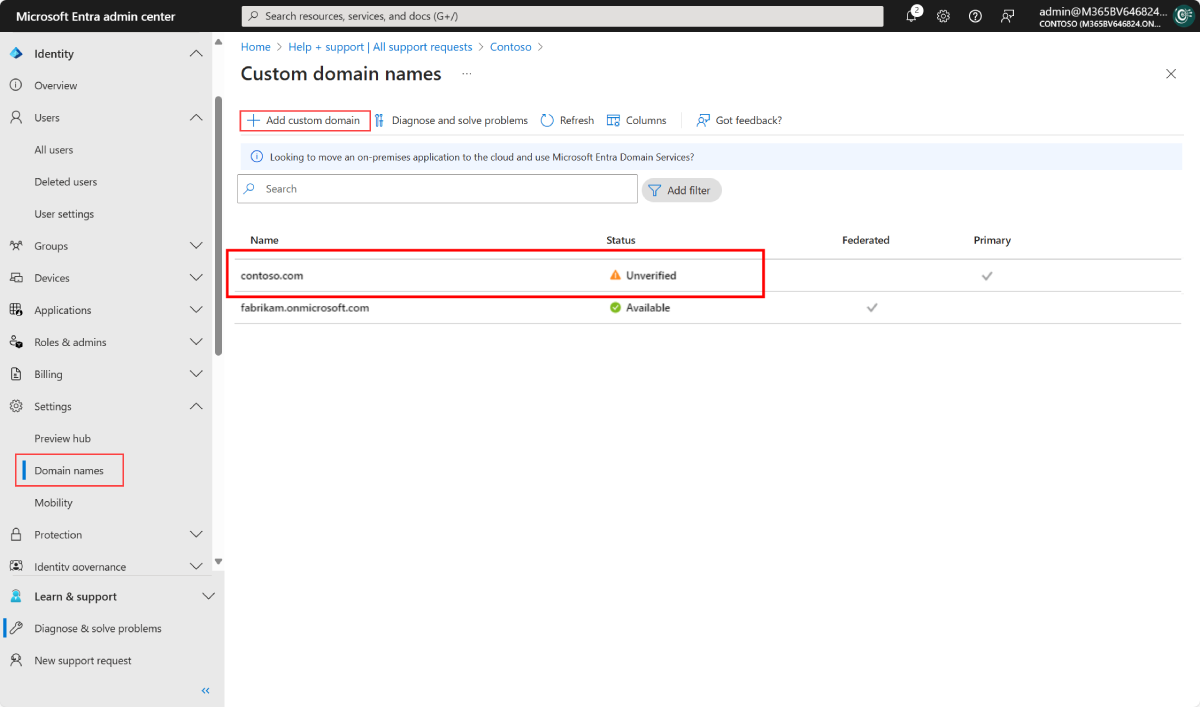
 5.On the contoso.com page, select Verify to make sure your custom domain is properly registered and is valid If this answers your query, do click
 `Accept Answer` and `Yes` 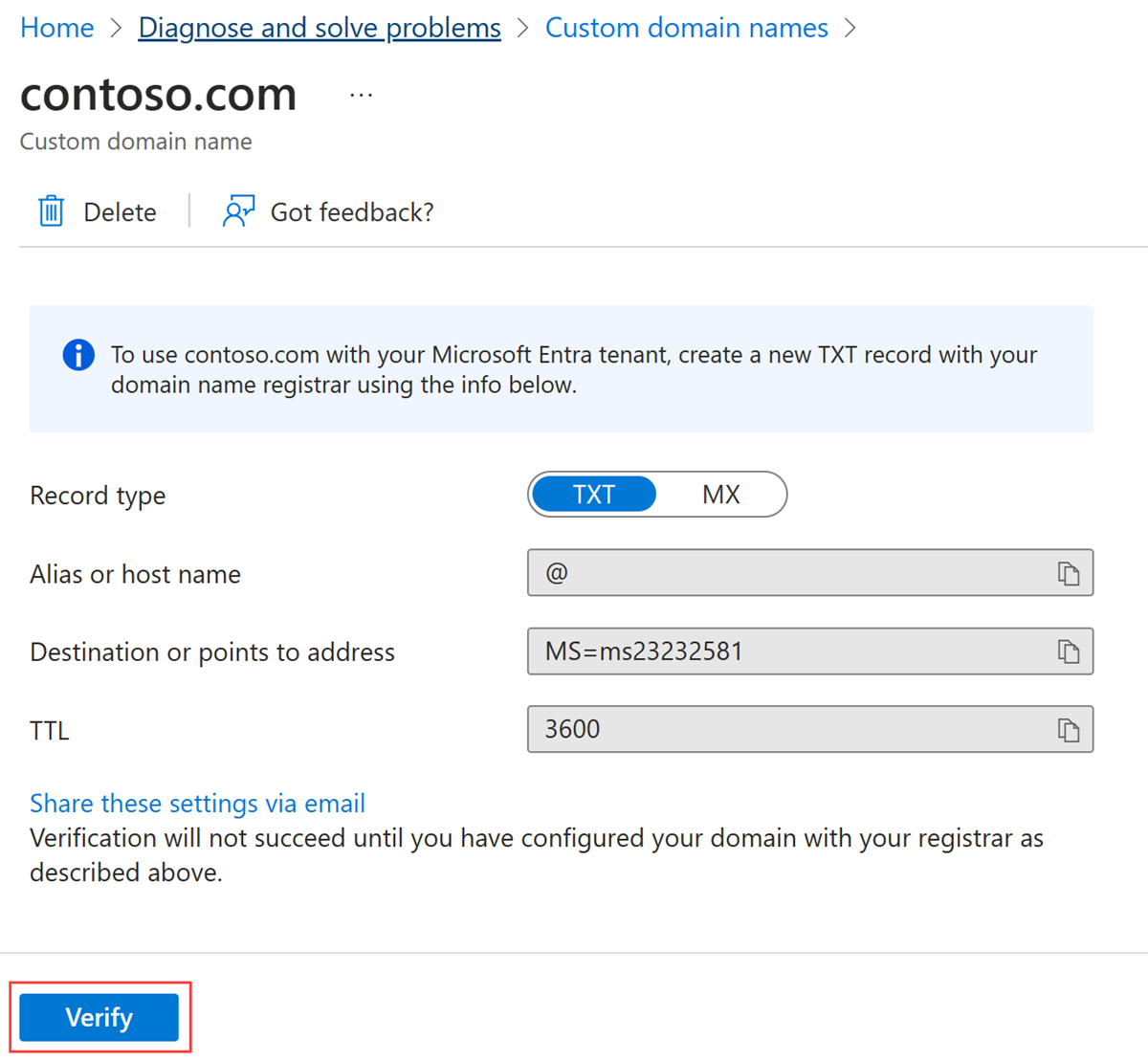
The verification is not working even after entering the information in Squarespace
Hello Oatlhotse Gaborone
I have started the private message please check and share me the information.
Which information do you want me to check & share with you? In my previous comment I have added a picture of the squarespace (domain host) & a picture that shows my attempt to verify
Hello Oatlhotse Gaborone
If your domain still not verified in Entra portal. Could you please Click Add custom domain and enter your domain. Since you already have the DNS TXT record in place you should be able to verify it quickly. I believe once you do that should show up as verified as well.
And also, I have started the private message please check and share me the information.
Hello Oatlhotse Gaborone
Just checking in to see if above information was helpful. If you have any further updates on this issue, please feel free to post back
DomainVerification2.pngDomainVerification3.pngDomainVerification.png
I had already done what you suggested & it has failed. Please see the attached images. The first one is DomainVerification.png
Could you please send me your tenant ID where you are attempting to verify your domain "ottisgabsacuity.com"?
Here it is: 11fexxxxxxxxxxx
Hello Oatlhotse Gaborone
The domain is already verified in another tenant directory. You can check this using https://www.whatismytenantid.com/I have checked on my end and confirmed that the domain is registered under a different tenant (66fbxxxx).
Could you please cross-check and confirm whether this tenant ID belongs to you?
If the tenant ID is different and you do not own that directory, the only option is to contact the Data Protection team via a support ticket to request the removal of the domain verification from the existing Entra ID tenant. Once the domain is removed, you should be able to verify it in your own tenant without any issues.
To involve the Data Protection team via a support ticket, I will need a few details from you. As this information includes Personally Identifiable Information (PII), please share the following via private message:
Once you provide these details via private message, we can connect offline to discuss further and assist you in resolving the issue.
This my old tenant : 166903a3-XXXX-4712-XXXX-736cxXXXxxx0
I am transitioning to the new tenant. What must I do to move the domain to the new tenant that I showed you
Thank you. This solved my issue. I was able to verify my Domain

I need migrate my domain from federated to managed, i have entra connect sync ok with PHS. The Stage rollout running ok, but ... on ADFS server with global admins rights,
Set-MsolDomainAuthentication -DomainName "intranet.domain.com.ar" -Authentication Managed
Set-MsolDomainAuthentication : Access Denied. You do not have permissions to call this cmdlet. At line:1 char:1 + Set-MsolDomainAuthentication -DomainName "intranet.domain.com.ar" - ... + ~~~~~~~~~~~~~~~~~~~~~~~~~~~~~~~~~~~~~~~~~~~~~~~~~~~~~~~~~~~~~~~~~~~~~ + CategoryInfo : OperationStopped: (:) [Set-MsolDomainAuthentication], MicrosoftOnlineException + FullyQualifiedErrorId : Microsoft.Online.Administration.Automation.AccessDeniedException,Microsoft.Online.Administration.Automation.SetDomainAuthentication
' cx='32' cy='32' r='32' /%3E%3Ctext x='50%25' y='55%25' dominant-baseline='middle' text-anchor='middle' fill='%23FFF' %3EJ%3C/text%3E%3C/svg%3E)
Hello Vigneshwar Duvva
I have only manage to verify one domain. Can you tell me I am unable to verify my second domain. Last time we spoke you had indicated that you will check why I can't verify this domain.Please see attachment