Azure Key Vault
An Azure service that is used to manage and protect cryptographic keys and other secrets used by cloud apps and services.
This browser is no longer supported.
Upgrade to Microsoft Edge to take advantage of the latest features, security updates, and technical support.
' cx='32' cy='32' r='32' /%3E%3Ctext x='50%25' y='55%25' dominant-baseline='middle' text-anchor='middle' fill='%23FFF' %3EYS%3C/text%3E%3C/svg%3E)
Getting this error when in secrets in the vault
The operation is not allowed by RBAC. If role assignments were recently changed, please wait several minutes for role assignments to become effective.
An Azure service that is used to manage and protect cryptographic keys and other secrets used by cloud apps and services.
' cx='32' cy='32' r='32' /%3E%3Ctext x='50%25' y='55%25' dominant-baseline='middle' text-anchor='middle' fill='%23FFF' %3ESM%3C/text%3E%3C/svg%3E)
Hello Yiz Segall,
In addition to the information provided by TP, please follow the below suggested steps.
The error message "The operation is not allowed by RBAC". If role assignments were recently changed, please wait several minutes for role assignments to become effective" when working with Azure Key Vault secrets typically means that the user or service principal does not have the necessary Role-Based Access Control (RBAC) permissions to perform the operation.Please try to assign Key Vault Secrets officer role by following the below suggested steps.
Assigning a role - Azure (RBAC) for Key Vault data plan operations:
1.Go to your Key Vault or the Resource Group that contains your Key Vault.
2.Select Access control (IAM).
3.Select Add > Add role assignment to open the Add role assignment page.
4.Select the Key Vault Secrets Officer role from Job function roles under Roles section.
5.Search by your name or email address by selecting Members section and then click Select.
6.Select Review + Assign as mentioned in the below Screenshot.
7.After assigning Key Vault Secrets Officer role, please wait for few minutes for changes to take place and then try to add secrets.
Additionally, please note that you can also assign Key Vault Administrator role for your user account and then add secrets to your Azure Key vault.
Please note that Key Vault Administrator role has the highest privileges to perform all data plane operations on a key vault and all objects in it.
Please verify that the Key Vault is using Azure RBAC as the Permission model: Azure Key Vault can be configured to use either Azure role-based access control(recommended) or Vault access policy. Please make sure your Key Vault is configured to use Azure RBAC if you are assigning roles via Access control(IAM).
Please refer to the below Screenshot for your reference.
Reference document which will be helpful:
Grant permission to applications to access an Azure key vault using Azure RBAC
Please note that it is not sufficient to have only the Owner role on an Azure Key Vault to add or manage secrets. The Owner role grants full management permissions on the resource (management plane) but does not inherently grant data plane permissions to create, read, or update secrets inside the Key Vault. To add secrets, you need specific Key Vault data plane permissions.
To better understand the Azure Key Vault RBAC Permission model, we'll first have to understand the differences between the Management and Data plane. This is because access to a key vault is controlled through two interfaces: the management plane and the data plane.
For Owner Permissions, you can see that you have access to every Management Plane operation, to create and manage resources of all types, but you don't have any Data Plane permissions. 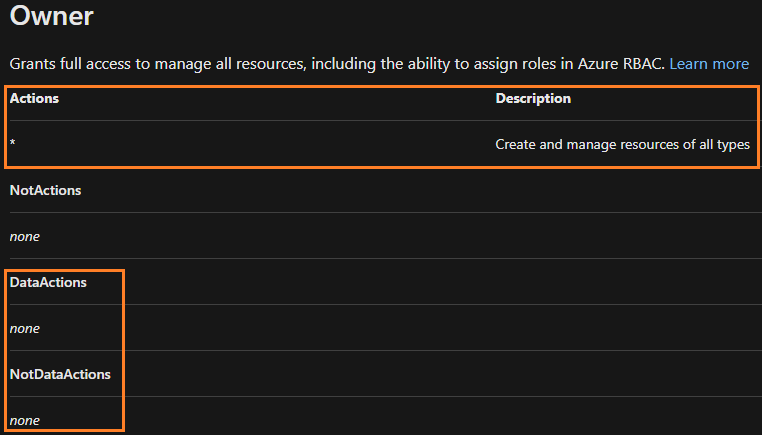
For the Key Vault Administrator role, you'll see that you have some Management Plane operations but you'll also have Data Plane operations. 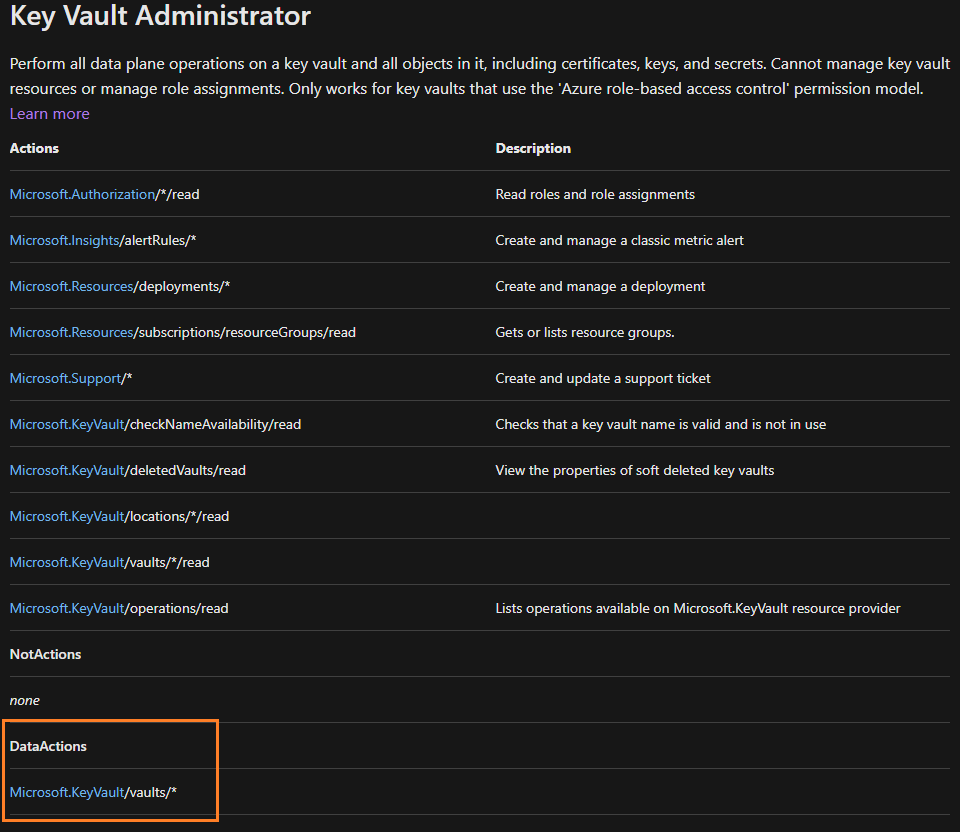
For more information - Azure built-in roles for Key Vault data plane operations
I hope the above information provided is helpful. Please feel free to reach out to us if you have any further questions.
If the answer is helpful, please click "Accept Answer" and kindly upvote it. If you have extra questions about this answer, please click "Comment".
Hello Yiz Segall,
I am just checking in to see if you had a chance to review my above answer. I hope the above information provided was useful in resolving this issue. Please feel free to reach out to us if you have any further questions.
If the answer is helpful, please click "Accept Answer" and kindly upvote it. If you have extra questions about this answer, please click "Comment".

Hi,
To create secrets you need to assign yourself Key Vault Secrets Officer role. To do this, please navigate to your Key Vault in Azure portal, on left click on Access control (IAM) blade, then click Add --> Add role assignment and follow wizard.
For reference, below is list of built-in roles for key vault data plane operations:
| Built-in role | Description | |
|---|---|---|
| Key Vault Administrator | Perform all data plane operations on a key vault and all objects in it, including certificates, keys, and secrets. Cannot manage key vault resources or manage role assignments. Only works for key vaults that use the 'Azure role-based access control' permission model. | |
| Key Vault Administrator | Perform all data plane operations on a key vault and all objects in it, including certificates, keys, and secrets. Cannot manage key vault resources or manage role assignments. Only works for key vaults that use the 'Azure role-based access control' permission model. | |
| Key Vault Administrator | Perform all data plane operations on a key vault and all objects in it, including certificates, keys, and secrets. Cannot manage key vault resources or manage role assignments. Only works for key vaults that use the 'Azure role-based access control' permission model. | |
| Key Vault Administrator | Perform all data plane operations on a key vault and all objects in it, including certificates, keys, and secrets. Cannot manage key vault resources or manage role assignments. Only works for key vaults that use the 'Azure role-based access control' permission model. | |
| Key Vault Reader | Read metadata of key vaults and its certificates, keys, and secrets. Cannot read sensitive values such as secret contents or key material. Only works for key vaults that use the 'Azure role-based access control' permission model. | |
| Key Vault Purge Operator | Allows permanent deletion of soft-deleted vaults. | |
| Key Vault Certificates Officer | Perform any action on the certificates of a key vault, except managing permissions. Only works for key vaults that use the 'Azure role-based access control' permission model. | |
| Key Vault Certificate User | Read entire certificate contents including secret and key portion. Only works for key vaults that use the 'Azure role-based access control' permission model. | |
| Key Vault Crypto Officer | Perform any action on the keys of a key vault, except manage permissions. Only works for key vaults that use the 'Azure role-based access control' permission model. | |
| Key Vault Crypto Service Encryption User | Read metadata of keys and perform wrap/unwrap operations. Only works for key vaults that use the 'Azure role-based access control' permission model. | |
| Key Vault Crypto User | Perform cryptographic operations using keys. Only works for key vaults that use the 'Azure role-based access control' permission model. | |
| Key Vault Crypto Service Release User | Release keys for Azure Confidential Computing and equivalent environments. Only works for key vaults that use the 'Azure role-based access control' permission model. | |
| Key Vault Secrets Officer | Perform any action on the secrets of a key vault, except manage permissions. Only works for key vaults that use the 'Azure role-based access control' permission model. | |
| Key Vault Secrets User | Read secret contents including secret portion of a certificate with private key. Only works for key vaults that use the 'Azure role-based access control' permission model. |
Please let me know if you have any questions by adding comment below.
Please click Accept Answer and upvote if the above was helpful.
Thanks.
-TP
Hi Sanoop,
My user has an Owner role. It should be able to anything
My user has an Owner role. It should be able to anything
Owner role does not allow access to data plane operations like adding/deleting secrets, keys, certificates. It does allow full access to control plane operations on the key vault, which is different.
Please add Key Vault Secrets Officer role as I described above and test. There can be few minutes delay for change to effect, but usually the change will take effect within a minute in my experience.
Article below describes differences between control plane and data plane in Azure RBAC:
Azure control plane and data plane
Hello Yiz Segall,
Thank you for your response.
Please note that it is not sufficient to have only the Owner role on an Azure Key Vault to add or manage secrets. The Owner role grants full management permissions on the resource (management plane) but does not inherently grant data plane permissions to create, read, or update secrets inside the Key Vault. To add secrets, you need specific Key Vault data plane permissions.
To better understand the Azure Key Vault RBAC Permission model, we'll first have to understand the differences between the Management and Data plane. This is because access to a key vault is controlled through two interfaces: the management plane and the data plane.
For Owner Permissions, you can see that you have access to every Management Plane operation, to create and manage resources of all types, but you don't have any Data Plane permissions.
For the Key Vault Administrator role, you'll see that you have some Management Plane operations but you'll also have Data Plane operations.
For more information - Azure built-in roles for Key Vault data plane operations
I hope the above information provided is helpful. Please let me know if you have any questions.
@Yiz Segall Please click Accept Answer to close up this thread.
Thank you.