The way the / \ slash faces does not make much differences in the address. For example, C:/WINDOWS/system32, or C:\WINDOWS\system32, typed in the Start RUN box will open the same folder.
This browser is no longer supported.
Upgrade to Microsoft Edge to take advantage of the latest features, security updates, and technical support.
' cx='32' cy='32' r='32' /%3E%3Ctext x='50%25' y='55%25' dominant-baseline='middle' text-anchor='middle' fill='%23FFF' %3EA%3C/text%3E%3C/svg%3E)
System.Reflection.TargetInvocationException error starting Task Manager...
Window 7, x64 bit version, Home Prem.
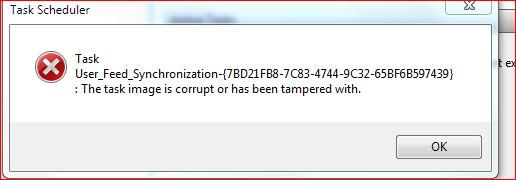
When I go to Control Panel, Administrative Tool, and click on Task Manager, I get the above error.
More info in screen capture
http://i1183.photobucket.com/albums/x478/ispalten/Capture.jpg
Irv S.
Locked Question. This question was migrated from the Microsoft Support Community. You can vote on whether it's helpful, but you can't add comments or replies or follow the question.
The way the / \ slash faces does not make much differences in the address. For example, C:/WINDOWS/system32, or C:\WINDOWS\system32, typed in the Start RUN box will open the same folder.
I see you mean Task Scheduler rather than Task Manager.
There is not much help in these but someone suggested it might be a problem with .Net Framework?
Have you tested with another user to see if it is a corrupt profile type of problem?
Are System Restore or the System File Checker able to help?
How to repair the operating system and how to restore the operating system configuration to an earlier point in time in Windows Vista (or 7)
http://support.microsoft.com/kb/936212/#appliesto
How to use the System File Checker tool to troubleshoot missing or corrupted system files on Windows Vista or on Windows 7
http://support.microsoft.com/kb/929833
You could look at your security settings and perhaps reset them to defaults.
Use the Vista instructions in this to reset to default the security settings.
How do I restore security settings to the default settings?
http://support.microsoft.com/kb/313222/#appliesto
Solving setup errors by using the SubInACL tool to repair file and registry permissions
Have you dabbled with Registry Cleaners on this machine?
Have you got any other clues in the log at C:\Windows\Tasks\SchedLGU.txt?
I see you mean Task Scheduler rather than Task Manager.
There is not much help in these but someone suggested it might be a problem with .Net Framework?
Have you tested with another user to see if it is a corrupt profile type of problem?
Are System Restore or the System File Checker able to help?
How to repair the operating system and how to restore the operating system configuration to an earlier point in time in Windows Vista (or 7)
http://support.microsoft.com/kb/936212/#appliesto
How to use the System File Checker tool to troubleshoot missing or corrupted system files on Windows Vista or on Windows 7
http://support.microsoft.com/kb/929833
You could look at your security settings and perhaps reset them to defaults.
Use the Vista instructions in this to reset to default the security settings.
How do I restore security settings to the default settings?
http://support.microsoft.com/kb/313222/#appliesto
Solving setup errors by using the SubInACL tool to repair file and registry permissions
Have you dabbled with Registry Cleaners on this machine?
Have you got any other clues in the log at C:\Windows\Tasks\SchedLGU.txt?
Yes, sorry Task Scheduler.
I've seen those about NetFramework and also that didn't fix it?
Only have ONE user other than the Hidden Administrator.
Ran SFC, no problems detected.
System Restore is good for about 3 weeks, but I don't know WHEN this problem started?
I did find that I can run MMC and then ADD in the snap-in for Task Scheduler... it opens with and error and once the error is dismissed it works...
Error dialog box --> http://i1183.photobucket.com/albums/x478/ispalten/Capture1.jpg
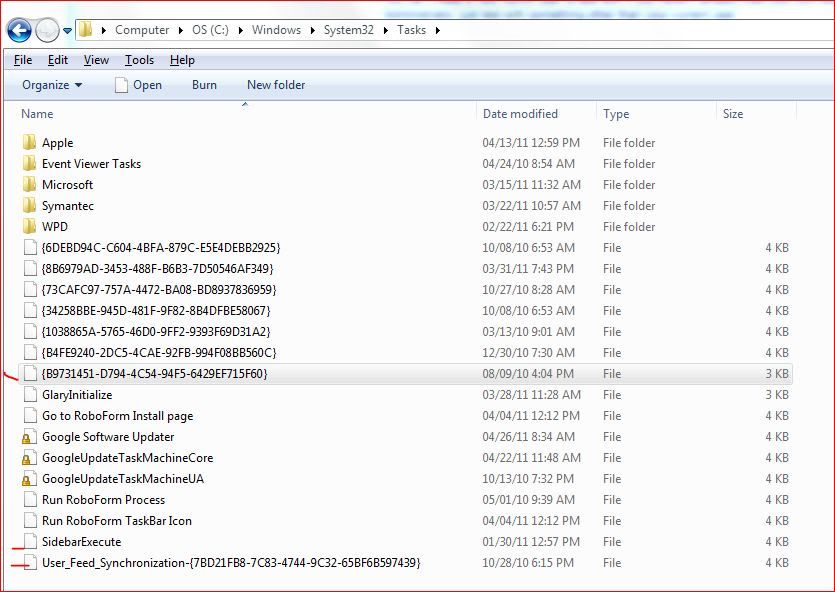
Now that files has a 10/28/2010 date on it. I have Norton Ghost and I have a 3/31/2010 backup, same file date. I restored it, but it didn't fix it?
It is possible I've got security permissions problems but I'm unsure of how to RESET W7 to the shipped values, and I'm worried some programs might have changed that and they'd no longer work?
I discovered this problem by accident... Even though the above link indicates my problem might be with User Feeds, RSS feeds continue to work?
Yes, I've messed with Reg Cleaners, CCLeaner mostly, and I have had problems with them, I usually wind up restoring whatever was removed.
Log file, of no value, a round-robin type going back to Feb... last few recent lines,
Started at 4/25/2011 12:41:30 PM
"Task Scheduler Service"
6.1.7600.16385 (win7_rtm.090713-1255)
"Task Scheduler Service"
Started at 4/25/2011 3:09:56 PM
"Task Scheduler Service"
6.1.7600.16385 (win7_rtm.090713-1255)
[ ***** Most recent entry is above this line ***** ]
It has been running...
Irv S.
You can create a new Admin user to test with if you haven't already tried your luck with the hidden Administrator, just test with something other than your current user.
Have you looked at your last error message for any clues?
I'd try resetting the security to defaults if it was my machine, but that is up to you to decide. I have often done that with no adverse results.
How to troubleshoot a problem by performing a clean boot in Windows Vista or in Windows 7
You can create a new Admin user to test with if you haven't already tried your luck with the hidden Administrator, just test with something other than your current user.
Have you looked at your last error message for any clues?
I'd try resetting the security to defaults if it was my machine, but that is up to you to decide. I have often done that with no adverse results.
How to troubleshoot a problem by performing a clean boot in Windows Vista or in Windows 7
I booted to the Hidden Administrator...
Task Scheduler starts and I don't get the MMC error but I do get the one about the User Feed. Dismiss that and it works as it does when I manually start the MMC and ADD Task Scheduler to the console.
Of course I don't see the User Feed in the list of tasks. I tried loading it but I'm told it is already there?
I wonder if I were to copy that file for the User Feed in C:\Windows\System32\Tasks to another folder and then DELETE the file and then try the Task Scheduler if it would open without any complaints? Not sure if I have to make a registry change too as well? If if did open OK, then I might be able to ADD back (Import) the User Feed? No?
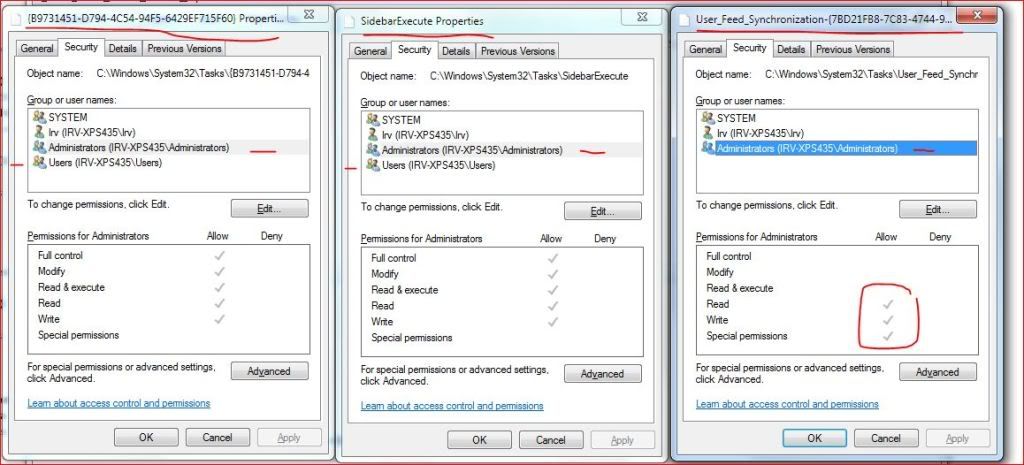
Still wonder if I have a PERMISSIONS problem here?
Look at this, http://i1183.photobucket.com/albums/x478/ispalten/ts.jpg, which is the folder for Tasks... Note the dates...
I then selected 3, and looked at the permissions... http://i1183.photobucket.com/albums/x478/ispalten/ts1.jpg and you can see User Feed is 'different'. Missing Users and Administrators have different permissions...
Should I do anything?
I looked at the google links for the error, found those or most of them before. No real help, but thanks..
I think I've tried resetting the permissions before when I thought I had a problem but I didn't see a change? What is the exact method of doing this? It seems this command will do it, "secedit /configure /cfg %windir%\inf\defltbase.inf /db defltbase.sdb /verbose" but that assumes I have a good database, no?
I found this as well, http://answers.microsoft.com/en-us/windows/forum/windows\_7-performance/how-to-reset-all-user-permissions-to-default/9da312d2-c99b-4283-a275-e74d93dcc366, a different set of directions?