Task scheduler cannot start a task. Error 0x41301

Anonymous
2015-10-08T19:01:59+00:00

I faced quite an odd issue. I created task for starting Transmission-QT at system start.

I enabled Task History and there all seems fine.
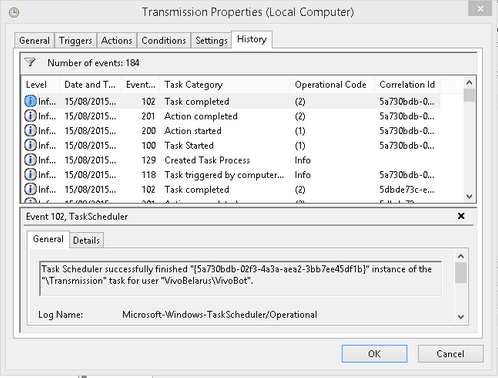
But really program doesn't start. In "Last run result" field of Task Scheduler I get a strange error 0x41301. 
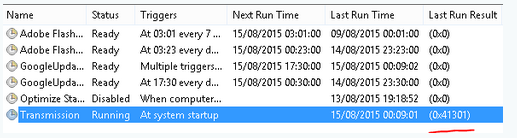
I googled it and discovered that it means "Task is already running". Surprisingly I found this program in running tasks just after system boot but no GUI is shown. Only the process itself is running.
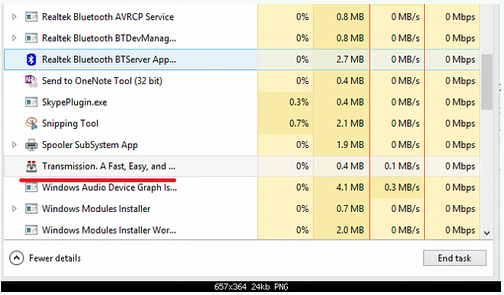
But after some time it dissapeared from Task Manager and then nothing happens.

I googled this error and tried all the proposed solutions: I set up option "Log on as a batch job", I specified "Start in" parameter explicitly in task definition, but had no luck.

Anybody has any suggestions?

Windows for home | Previous Windows versions | Performance and system failures

Locked Question. This question was migrated from the Microsoft Support Community. You can vote on whether it's helpful, but you can't add comments or replies or follow the question.

0 comments No comments
{count} votes

7 answers

Sort by: Most helpful
  1. Anonymous
    2015-10-08T19:25:38+00:00

    Hi,

    That code just means that the task is running. You can actually see that in your screenshot even if you look to the left of it under the column called "Status". 

    See this article for more info: https://msdn.microsoft.com/en-us/library/windows/desktop/aa383604%28v=vs.85%29.aspx?f=255&MSPPError=-2147217396

    26 people found this answer helpful.
    0 comments No comments
  2. Anonymous
    2015-10-09T08:04:38+00:00

    It is all wonderful but how will it help me in practice?

    I was aware the error code but I cannot guess WHY the task seems already running to system. I made in accordance with the standard process and see no reasons for this.

    13 people found this answer helpful.
    0 comments No comments
  3. Anonymous
    2015-10-09T18:11:31+00:00

    It depends on what you've configured in the settings for it.

    For example, the task called RAC handles the Reliability Monitor the latter of which is accessible by clicking the Action Center icon (looks like a flag) on the taskbar and then click the down arrow in Maintenance. You can see from that what's happening on the machine by clicking the link to Reliability history.

    But I don't want to to be running all the time and therefore I've configured the Conditions menu to only start the task if the computer has been idle for ten minutes and to wait for one hour for that to happen. In that respect, the default is one minute. Here's a screenshot of that.

    If left on the default setting it generates a message that an app needs to close before the computer can be shutdown since it will start if I don't touch the keyboard or move the mouse for 60 seconds.

    The Trigger menu also plays a role in deciding when to run the task.

    0 comments No comments
  4. Anonymous
    2015-10-10T11:32:27+00:00

    I haven't got such sophisticated conditions, so it is not the case.

    Any other suggestions?

    3 people found this answer helpful.
    0 comments No comments
  5. Anonymous
    2015-10-10T13:16:50+00:00

    Maybe it's dependent on the way the torrent client is configured: http://sourceforge.net/projects/trqtw/

    0 comments No comments
