


Scheduled Tasks would not start in Windows Server 2019

Mikhail Firsov 1,881 Reputation points
2021-02-12T11:24:15.973+00:00

Hello!

Would anybody tell me if the Scheduled Tasks that are triggered by some eventIDs can still be used in Windows server 2019 ?

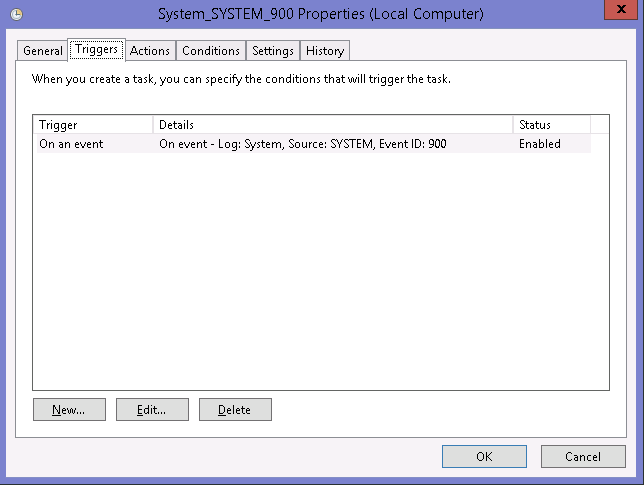
I've got several tasks that work perfect in Windows Server 2008R2-2016, but do not work any more on Windows Server 2019, for example, this test task works on any pre-2019 server but would do nothing in 2019:
67329-01.png
67367-01.png

After running the following command...

Eventcreate /t Information /id 900 /l System /d "Test event in the System log."

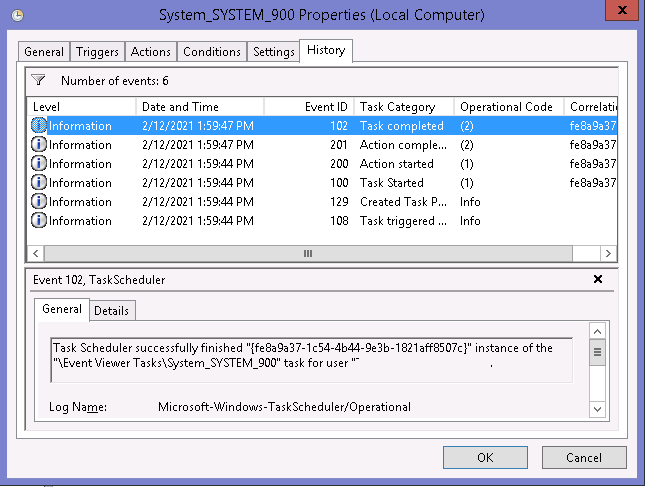
...the task is successfully triggered:
67387-02.png

On the box with the Windows Server 2019 nothing happens at all - no errors, no "Task started".

Thank you in advance,
Michael

Windows for business | Windows Server | User experience | Other
0 comments No comments
{count} votes

12 answers

Sort by: Most helpful
  1. MotoX80 37,161 Reputation points
    2021-11-11T13:42:06.363+00:00

    I don't have a Server instance to test with, so I can't recreate the problem.

    Since you can easily use eventcreate, try 3 tests.

    System
    Local account that's in the Administrators group.
    AD Account that's in the Administrators group.

    In your local security policy, enable success and failure auditing for "Audit logon events".

    Do any of the tests work? Check the tasks's history to see what events get generated.

    Then check these event logs to see if there's anything different when a task doesn't get generated.

    The normal System/Security/Application
    Microsoft-Windows-TaskScheduler/Operational

    There could be something in User Rights assignment that needs to be tweaked.

    0 comments No comments

  2. Mikhail Firsov 1,881 Reputation points
    2021-11-11T13:55:21.02+00:00

    I did those tests many times and they did not work... but today it started working! The only thing that has changed - I've reinstalled my Windows Servers 2019 from scratch using the latest ISO - seems MS has fixed this bug!

    0 comments No comments

Your answer

Answers can be marked as 'Accepted' by the question author and 'Recommended' by moderators, which helps users know the answer solved the author's problem.