Share via

cannot enable shared access. error: 87 the parameter is incorrect (VPN Starts Internet Connection Sharing service failure )

Anonymous
2018-01-11T04:33:17+00:00

When trying to enable Internet Connection Sharing on a VPN connection (windows build in VPN client), it can't be done and returns an error information:

"cannot enable shared access. error: 87 the parameter is incorrect"
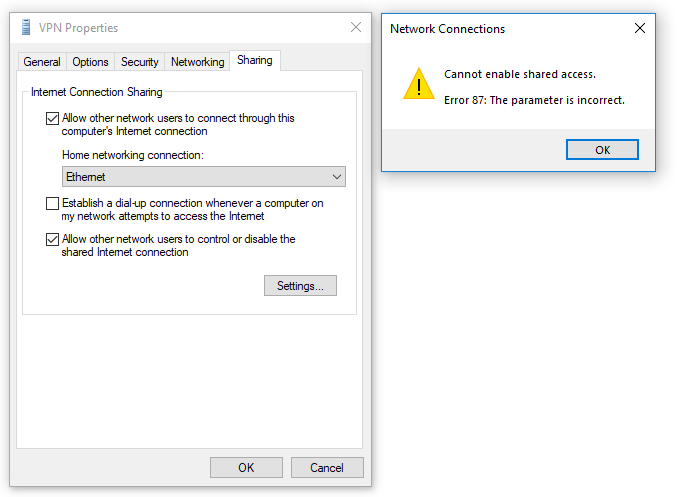
This BUG has been brought to Windows 10 for a long time , probably  since Version 1607, and still remains unfixed untill now (Version 1709, Build 16299.15)

In early windows 10 version such as 1511, this function works fine.

Here comes the most weird thing. I'm pretty sure about my OS is fine. I've reinstall my windows 10 system and the sharing function is just fine on other network adapters such as ethernet or wi-fi adapter, even a 3rd party VPN client adapter. 

The function just can't work on windows build in vpn client (WAN Miniport adapter) .

I hope Microsoft engineer can fix this bug soon . I have been waiting a long time for this and posted an question before this one

Windows for home | Windows 10 | Internet and connectivity

Locked Question. This question was migrated from the Microsoft Support Community. You can vote on whether it's helpful, but you can't add comments or replies or follow the question.

0 comments No comments

9 answers

Sort by: Most helpful
  1. Anonymous
    2018-01-19T01:57:17+00:00

    Hi,

    We would like to know if you are still having the same issue with enabling Internet Connection Sharing on a VPN connection.

    We strongly recommend that you post your queries in our Technet forum, like what Roberto Ven have mentioned. This is to make sure that you will get response from IT pros in the said forum.

    Please let us know if you need further assistance.

    The issue remains and I post a question in Technet forum here

    Was this answer helpful?

    0 comments No comments
  2. Anonymous
    2018-01-18T07:43:00+00:00

    Hi,

    We would like to know if you are still having the same issue with enabling Internet Connection Sharing on a VPN connection.

    We strongly recommend that you post your queries in our Technet forum, like what Roberto Ven have mentioned. This is to make sure that you will get response from IT pros in the said forum.

    Please let us know if you need further assistance.

    Was this answer helpful?

    0 comments No comments
  3. Anonymous
    2018-01-15T01:45:24+00:00

    Just to verify, go to - Control Panel\All Control Panel Items\Windows Defender Firewall\Allowed apps - and scroll the list and verify that Internet Connection Sharing is enabled (all 3 check boxes checked).

    It has been enabled.

    Was this answer helpful?

    0 comments No comments
  4. Anonymous
    2018-01-13T04:29:52+00:00

    Just to verify, go to - Control Panel\All Control Panel Items\Windows Defender Firewall\Allowed apps - and scroll the list and verify that Internet Connection Sharing is enabled (all 3 check boxes checked).

    Was this answer helpful?

    0 comments No comments
