SQL Server | Other
Additional SQL Server features and topics not covered by specific categories
This browser is no longer supported.
Upgrade to Microsoft Edge to take advantage of the latest features, security updates, and technical support.
' cx='32' cy='32' r='32' /%3E%3Ctext x='50%25' y='55%25' dominant-baseline='middle' text-anchor='middle' fill='%23FFF' %3EID%3C/text%3E%3C/svg%3E)
Overall summary:
Final result: Error: vea los detalles a continuación
Exit code (Decimal): -2068119551
Exit facility code: 1211
Exit error code: 1
Exit message: El sistema no puede encontrar el archivo especificado.
Start time: 2021-03-05 11:03:11
End time: 2021-03-05 11:03:24
Requested action: Install
Exception help link: https://go.microsoft.com/fwlink?LinkId=20476&ProdName=Microsoft+SQL+Server&EvtSrc=setup.rll&EvtID=50000&ProdVer=15.0.4013.40&EvtType=0x37D77D9E%400xDC80C325&EvtType=0x37D77D9E%400xDC80C325
Setup completed with required actions for features.
Troubleshooting information for those features:
Next step for SQLEngine: El programa de configuración de SQL Server se canceló antes de completar la operación. Intente de nuevo el proceso de instalación.
Next step for ComponentUpdate: El programa de configuración de SQL Server se canceló antes de completar la operación. Intente de nuevo el proceso de instalación.
Next step for SNAC: El programa de configuración de SQL Server se canceló antes de completar la operación. Intente de nuevo el proceso de instalación.
Next step for SNAC_SDK: El programa de configuración de SQL Server se canceló antes de completar la operación. Intente de nuevo el proceso de instalación.
Next step for Writer: El programa de configuración de SQL Server se canceló antes de completar la operación. Intente de nuevo el proceso de instalación.
Next step for Browser: El programa de configuración de SQL Server se canceló antes de completar la operación. Intente de nuevo el proceso de instalación.
Machine Properties:
Machine name: DESKTOP-VAGDKCC
Machine processor count: 4
OS version: Microsoft Windows 10 Pro (10.0.19042)
OS service pack:
OS region: España
OS language: español (España, alfabetización internacional)
OS architecture: x64
Process architecture: 64 bits
OS clustered: No
Product features discovered:
Product Instance Instance ID Feature Language Edition Version Clustered Configured
Package properties:
Description: Microsoft SQL Server 2019
ProductName: SQL Server 2019
Type: RTM
Version: 15
SPLevel: 0
Installation location: C:\SQL2019\Express_ESN\x64\setup\
Installation edition: Express
Product Update Status:
El usuario seleccionó que no se incluyan actualizaciones de productos.
Configuración de entrada de usuario:
ACTION: Install
ADDCURRENTUSERASSQLADMIN: true
AGTSVCACCOUNT: NT AUTHORITY\Servicio de red
AGTSVCPASSWORD: *****
AGTSVCSTARTUPTYPE: Disabled
ASBACKUPDIR: Backup
ASCOLLATION: Latin1_General_CI_AS
ASCONFIGDIR: Config
ASDATADIR: Data
ASLOGDIR: Log
ASPROVIDERMSOLAP: 1
ASSERVERMODE: TABULAR
ASSVCACCOUNT: <vacío>
ASSVCPASSWORD: <vacío>
ASSVCSTARTUPTYPE: Automatic
ASSYSADMINACCOUNTS: <vacío>
ASTELSVCACCT: <vacío>
ASTELSVCPASSWORD: <vacío>
ASTELSVCSTARTUPTYPE: 0
ASTEMPDIR: Temp
BROWSERSVCSTARTUPTYPE: Disabled
CLTCTLRNAME: <vacío>
CLTRESULTDIR: <vacío>
CLTSTARTUPTYPE: 0
CLTSVCACCOUNT: <vacío>
CLTSVCPASSWORD: <vacío>
CLTWORKINGDIR: <vacío>
COMMFABRICENCRYPTION: 0
COMMFABRICNETWORKLEVEL: 0
COMMFABRICPORT: 0
CONFIGURATIONFILE: C:\SQL2019\Express_ESN\SqlServerInstallConfig.ini
CTLRSTARTUPTYPE: 0
CTLRSVCACCOUNT: <vacío>
CTLRSVCPASSWORD: <vacío>
CTLRUSERS: <vacío>
ENABLERANU: true
ENU: false
EXTSVCACCOUNT: <vacío>
EXTSVCPASSWORD: <vacío>
FEATURES: SQLENGINE
FILESTREAMLEVEL: 0
FILESTREAMSHARENAME: <vacío>
FTSVCACCOUNT: <vacío>
FTSVCPASSWORD: <vacío>
HELP: false
IACCEPTPYTHONLICENSETERMS: false
IACCEPTROPENLICENSETERMS: false
IACCEPTSQLSERVERLICENSETERMS: true
IACKNOWLEDGEENTCALLIMITS: false
INDICATEPROGRESS: true
INSTALLSHAREDDIR: C:\Program Files\Microsoft SQL Server\
INSTALLSHAREDWOWDIR: C:\Program Files (x86)\Microsoft SQL Server\
INSTALLSQLDATADIR: <vacío>
INSTANCEDIR: C:\Program Files\Microsoft SQL Server
INSTANCEID: SQLEXPRESS
INSTANCENAME: SQLEXPRESS
ISMASTERSVCACCOUNT: NT AUTHORITY\Network Service
ISMASTERSVCPASSWORD: <vacío>
ISMASTERSVCPORT: 8391
ISMASTERSVCSSLCERTCN: <vacío>
ISMASTERSVCSTARTUPTYPE: Automatic
ISMASTERSVCTHUMBPRINT: <vacío>
ISSVCACCOUNT: NT AUTHORITY\Network Service
ISSVCPASSWORD: <vacío>
ISSVCSTARTUPTYPE: Automatic
ISTELSVCACCT: <vacío>
ISTELSVCPASSWORD: <vacío>
ISTELSVCSTARTUPTYPE: 0
ISWORKERSVCACCOUNT: NT AUTHORITY\Network Service
ISWORKERSVCCERT: <vacío>
ISWORKERSVCMASTER: <vacío>
ISWORKERSVCPASSWORD: <vacío>
ISWORKERSVCSTARTUPTYPE: Automatic
MATRIXCMBRICKCOMMPORT: 0
MATRIXCMSERVERNAME: <vacío>
MATRIXNAME: <vacío>
MRCACHEDIRECTORY:
NPENABLED: 0
PBDMSSVCACCOUNT: <vacío>
PBDMSSVCPASSWORD: <vacío>
PBDMSSVCSTARTUPTYPE: 0
PBENGSVCACCOUNT: <vacío>
PBENGSVCPASSWORD: <vacío>
PBENGSVCSTARTUPTYPE: 0
PBPORTRANGE: <vacío>
PBSCALEOUT: false
PID: *****
QUIET: true
QUIETSIMPLE: false
ROLE: AllFeatures_WithDefaults
RSINSTALLMODE: DefaultNativeMode
RSSVCACCOUNT: <vacío>
RSSVCPASSWORD: <vacío>
RSSVCSTARTUPTYPE: Automatic
SAPWD: <vacío>
SECURITYMODE: <vacío>
SQLBACKUPDIR: <vacío>
SQLCOLLATION: Modern_Spanish_CI_AS
SQLJAVADIR: <vacío>
SQLMAXDOP: 0
SQLMAXMEMORY: 2147483647
SQLMINMEMORY: 0
SQLSVCACCOUNT: NT Service\MSSQL$SQLEXPRESS
SQLSVCINSTANTFILEINIT: true
SQLSVCPASSWORD: <vacío>
SQLSVCSTARTUPTYPE: Automatic
SQLSYSADMINACCOUNTS: DESKTOP-VAGDKCC\USER
SQLTELSVCACCT: NT Service\SQLTELEMETRY$SQLEXPRESS
SQLTELSVCPASSWORD: <vacío>
SQLTELSVCSTARTUPTYPE: Automatic
SQLTEMPDBDIR: <vacío>
SQLTEMPDBFILECOUNT: 1
SQLTEMPDBFILEGROWTH: 64
SQLTEMPDBFILESIZE: 8
SQLTEMPDBLOGDIR: <vacío>
SQLTEMPDBLOGFILEGROWTH: 64
SQLTEMPDBLOGFILESIZE: 8
SQLUSERDBDIR: <vacío>
SQLUSERDBLOGDIR: <vacío>
SUPPRESSPAIDEDITIONNOTICE: false
SUPPRESSPRIVACYSTATEMENTNOTICE: false
TCPENABLED: 0
UIMODE: AutoAdvance
UpdateEnabled: false
UpdateSource: MU
USEMICROSOFTUPDATE: false
USESQLRECOMMENDEDMEMORYLIMITS: false
X86: false
Configuration file: C:\Program Files\Microsoft SQL Server\150\Setup Bootstrap\Log\20210305_110255\ConfigurationFile.ini
Detailed results:
Feature: Servicios de Motor de base de datos
Status: Error
Reason for failure: Se canceló la instalación de la característica.
Next Step: El programa de configuración de SQL Server se canceló antes de completar la operación. Intente de nuevo el proceso de instalación.
Feature: Archivos auxiliares del programa de configuración
Status: Error
Reason for failure: Se canceló la instalación de la característica.
Next Step: El programa de configuración de SQL Server se canceló antes de completar la operación. Intente de nuevo el proceso de instalación.
Feature: Conectividad de cliente SQL
Status: Error
Reason for failure: Se canceló la instalación de la característica.
Next Step: El programa de configuración de SQL Server se canceló antes de completar la operación. Intente de nuevo el proceso de instalación.
Feature: SDK de conectividad de cliente SQL
Status: Error
Reason for failure: Se canceló la instalación de la característica.
Next Step: El programa de configuración de SQL Server se canceló antes de completar la operación. Intente de nuevo el proceso de instalación.
Feature: Objeto de escritura de SQL
Status: Error
Reason for failure: Se canceló la instalación de la característica.
Next Step: El programa de configuración de SQL Server se canceló antes de completar la operación. Intente de nuevo el proceso de instalación.
Feature: SQL Browser
Status: Error
Reason for failure: Se canceló la instalación de la característica.
Next Step: El programa de configuración de SQL Server se canceló antes de completar la operación. Intente de nuevo el proceso de instalación.
Rules with failures or warnings:
Global rules:
Advertencia IsFirewallEnabled El Firewall de Windows está habilitado. Compruebe que están abiertos los puertos correspondientes para habilitar el acceso remoto. Consulte la documentación sobre reglas en https://go.microsoft.com/fwlink/?linkid=2094702 para obtener información sobre los puertos que se deben abrir para cada característica.
Rules report file: C:\Program Files\Microsoft SQL Server\150\Setup Bootstrap\Log\20210305_110255\SystemConfigurationCheck_Report.htm
Exception summary:
The following is an exception stack listing the exceptions in outermost to innermost order
Inner exceptions are being indented
Exception type: Microsoft.SqlServer.Configuration.Sco.ScoException
Message:
El sistema no puede encontrar el archivo especificado.
HResult : 0x84bb0001
    FacilityCode : 1211 (4bb)
    ErrorCode : 1 (0001)
Data:
  DisableRetry = true
  DisableWatson = true
Stack:
    en Microsoft.SqlServer.Configuration.Sco.Service.GetStartAccount()
    en Microsoft.SqlServer.Configuration.SqlBrowser.SqlBrowserPublicConfig.CalculateUserNamePassword()
    en Microsoft.SqlServer.Configuration.SqlBrowser.SqlBrowserPublicConfig.Calculate()
    en Microsoft.SqlServer.Chainer.Infrastructure.PublicConfigurationBridge.Calculate()
    en Microsoft.SqlServer.Chainer.Infrastructure.InputSettingService.CalculateSettings(IEnumerable`1 settingIds)
    en Microsoft.SqlServer.Chainer.Infrastructure.InputSettingService.CalculateAllSettings(Boolean chainerSettingOnly)
    en Microsoft.SqlServer.Configuration.SetupExtension.FinalCalculateSettingsAction.ExecuteAction(String actionId)
    en Microsoft.SqlServer.Chainer.Infrastructure.Action.Execute(String actionId, TextWriter errorStream)
    en Microsoft.SqlServer.Setup.Chainer.Workflow.ActionInvocation.<>c__DisplayClass2_0.<ExecuteActionWithRetryHelper>b__0()
    en Microsoft.SqlServer.Setup.Chainer.Workflow.ActionInvocation.ExecuteActionHelper(ActionWorker workerDelegate)
Inner exception type: System.ComponentModel.Win32Exception
    Message:
            El sistema no puede encontrar el archivo especificado.

    HResult : 0x80004005
    Error : 2
    Stack:
            en Microsoft.SqlServer.Configuration.Sco.Service.QueryServiceConfig()
            en Microsoft.SqlServer.Configuration.Sco.Service.GetStartAccount()
Additional SQL Server features and topics not covered by specific categories
' cx='32' cy='32' r='32' /%3E%3Ctext x='50%25' y='55%25' dominant-baseline='middle' text-anchor='middle' fill='%23FFF' %3ESG%3C/text%3E%3C/svg%3E)
Hello,
You're better off uploading the full log, as that is telling you that there was an issue querying or opening the service for access to resolve the account used but we have no other contextual data. Additionally, please note that this is an english only forum.

Hi @Iratxe De Osa , I saw you had create 2 threads for this issue. Please check the answer from this link, and could you please close this thread?
Sorry, but I still have these problems
How can I close one of the threads?75367-detail-local.txt75326-detail.txt
It had a problem querying the information for the sql browser service, there should be a detail.txt for that install as well.
Hi, we have not received a reply from you. Any update for this issue?
Hi @Iratxe De Osa ,
From the error log which you provided, there have 2 reasons may cause this issue:
1.Maybe the firewall systems or antivirus prevent unauthorized access to computer resources. To access an instance of the SQL Server through a firewall, you must configure the firewall on the computer that is running SQL Server. Please refer to Configure the Windows Firewall to Allow SQL Server Access to get more information.
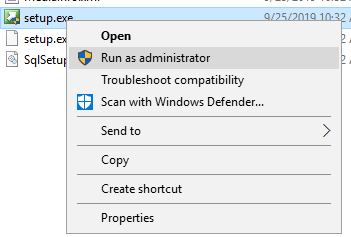
2.The other reason is your account does have sysadmin permissions, please right click ->run as administrator
Best regards,
Carrin
If the answer is helpful, please click "Accept Answer" and upvote it.
Note: Please follow the steps in our documentation to enable e-mail notifications if you want to receive the related email notification for this thread.
' cx='32' cy='32' r='32' /%3E%3Ctext x='50%25' y='55%25' dominant-baseline='middle' text-anchor='middle' fill='%23FFF' %3ETP%3C/text%3E%3C/svg%3E)
The error you are getting is almost always related to permissions. Please make sure you are running as a local administrator, and you do not have any services installed which monitor or modify the permissions when administrators run processes.
There are some instances where anti-virus programs have also caused this issue.