Microsoft Security | Intune | Configuration
Setting up and managing device configurations using Intune

This browser is no longer supported.
Upgrade to Microsoft Edge to take advantage of the latest features, security updates, and technical support.

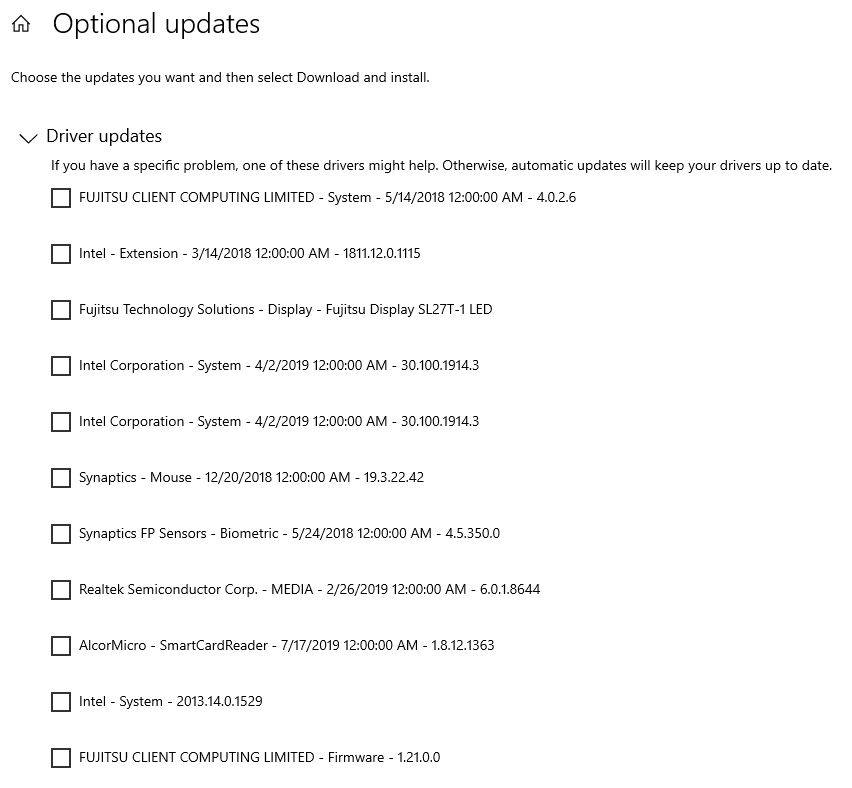
These drivers will get installed only manually. The device is only 2 years old model. Is there any way to push silent command from Intune to get those drivers installed automatically?
Setting up and managing device configurations using Intune
Registering devices with Intune for management and policy enforcement
I came up with the script of my own (copied the major idea from somewhere but added options and skip errors etc.). I am testing this in Autopilot now, looks promising.
New-Item -ItemType directory -Path C:\Drivers -ErrorAction SilentlyContinue
Install-PackageProvider -Name NuGet -MinimumVersion 2.8.5.021 -Force
Install-Module -Name PSWindowsUpdate -Force
Import-Module -Name PSWindowsUpdate -Force
Add-WUServiceManager -ServiceID "7971f918-a847-4430-9279-4a52d1efe18d" -Confirm:$false
Install-WindowsUpdate -Install -AcceptAll -UpdateType Driver -MicrosoftUpdate -ForceDownload -ForceInstall -IgnoreReboot -ErrorAction SilentlyContinue | Out-File "c:\Drivers\Drivers_Install_1_$(get-date -f dd-MM-yyyy).log" -Force
Install-WindowsUpdate -Install -AcceptAll -UpdateType Driver -MicrosoftUpdate -ForceDownload -ForceInstall -IgnoreReboot -ErrorAction SilentlyContinue | Out-File "c:\Drivers\Drivers_Install_2_$(get-date -f dd-MM-yyyy).log" -Force
' cx='32' cy='32' r='32' /%3E%3Ctext x='50%25' y='55%25' dominant-baseline='middle' text-anchor='middle' fill='%23FFF' %3ERA%3C/text%3E%3C/svg%3E)
There have been exciting announcement in Ignite where address your requirement , take a look at:
https://techcommunity.microsoft.com/t5/windows-it-pro-blog/introducing-a-new-deployment-service-for-driver-and-firmware/ba-p/2176942
Yes, but there is a long waiting before this hits production.

@Pavel yannara Mirochnitchenko Thanks for your reminder.
Yes, I get this new information about windows update now and I find that Windows Update starting in version 2004 distributes only Automatic drivers for a system's devices. When Manual drivers are available for devices on the computer, the Windows Update page in the Settings app displays View optional updates.
From intune's point of view, currently, there is no method to get drivers installed automatically. During my research, I find other customer who has the similiar request posted in Intune uservoice as below. We can vote and post our detailed request here. This is a place to collect customers' requirements and problems.
https://microsoftintune.uservoice.com/forums/291681-ideas/suggestions/42703583-ability-to-install-optional-windows-updates
Thanks for understanding and have a nice day.
@Pavel yannara Mirochnitchenko Thanks for posting in our Q&A. From your description, I know that you want to update driver via intune. If there is anything misunderstanding, feel free to let us know.
For this issue, I find that there is a windows driver setting in Windows 10 update rings policy in intune.
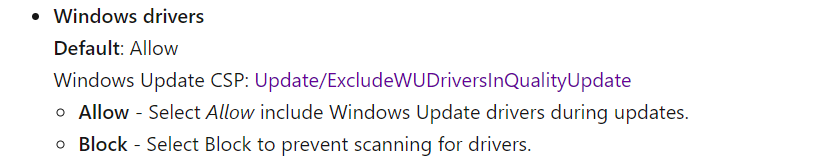
https://learn.microsoft.com/en-us/mem/intune/protect/windows-update-settings
So it is suggested to try to use Windows 10 update rings and Windows 10 feature updates to manage updates for your Windows 10 devices. We can read the following article as a reference.
https://learn.microsoft.com/en-us/mem/intune/protect/windows-update-for-business-configure
If there is anything unclear, feel free to let us know.
If the response is helpful, please click "Accept Answer" and upvote it.
Note: Please follow the steps in our documentation to enable e-mail notifications if you want to receive the related email notification for this thread.
@Lu Dai-MSFT you probably know, that in Windows 10 20H2 the behavior of drivers is changed. Before that, in 1909 Intune could cover all drivers automatically. In 202H, if a vendor does not mark the driver as critical or it is older, the driver will not get installed automatically but only appears as optional, like in the screen I show at the beginning. I had Allow set in my Intune ring policy all this time and it stopped working in after we moved to 20H2.
' cx='32' cy='32' r='32' /%3E%3Ctext x='50%25' y='55%25' dominant-baseline='middle' text-anchor='middle' fill='%23FFF' %3ESS%3C/text%3E%3C/svg%3E)
And? What's your point?
