Microsoft Security | Intune | Configuration Manager | Other
Other Configuration Manager-related features and issues

This browser is no longer supported.
Upgrade to Microsoft Edge to take advantage of the latest features, security updates, and technical support.
' cx='32' cy='32' r='32' /%3E%3Ctext x='50%25' y='55%25' dominant-baseline='middle' text-anchor='middle' fill='%23FFF' %3ER%3C/text%3E%3C/svg%3E)
Hello.
I setup a couple of ADRs.
They run successfully and correctly update SUGs and DPs.
Problem is that clients don't get the updates even though they are in the relevant collection.
Can somebody help me debug and fix this?
Thank you and best regards.
' cx='32' cy='32' r='32' /%3E%3Ctext x='50%25' y='55%25' dominant-baseline='middle' text-anchor='middle' fill='%23FFF' %3ERJ%3C/text%3E%3C/svg%3E)
Are the clients not installing the updates or not evaluating the updated assignments?
Not installing. I tell that because I just distributed another package (sw package, not an update) to the same collection and the client got the update.
What log files should I be looking into?
Then you should check whether the devices are receiving the policies for your SUG assignments. I would start by checking the deployment status report first and see what's going on there.
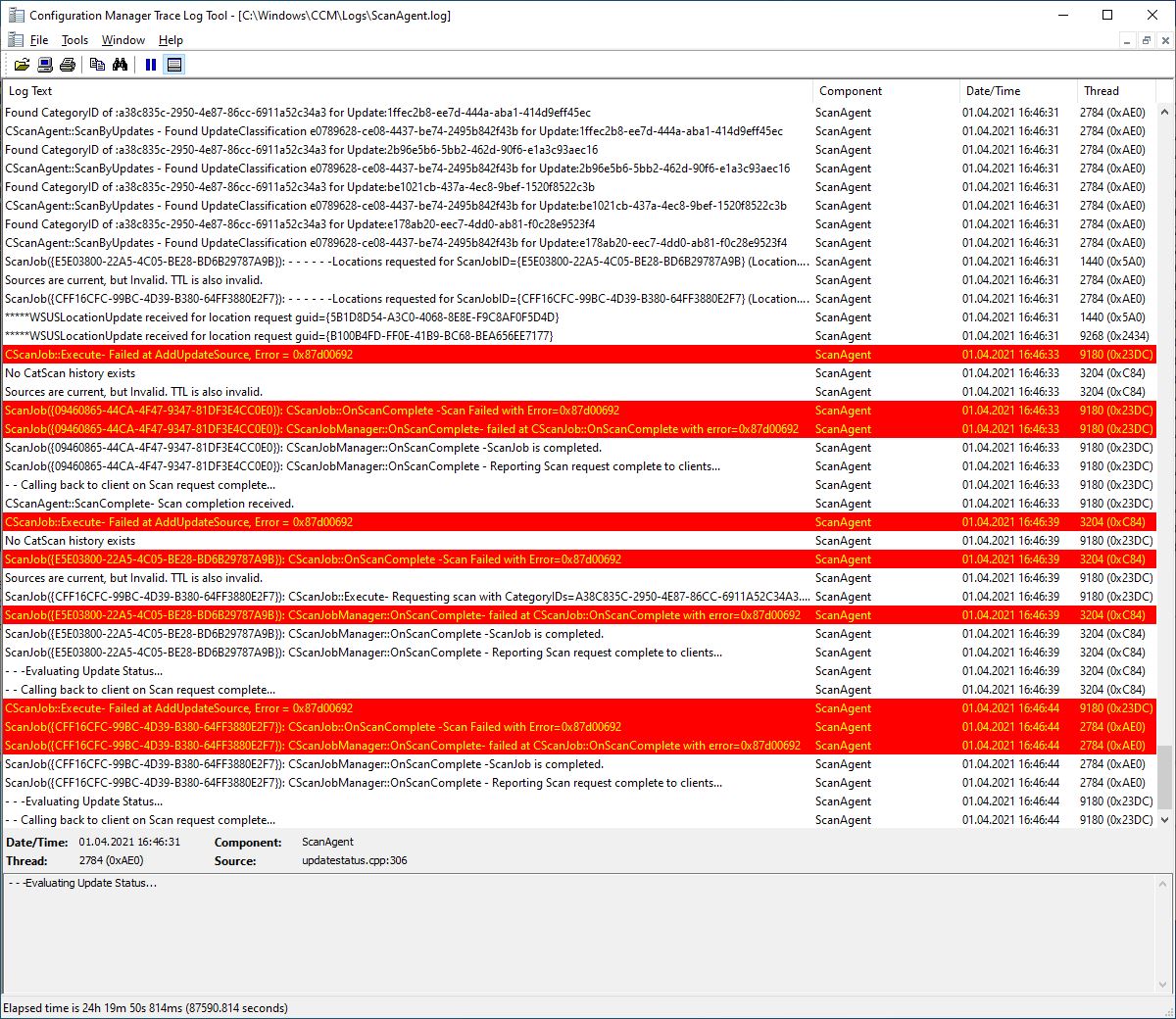
The logs show a problem in AddUpdateSource.
Please see the attached image.
Thank you.
Roberto
You seem to have a GPO conflict. Either match the WSUS server name in the policy or get rid of the GPO completely. Let ConfigMgr handle the SUP policies.
Hi @Amandayou-MSFT
Hi @Kalyan Sundar
Hi @Rahul Jindal
The situation now is as follows:
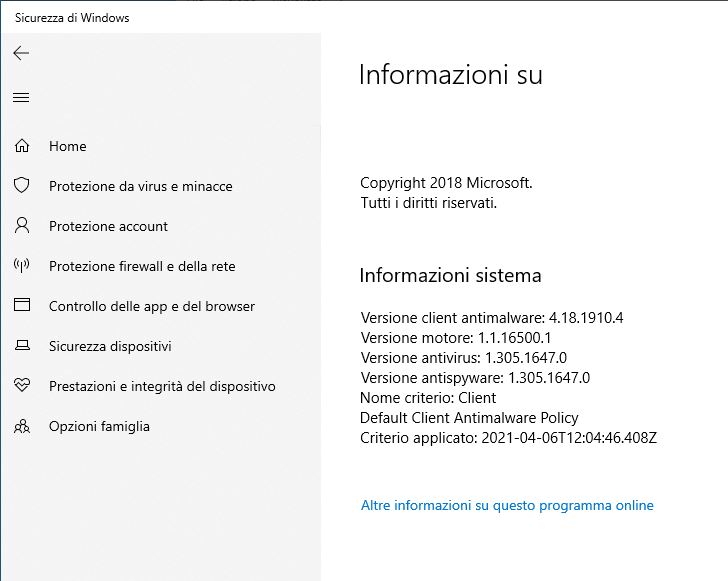
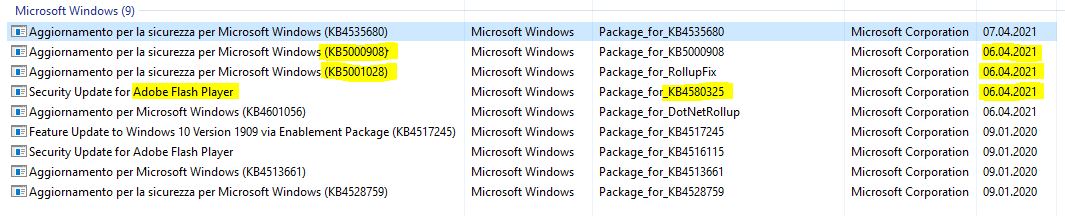
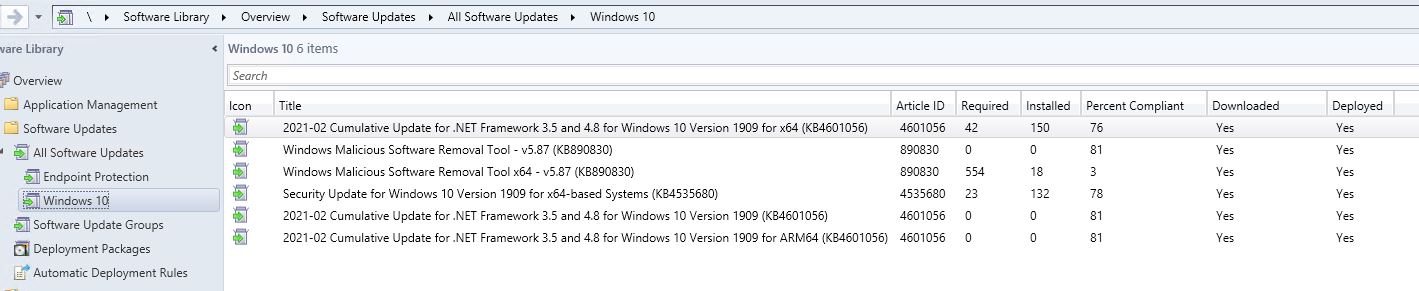
Clients get the updates included in one UG (Windows 10), but still have the following problems:
Maybe what I include in the "Endpoint Protection" UG and on WSUS is not what clients need to update their security?
What do I need to put on the Endpoint Protection UG for updating the security intelligence and definitions on clients?

Any more hints?
Thank you and best regards.
Roberto
Problem 2 is solved. As I suspected, Windows 10 clients appear to need Windows defender updates and not Enpoint Protection updates.
Problem 1 is still unresolved.
Hi @Amandayou-MSFT
Hi @Kalyan Sundar
Hi @Rahul Jindal
Now that in "All Software Updates" are present the Windows Defender updates, the client somehow gets them even though these updates are not in any UG. That's good because something works, but very bad because any client can get anything it finds on the WSUS. I don't want that. Client must not take any update directly from WSUS, but only SCCM ADRs puts in UGs for them.
How to do I fix that? I want that clients only take what is in UGs associated with collections that includes those clients.
Thank you and best regards.
Roberto
Clients will not get the policy assignments for updates unless deployed explicitly. Check the updatedeployment.log to validate all the assignments. You can run a report or query the sql db v_CIassignments if that is easier for you.
Hi @Amandayou-MSFT
Hi @Kalyan Sundar
Hi @Rahul Jindal
Sorry I'm late in answering, but had to work on other tasks.
Problem is not fixed because clients gets any update they want directly from WSUS and not only what is in UGs.
For now I disabled the sync on a schedule of SUP and now clients don't get any update anymore. I will go back to work on this later on, after lessons and exams will be over because I don't want to risk hundreds of clients again go BSOD during exams because of updates like the recent kb5000808.
I will anyways Accept answer from @Rahul Jindal as he helped me find the conflicting GPO and debugging the problem.
One more question though:
When I configure Software Update Point Component Properties, I see in Sync Settings: "Synchronize from Microsoft Update". Does that refers to SCCM or WSUS? I believe WSUS, because everything I set here I usually find it later in WSUS, but I'd like your opinion.
Thank you and best regards.
Roberto
SCCM through SUP uses WSUS to sync updates. The normal configuration setting is to allow synchronization from Microsoft Update servers.
As for your issue where clients are getting updates outside the SUG assignments, that shouldn't happen if you are using SUP to manage updates. How are you sure that clients are installing updates outside the SUGs? Where are you checking?
Directly on the clients, I see the updates installed.
Again, where are you checking? Directly in the updates history?