Azure Data Factory
An Azure service for ingesting, preparing, and transforming data at scale.
9,599 questions
This browser is no longer supported.
Upgrade to Microsoft Edge to take advantage of the latest features, security updates, and technical support.

Hello everyone,
I'm in process of planning out a demo for one of our clients. They are a health care provider with many providers, but for the demo sake, this will be 3 - 4 records per store type, which is BLOB storage, Azure Data Lake and SFTP.
Based on the source data, which resides in Azure SQL Database, provider id and store type, the data will land in one out of three destinations (ADL, BLOB Storage & SFTP Gateway).
I'm not sure how I would go about developing this without separate pipelines.
Any information would be greatly appreciated.
Thank you

Hey,
Can you please share some sample data and some example of your expectation which might help us to provide a better approach.
Based on my understanding that there is a config table which indicates what data needs to be copied where:
You can leverage a combination of below activities in a single pipeline:
Lookup activity to get the provider id and destination
The output of lookup activity can be added in if activity or switch activity with each scenario having a copy activity with SQL db as source and either of the destination
Hi Nandan,
Yes of course, below is my sample data:
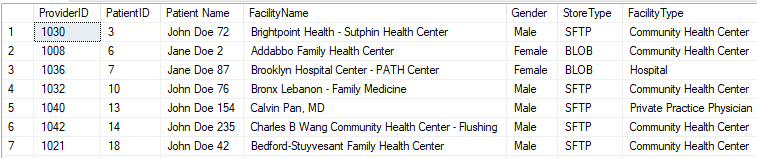
The records that have a StoreType = BLOB need to be placed in Azure BLOB Storage. The records with a StoreType = 'ADF' need to be placed in Azure Data Lake and so on.
Hey,
You can create 3 copy activities within a pipeline with each copy activity representing SFTP or blob or adl.
The source would be azure SQL db with query being filtered as per need
Sample:
Select * from table where storetype='blob' would be the source query for the copy activity with blob as destination
Thank you,
I have it setup like that already, the only issue I'm running across is the ProviderID folders need to be dynamically created during runtime.
Should I use a lookup activity and a for-each loop or is there another way I can pass that ProviderID as an array?
Hey,
You are right .
It is best to use a lookup activity to get distinct providerID and use a foreach loop activity to pass the array (and you can use parallel load for foreach activity) and parameterise the output dataset path with the ProviderId
Thank you for your response Nandan,
What I'm struggling with is how do I pass the list of distinct of ProviderID's from my lookup to the ForEach loop? Within the Lookup, I'm using the following query:
SELECT DISTINCT ProviderID
FROM [dbo].[PatientInformation]
WHERE StoreType = 'BLOB'
How do I pass the above values as an array to the ForEach loop? I did create a parameter as ProviderID with a parameter type as an Array for the pipeline which is as follows:
@pipeline().parameters.ProviderID
When I attempt to run the pipeline, it's asking me for a value. Shouldn't the value be passed automatically?
Thanks again
Hey,
You can use the :
@activity('Test').output.value
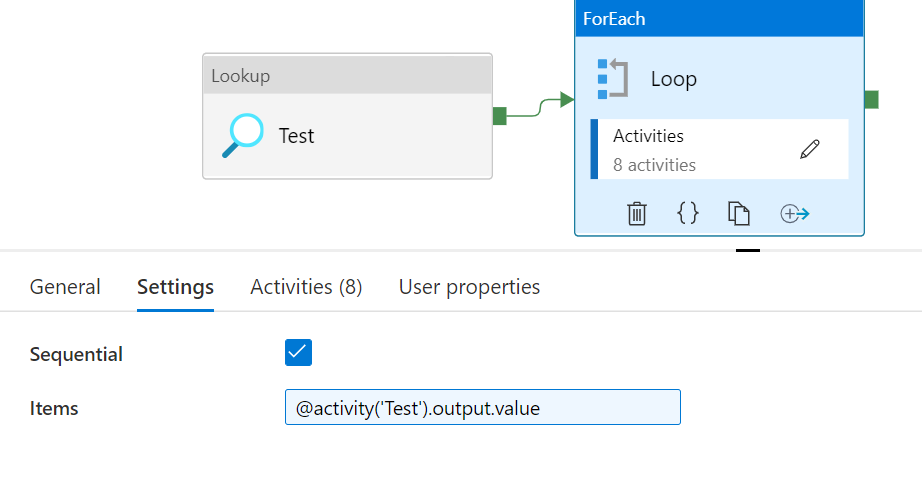
Note: You can uncheck sequential to allow parallel loops
No need to create a parameter. you can directly pass the array to for activity
Hi,
This message comes up when I enter that string within the Items section of the ForEach section:
"The output of activity 'Test' can't be referenced since it is either not an ancestor to the current activity or does not exist"
Ohhh!
Sorry for the confusion.
It should be the Lookup activity name and not hardcoded as Test.
If you see my lookup activityname is Test.
Replace Test with your lookup activityname