Windows 10
A Microsoft operating system that runs on personal computers and tablets.
10,617 questions
This browser is no longer supported.
Upgrade to Microsoft Edge to take advantage of the latest features, security updates, and technical support.
' cx='32' cy='32' r='32' /%3E%3Ctext x='50%25' y='55%25' dominant-baseline='middle' text-anchor='middle' fill='%23FFF' %3ESK%3C/text%3E%3C/svg%3E)
Today I took a generic Windows 10 20H2 machine and decided to update it with the 'keep nothing' option. After the initial install I set the proper time and did a WIndows Update. The update installs but hangs up on KB2267602 and gives me the error 0x80070643.
I am doing a fresh install and 20H2 bombs. Very sad.
' cx='32' cy='32' r='32' /%3E%3Ctext x='50%25' y='55%25' dominant-baseline='middle' text-anchor='middle' fill='%23FFF' %3ERA%3C/text%3E%3C/svg%3E)
Did you manage to install other updates?
Try restart your PC and run the Windows Update again.
' cx='32' cy='32' r='32' /%3E%3Ctext x='50%25' y='55%25' dominant-baseline='middle' text-anchor='middle' fill='%23FFF' %3EFC%3C/text%3E%3C/svg%3E)
What Stan suggested worked for me. Thank you!
' cx='32' cy='32' r='32' /%3E%3Ctext x='50%25' y='55%25' dominant-baseline='middle' text-anchor='middle' fill='%23FFF' %3ETS%3C/text%3E%3C/svg%3E)
My computer keeps failing to install KB2267602 and yet there is nothing wrong with my computer. May I suggest that the problem is with the update!
My computer keeps failing to install KB2267602 and yet there is nothing wrong with my computer. May I suggest that the problem is with the update!
The issue is with the whole update process. Over the last 3-6 months Microsoft has gone to a update process and hence we have growing pains. 1st. Edge now seems to have its own update process like Onedrive. If you have/use Edge go to 'help about' and see if you can update it. Then check if you have June cumulative update and other defaults. Then seem if KB2267602 install. However, I have a feeling since it is 2 months old it may have been superceded.
' cx='32' cy='32' r='32' /%3E%3Ctext x='50%25' y='55%25' dominant-baseline='middle' text-anchor='middle' fill='%23FFF' %3EAM%3C/text%3E%3C/svg%3E)
I have same problem with this update. Always fails to install. Other updates work fine, its just this KB2267602.
' cx='32' cy='32' r='32' /%3E%3Ctext x='50%25' y='55%25' dominant-baseline='middle' text-anchor='middle' fill='%23FFF' %3EBS%3C/text%3E%3C/svg%3E)
I had the same problem 10 minutes ago. Simply clicked "Pause updates for 7 days" and then "Resume updates". It reinstalled the same update correctly. I don't know if it would solve your problem but it's worth a shot.
It appears there are some strange dependencies that need to occur and then it works. Speculation is some magic incantation will make this work (just kidding). Hopefully this is a blue moon type of event in regards to updates. Although the last 4 months have been rather rough. My fix is patience and luck (wow).
' cx='32' cy='32' r='32' /%3E%3Ctext x='50%25' y='55%25' dominant-baseline='middle' text-anchor='middle' fill='%23FFF' %3EA%3C/text%3E%3C/svg%3E)
This worked for me. Thanks!
' cx='32' cy='32' r='32' /%3E%3Ctext x='50%25' y='55%25' dominant-baseline='middle' text-anchor='middle' fill='%23FFF' %3EMP%3C/text%3E%3C/svg%3E)
Worked for me, too. Didn't have to wait the 7 days, just Resumed immediately and everything seemed fine.
' cx='32' cy='32' r='32' /%3E%3Ctext x='50%25' y='55%25' dominant-baseline='middle' text-anchor='middle' fill='%23FFF' %3EKL%3C/text%3E%3C/svg%3E)
Yep. Pause then Resume worked for me too. Computers can be weird.
' cx='32' cy='32' r='32' /%3E%3Ctext x='50%25' y='55%25' dominant-baseline='middle' text-anchor='middle' fill='%23FFF' %3EBM%3C/text%3E%3C/svg%3E)
This worked also for me! Thank you!
' cx='32' cy='32' r='32' /%3E%3Ctext x='50%25' y='55%25' dominant-baseline='middle' text-anchor='middle' fill='%23FFF' %3ESK%3C/text%3E%3C/svg%3E)
Worked for Me!
' cx='32' cy='32' r='32' /%3E%3Ctext x='50%25' y='55%25' dominant-baseline='middle' text-anchor='middle' fill='%23FFF' %3EDB%3C/text%3E%3C/svg%3E)
No idea why, but this worked for me too - great fix - thanks for sharing
' cx='32' cy='32' r='32' /%3E%3Ctext x='50%25' y='55%25' dominant-baseline='middle' text-anchor='middle' fill='%23FFF' %3EV%3C/text%3E%3C/svg%3E)
This works. Amazing Solution. Thanks a lot.
' cx='32' cy='32' r='32' /%3E%3Ctext x='50%25' y='55%25' dominant-baseline='middle' text-anchor='middle' fill='%23FFF' %3EDM%3C/text%3E%3C/svg%3E)
Worked for me too. Thanks
' cx='32' cy='32' r='32' /%3E%3Ctext x='50%25' y='55%25' dominant-baseline='middle' text-anchor='middle' fill='%23FFF' %3EMM%3C/text%3E%3C/svg%3E)
Worked for me too this is the fix!!!
' cx='32' cy='32' r='32' /%3E%3Ctext x='50%25' y='55%25' dominant-baseline='middle' text-anchor='middle' fill='%23FFF' %3ELZ%3C/text%3E%3C/svg%3E)
After almost a year with this problem, tried LOTS of things... This worked. I do not know why, though. I'm happy it worked. Thanks...
' cx='32' cy='32' r='32' /%3E%3Ctext x='50%25' y='55%25' dominant-baseline='middle' text-anchor='middle' fill='%23FFF' %3EC%3C/text%3E%3C/svg%3E)
have tried the above as well as running .net fixer & nothing has worked as well as a repair install
Windows update gets the updates & downloads them, install gets to 100% but then throws an error message (0x80070643)
also tried the latest definitions from https://www.microsoft.com/en-us/wdsi/defenderupdates
& running the installer, seems to do noting
Now updating Microsoft edge from within edge still throws up the error with windows update, however now checking for updates directly within virus & threat protection has a spinning circle as though its trying - previously would only spin shortly before giving up but still has same result = Engine unavailable
Note all other updates have installed fine, win 10 home v21h1
' cx='32' cy='32' r='32' /%3E%3Ctext x='50%25' y='55%25' dominant-baseline='middle' text-anchor='middle' fill='%23FFF' %3EMM%3C/text%3E%3C/svg%3E)
I have the same problem. I cannot install the update.
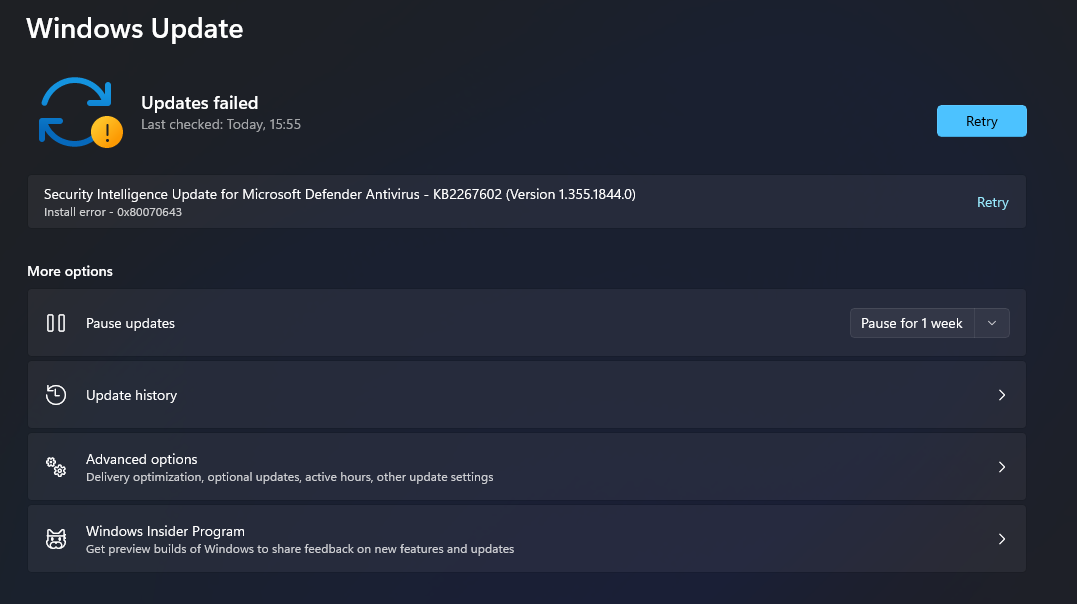 ]1
]1
' cx='32' cy='32' r='32' /%3E%3Ctext x='50%25' y='55%25' dominant-baseline='middle' text-anchor='middle' fill='%23FFF' %3EMM%3C/text%3E%3C/svg%3E)
hello
i am having the same problem....
the way to fix it is running twice the troubleshooter.
i resolve 2 errors like that.
DA
' cx='32' cy='32' r='32' /%3E%3Ctext x='50%25' y='55%25' dominant-baseline='middle' text-anchor='middle' fill='%23FFF' %3EPN%3C/text%3E%3C/svg%3E)
Its work for me.
Thaanks
:-)
' cx='32' cy='32' r='32' /%3E%3Ctext x='50%25' y='55%25' dominant-baseline='middle' text-anchor='middle' fill='%23FFF' %3ESS%3C/text%3E%3C/svg%3E)
Open an elevated command prompt windows, type the following commands one after the other, and hit Enter:
net stop wuauserv
net stop bits
rename c:\windows\SoftwareDistribution SoftwareDistribution.bak
net start wuauserv
net start bits
Open an elevated Command Prompt, type the following command one after the other and hit Enter:
net stop cryptsvc
md %systemroot%\system32\catroot2.bak
xcopy %systemroot%\system32\catroot2 %systemroot%\system32\catroot2.bak /s
Move to C:\Windows\System32\catroot2.
Then, Delete everything from this folder.
Now, Run the following command.
net start cryptsvc
Then, Check for the latest Windows update.
See also:

I would recommend trying the Windows Update troubleshooter (and a reboot) first before nuking SoftwareDistribution.
' cx='32' cy='32' r='32' /%3E%3Ctext x='50%25' y='55%25' dominant-baseline='middle' text-anchor='middle' fill='%23FFF' %3EST%3C/text%3E%3C/svg%3E)
When I'm about to delete Catroot2 folder, it says: The action can't be completed because the folder or a file in it is open in another program.
Close the folder or file and try again.
what to do in order to delete it.