Community Center | Not monitored
Tag not monitored by Microsoft.

This browser is no longer supported.
Upgrade to Microsoft Edge to take advantage of the latest features, security updates, and technical support.

Hi,
I try to import data from site web :
https://www.forbes.com/global2000/#28adc35a335d
or
https://mvp.microsoft.com/en-us/MvpSearch?ex=Business+Applications
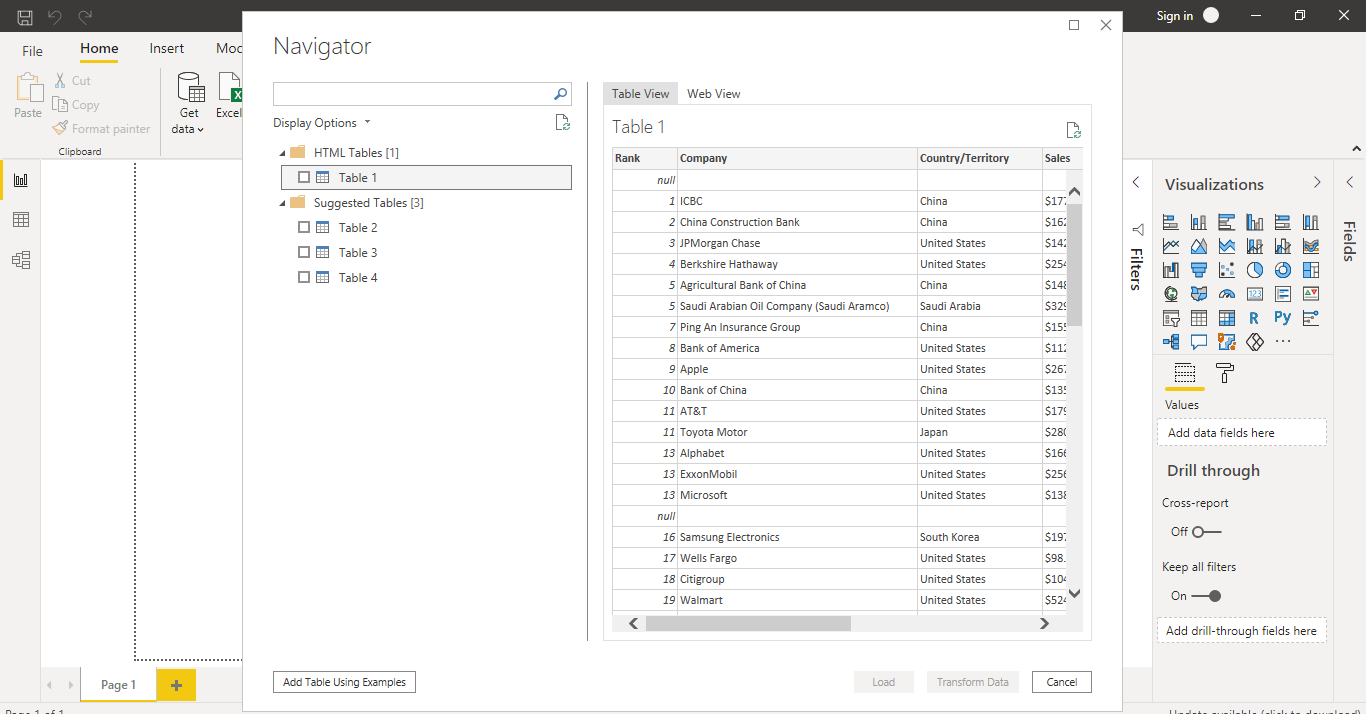
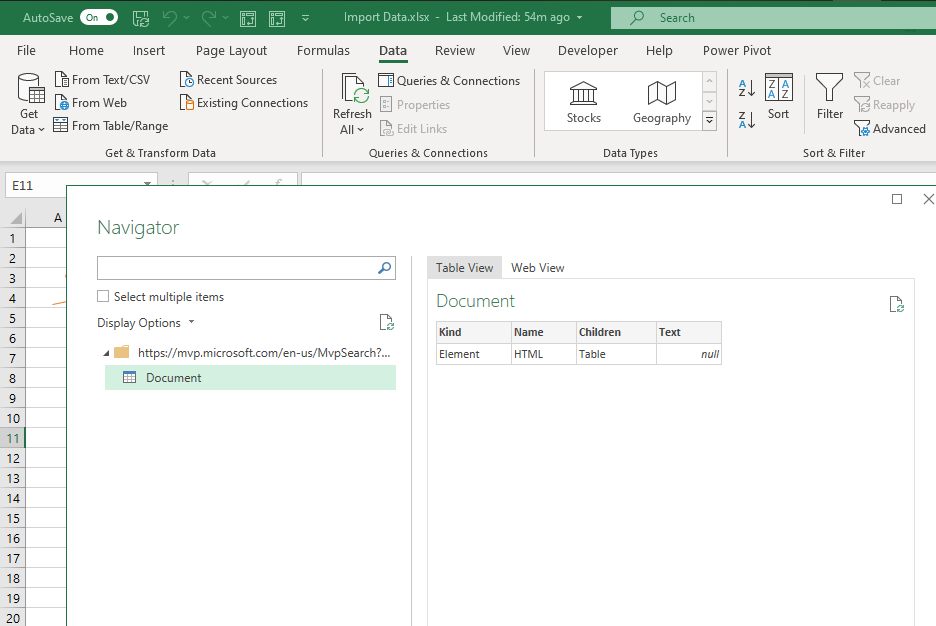
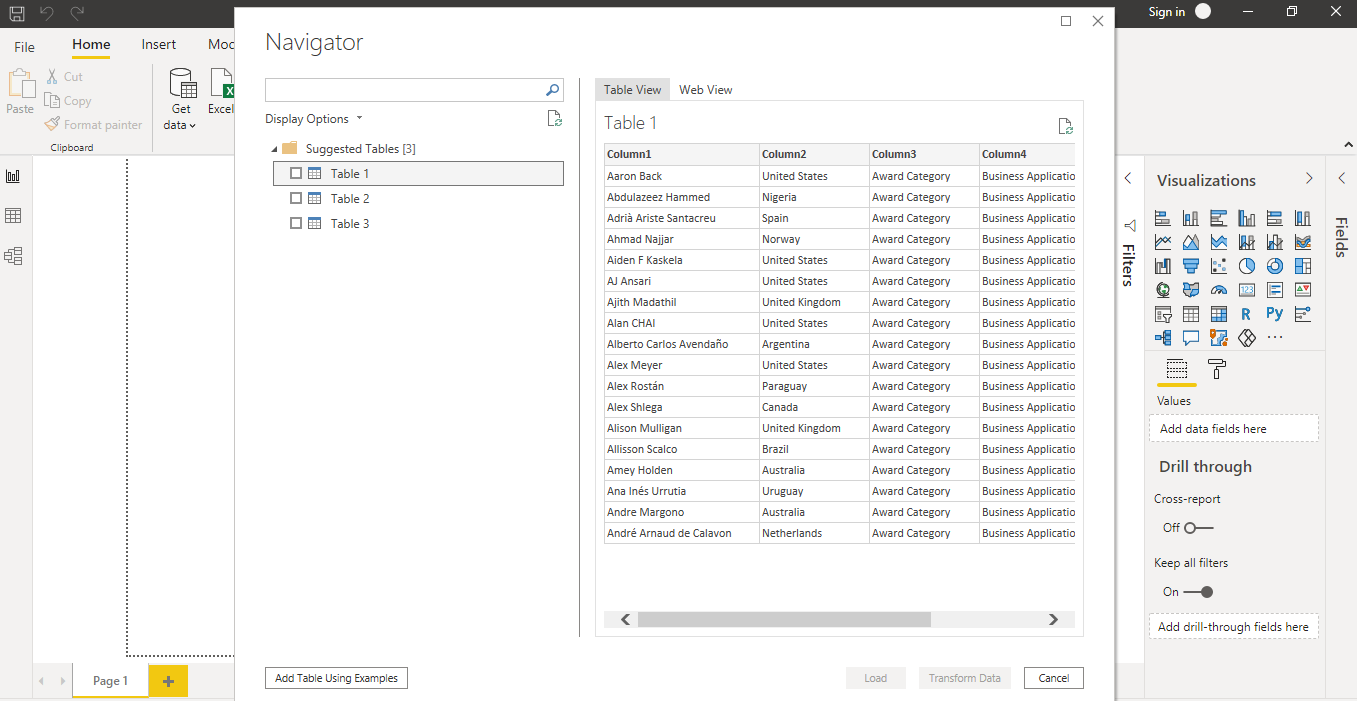
I can Import table from those web sites by using Power BI Desktop without any problem (as in the image below), but I'm unable to Importing Data from those Websites by using Power Query in Excel (as in the image below).
in other hand, I don't know the Best way to export data from Power Bi Desktop to Excel.
@Miguel Escobar @Chris Webb @Lz._
Thanks in advance,
Mourad

' cx='32' cy='32' r='32' /%3E%3Ctext x='50%25' y='55%25' dominant-baseline='middle' text-anchor='middle' fill='%23FFF' %3EEM%3C/text%3E%3C/svg%3E)
Hi Mourad. One note on Q&A protocol: please don't tag people in your questions/comments unless they've already replied to the question. Thanks!
Ehren

Power BI Desktop provides more funtionalities and functions than Power Query for Excel...
Tables inside Web pages can be defined with HMTL tags <div> and <table>
As of today, Excel Power Query only "recognizes" tables defined with the <table> tag. So, when your target Web page only contains tables defined with <div> tags the PQ Navigator doesn't list any Table but HMTL document(s) instead (as shown in your 1st picture)
Things are different in Power BI Desktop as it recognizes a wider variety of tables, thanks to (and probably not only) function Hmtl.Table that isn't currently available in Excel PQ
Hope this clarifies things
' cx='32' cy='32' r='32' /%3E%3Ctext x='50%25' y='55%25' dominant-baseline='middle' text-anchor='middle' fill='%23FFF' %3EP%3C/text%3E%3C/svg%3E)
Does this mean that to import data from webpages that identify their tables with <div> I would need to install an additional program?
Right now, you would either need to use Power BI Desktop or write some custom M in Excel to extract the data. Eventually, however, the new web connector will appear in Excel as well.
' cx='32' cy='32' r='32' /%3E%3Ctext x='50%25' y='55%25' dominant-baseline='middle' text-anchor='middle' fill='%23FFF' %3EME%3C/text%3E%3C/svg%3E)
Hey!
What happens when you copy the query that was created in Power BI Desktop into Excel? does the query still work?
I did that, but it doesn't recognize Html.Table function, and show the error below :
Expression.Error: The name 'Html.Table' wasn't recognized. Make sure it's spelled correctly.
The M Code in Power Bi Desktop below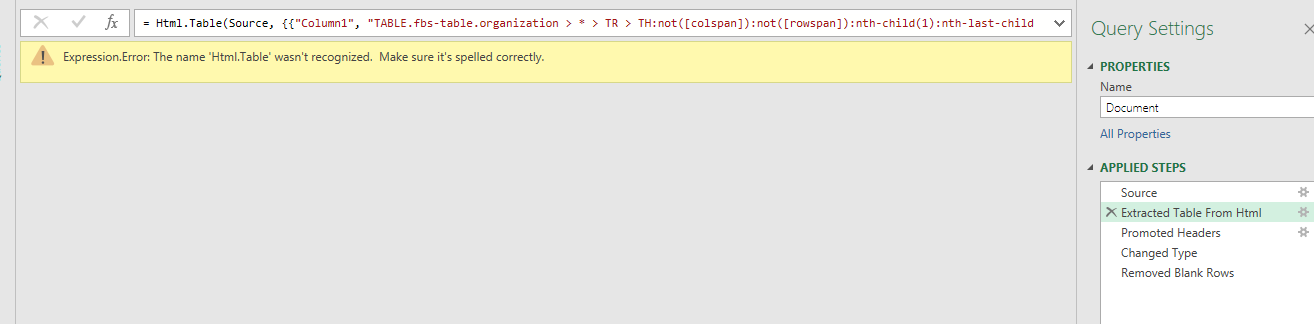
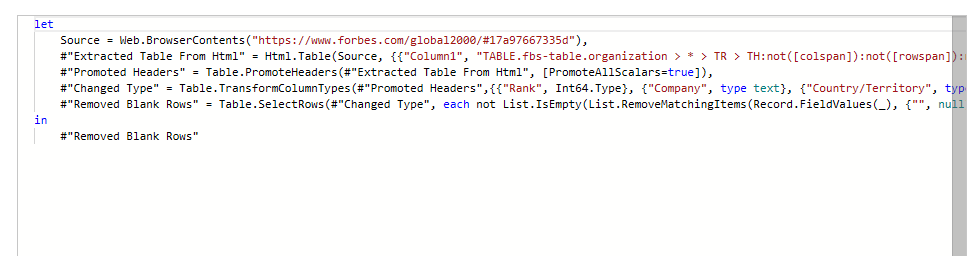
I did that, but it doesn't recognize Html.Table function, and show the error below :
Expression.Error: The name 'Html.Table' wasn't recognized. Make sure it's spelled correctly.
The M Code in Power Bi Desktop below :
let
    Source = Web.BrowserContents("https://www.forbes.com/global2000/#17a97667335d"),
    #"Extracted Table From Html" = Html.Table(Source, {{"Column1", "TABLE.fbs-table.organization > * > TR > TH:not([colspan]):not([rowspan]):nth-child(1):nth-last-child(7), TABLE.fbs-table.organization > * > TR > TD:not([colspan]):not([rowspan]):nth-child(1):nth-last-child(7), TABLE.fbs-table.organization > * > TR > TD[colspan=""8""]:not([rowspan]):nth-child(1):nth-last-child(1)"}, {"Column2", "TABLE.fbs-table.organization > * > TR > TH:not([colspan]):not([rowspan]):nth-child(1):nth-last-child(7) + TH:not([colspan]):not([rowspan]):nth-child(2):nth-last-child(6), TABLE.fbs-table.organization > * > TR > TD:not([colspan]):not([rowspan]):nth-child(1):nth-last-child(7) + TD:not([colspan]):not([rowspan]):nth-child(2):nth-last-child(6), TABLE.fbs-table.organization > * > TR > TD[colspan=""8""]:not([rowspan]):nth-child(1):nth-last-child(1)"}, {"Column3", "TABLE.fbs-table.organization > * > TR > TH:not([colspan]):not([rowspan]):nth-child(1):nth-last-child(7) + TH:not([colspan]):not([rowspan]):nth-child(2):nth-last-child(6) + TH:not([colspan]):not([rowspan]):nth-child(3):nth-last-child(5), TABLE.fbs-table.organization > * > TR > TD:not([colspan]):not([rowspan]):nth-child(1):nth-last-child(7) + TD:not([colspan]):not([rowspan]):nth-child(2):nth-last-child(6) + TD:not([colspan]):not([rowspan]):nth-child(3):nth-last-child(5), TABLE.fbs-table.organization > * > TR > TD[colspan=""8""]:not([rowspan]):nth-child(1):nth-last-child(1)"}, {"Column4", "TABLE.fbs-table.organization > * > TR > TH:not([colspan]):not([rowspan]):nth-child(1):nth-last-child(7) + TH:not([colspan]):not([rowspan]):nth-child(2):nth-last-child(6) + TH:not([colspan]):not([rowspan]):nth-child(3):nth-last-child(5) + TH:not([colspan]):not([rowspan]):nth-child(4):nth-last-child(4), TABLE.fbs-table.organization > * > TR > TD:not([colspan]):not([rowspan]):nth-child(1):nth-last-child(7) + TD:not([colspan]):not([rowspan]):nth-child(2):nth-last-child(6) + TD:not([colspan]):not([rowspan]):nth-child(3):nth-last-child(5) + TD:not([colspan]):not([rowspan]):nth-child(4):nth-last-child(4), TABLE.fbs-table.organization > * > TR > TD[colspan=""8""]:not([rowspan]):nth-child(1):nth-last-child(1)"}, {"Column5", "TABLE.fbs-table.organization > * > TR > TH:not([colspan]):not([rowspan]):nth-child(1):nth-last-child(7) + TH:not([colspan]):not([rowspan]):nth-child(2):nth-last-child(6) + TH:not([colspan]):not([rowspan]):nth-child(3):nth-last-child(5) + TH:not([colspan]):not([rowspan]):nth-child(4):nth-last-child(4) + TH:not([colspan]):not([rowspan]):nth-child(5):nth-last-child(3), TABLE.fbs-table.organization > * > TR > TD:not([colspan]):not([rowspan]):nth-child(1):nth-last-child(7) + TD:not([colspan]):not([rowspan]):nth-child(2):nth-last-child(6) + TD:not([colspan]):not([rowspan]):nth-child(3):nth-last-child(5) + TD:not([colspan]):not([rowspan]):nth-child(4):nth-last-child(4) + TD:not([colspan]):not([rowspan]):nth-child(5):nth-last-child(3), TABLE.fbs-table.organization > * > TR > TD[colspan=""8""]:not([rowspan]):nth-child(1):nth-last-child(1)"}, {"Column6", "TABLE.fbs-table.organization > * > TR > TH:not([colspan]):not([rowspan]):nth-child(1):nth-last-child(7) + TH:not([colspan]):not([rowspan]):nth-child(2):nth-last-child(6) + TH:not([colspan]):not([rowspan]):nth-child(3):nth-last-child(5) + TH:not([colspan]):not([rowspan]):nth-child(4):nth-last-child(4) + TH:not([colspan]):not([rowspan]):nth-child(5):nth-last-child(3) + TH:not([colspan]):not([rowspan]):nth-child(6):nth-last-child(2), TABLE.fbs-table.organization > * > TR > TD:not([colspan]):not([rowspan]):nth-child(1):nth-last-child(7) + TD:not([colspan]):not([rowspan]):nth-child(2):nth-last-child(6) + TD:not([colspan]):not([rowspan]):nth-child(3):nth-last-child(5) + TD:not([colspan]):not([rowspan]):nth-child(4):nth-last-child(4) + TD:not([colspan]):not([rowspan]):nth-child(5):nth-last-child(3) + TD:not([colspan]):not([rowspan]):nth-child(6):nth-last-child(2), TABLE.fbs-table.organization > * > TR > TD[colspan=""8""]:not([rowspan]):nth-child(1):nth-last-child(1)"}, {"Column7", "TABLE.fbs-table.organization > * > TR > TH:not([colspan]):not([rowspan]):nth-child(1):nth-last-child(7) + TH:not([colspan]):not([rowspan]):nth-child(2):nth-last-child(6) + TH:not([colspan]):not([rowspan]):nth-child(3):nth-last-child(5) + TH:not([colspan]):not([rowspan]):nth-child(4):nth-last-child(4) + TH:not([colspan]):not([rowspan]):nth-child(5):nth-last-child(3) + TH:not([colspan]):not([rowspan]):nth-child(6):nth-last-child(2) + TH:not([colspan]):not([rowspan]):nth-child(7):nth-last-child(1), TABLE.fbs-table.organization > * > TR > TD:not([colspan]):not([rowspan]):nth-child(1):nth-last-child(7) + TD:not([colspan]):not([rowspan]):nth-child(2):nth-last-child(6) + TD:not([colspan]):not([rowspan]):nth-child(3):nth-last-child(5) + TD:not([colspan]):not([rowspan]):nth-child(4):nth-last-child(4) + TD:not([colspan]):not([rowspan]):nth-child(5):nth-last-child(3) + TD:not([colspan]):not([rowspan]):nth-child(6):nth-last-child(2) + TD:not([colspan]):not([rowspan]):nth-child(7):nth-last-child(1), TABLE.fbs-table.organization > * > TR > TD[colspan=""8""]:not([rowspan]):nth-child(1):nth-last-child(1)"}, {"Column8", "TABLE.fbs-table.organization > * > TR > TD[colspan=""8""]:not([rowspan]):nth-child(1):nth-last-child(1)"}}, [RowSelector="TABLE.fbs-table.organization > * > TR"]),
    #"Promoted Headers" = Table.PromoteHeaders(#"Extracted Table From Html", [PromoteAllScalars=true]),
    #"Changed Type" = Table.TransformColumnTypes(#"Promoted Headers",{{"Rank", Int64.Type}, {"Company", type text}, {"Country/Territory", type text}, {"Sales", type text}, {"Profits", type text}, {"Assets", type text}, {"Market Value", type text}, {"Column8", type text}}),
    #"Removed Blank Rows" = Table.SelectRows(#"Changed Type", each not List.IsEmpty(List.RemoveMatchingItems(Record.FieldValues(_), {"", null})))
in
    #"Removed Blank Rows"
' cx='32' cy='32' r='32' /%3E%3Ctext x='50%25' y='55%25' dominant-baseline='middle' text-anchor='middle' fill='%23FFF' %3EYZ%3C/text%3E%3C/svg%3E)
Have exact same problem and have not been able to solve it.
' cx='32' cy='32' r='32' /%3E%3Ctext x='50%25' y='55%25' dominant-baseline='middle' text-anchor='middle' fill='%23FFF' %3EAB%3C/text%3E%3C/svg%3E)
I have the same Issue