
The simplest solution may be to remove the VPN and routing from the domain controller.
--please don't forget to Accept as answer if the reply is helpful--
This browser is no longer supported.
Upgrade to Microsoft Edge to take advantage of the latest features, security updates, and technical support.

My Domain Controller is failing to resolve any DNS records:
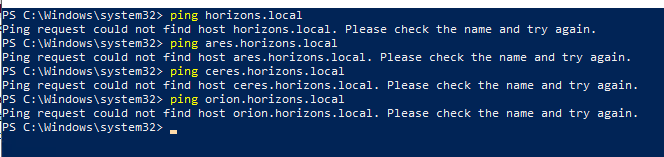 ]2
]2
However all the client Machines that are connected to the DC can resolve all the DNS records with no issues:

I am running a Virtual Switch, VPN and a few other things on the system if this may be any help to solving the issue.
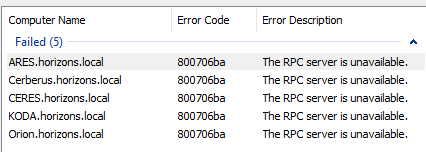
This is really messing up a lot of things as I can't use any RPC features which prevents me from updating policies across the entire network.
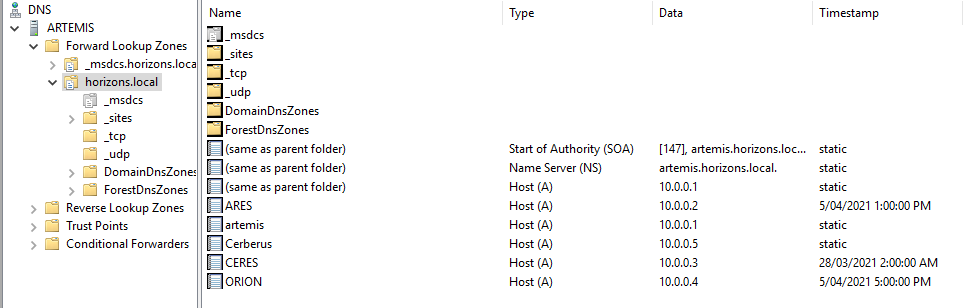
My DNS setup doesn't seem to be incorrect.
Hopefully someone may have an answer to this issue, if I find a solution to the issue I will post it here.
' cx='32' cy='32' r='32' /%3E%3Ctext x='50%25' y='55%25' dominant-baseline='middle' text-anchor='middle' fill='%23FFF' %3EA%3C/text%3E%3C/svg%3E)
The simplest solution may be to remove the VPN and routing from the domain controller.
--please don't forget to Accept as answer if the reply is helpful--
That would make things very difficult as the entire network relies on the VPN, all the servers and users connect to the master server using it.
Would there be a fix that will allow me to keep the VPN?
Thanks for DSPatrick's solution and glad to hear that it was helpful to you. If there is anything else we can do for you, please feel free to post in the forum.
Not really, as I already mentioned multi-homing a domain controller will cause unexpected / unreliable results as you have already experienced. Standing up virtual machines using hyper-v manager is fairly simple and straight forward.
https://learn.microsoft.com/en-us/windows-server/virtualization/hyper-v/get-started/get-started-with-hyper-v-on-windows
Thanks, I'll try my best to make of the HyperV documentations :)
I think my main issue is more that I don't know how to develop Windows through only using commands, that will be my main struggle, I managed to get a VM up with hyperv how-ever which is a start
Sounds good, yes stick to using the GUI configuration for now.
This will mean that I'll have to pay for another copy of WinServer2019 right? Or am I doing something wrong, I've been installing the Hyper-Visors with ISO's
Some general info
Okay, in that case I believe that the license I have should cover this, I'm going to assume that I'll just use the same key that my DC is using
For standard edition yes that's correct.
Awesome! Thanks :)
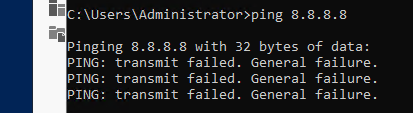
Okay so I've set up the Virtual Switch (External) and the Hyper-V, I've done some research and followed all the steps to get the Hyper-V internet access but it just doesn't seem to want to work...

Since a new topic please start a new thread here.
https://learn.microsoft.com/answers/topics/windows-server-hyper-v.html