SQL Server Reporting Services
A SQL Server technology that supports the creation, management, and delivery of both traditional, paper-oriented reports and interactive, web-based reports.
This browser is no longer supported.
Upgrade to Microsoft Edge to take advantage of the latest features, security updates, and technical support.
' cx='32' cy='32' r='32' /%3E%3Ctext x='50%25' y='55%25' dominant-baseline='middle' text-anchor='middle' fill='%23FFF' %3EAN%3C/text%3E%3C/svg%3E)
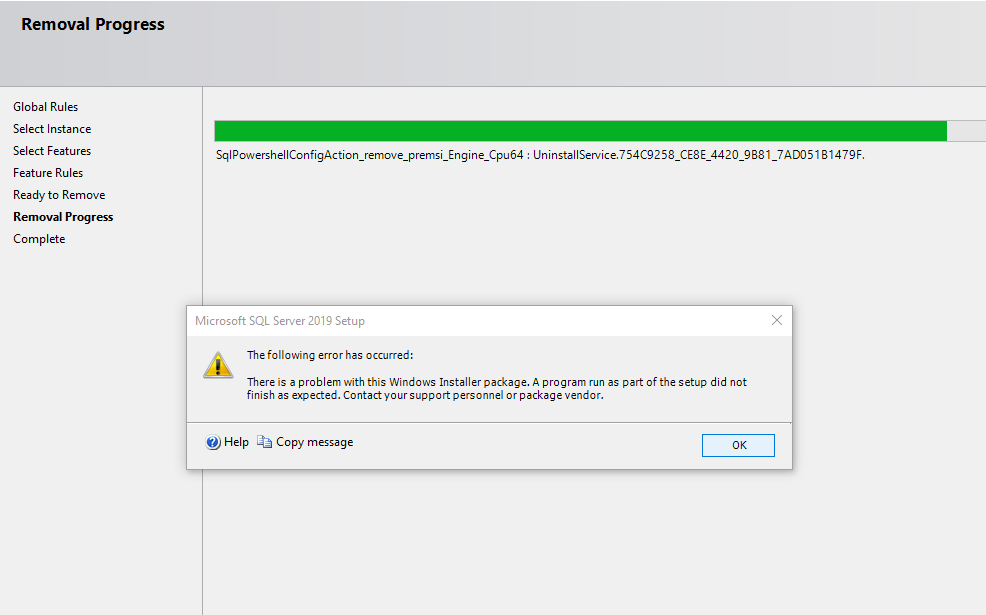
Due to some connectivity issue with the sql server, I tried to uninstall and re-install sql server2019. But when i tried to uninstall it from settings>>apps>>apps and features>> Microsoft sql server 2019(64 bit)>> uninstall... it was unsuccessful and it threw an error. I have attached the snapshot of the error and below is the log summary . kindly help me to solve the issue.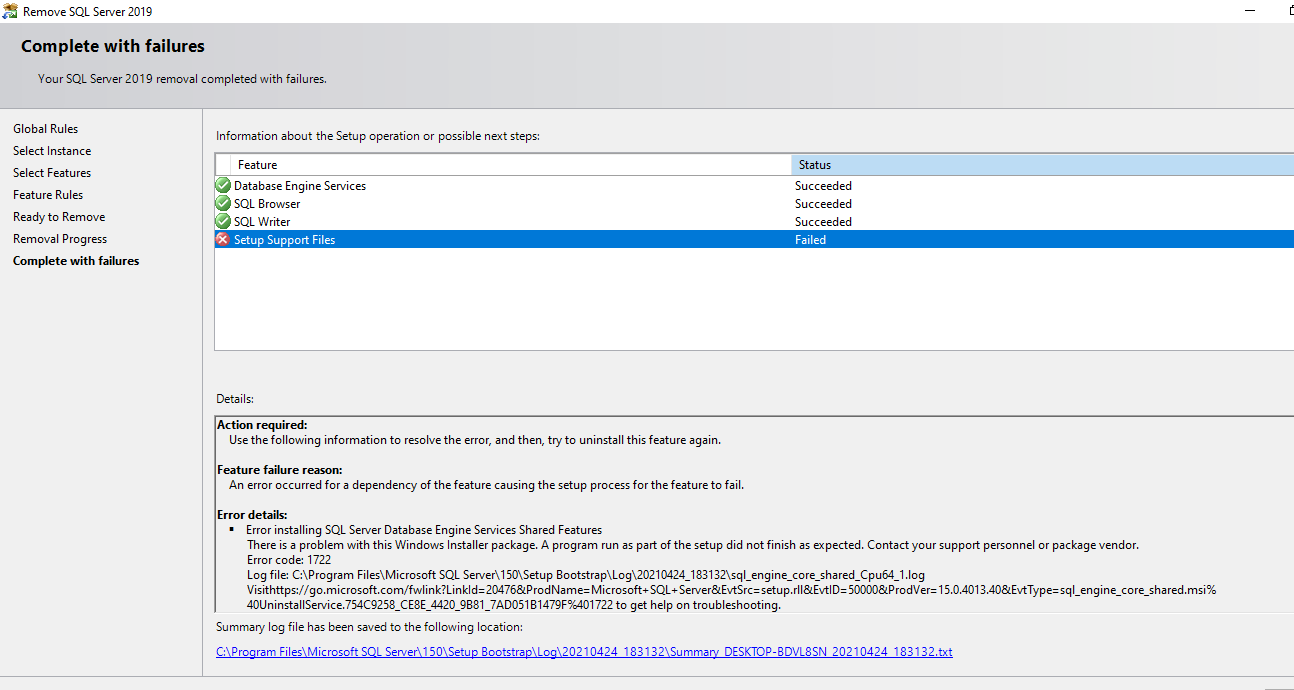
Overall summary:
Final result: Failed: see details below
Exit code (Decimal): -2068052294
Start time: 2021-04-24 18:31:33
End time: 2021-04-24 18:36:31
Requested action: Uninstall
Setup completed with required actions for features.
Troubleshooting information for those features:
Next step for ComponentUpdate: Use the following information to resolve the error, and then, try to uninstall this feature again.
Machine Properties:
Machine name: DESKTOP-BDVL8SN
Machine processor count: 4
OS version: Microsoft Windows 10 Pro (10.0.19042)
OS service pack:
OS region: United States
OS language: English (United States)
OS architecture: x64
Process architecture: 64 Bit
OS clustered: No
Product features discovered:
Product Instance Instance ID Feature Language Edition Version Clustered Configured
SQL Server 2019 MSSQLSERVER MSSQL15.MSSQLSERVER Database Engine Services 1033 Developer Edition 15.0.2000.5 No Yes
Package properties:
Description: Microsoft SQL Server 2019
ProductName: SQL Server 2019
Type: RTM
Version: 15
SPLevel: 0
Installation edition: Developer
User Input Settings:
ACTION: Uninstall
CONFIGURATIONFILE: C:\Program Files\Microsoft SQL Server\150\Setup Bootstrap\Log\20210424_183132\ConfigurationFile.ini
ENU: true
FEATURES: SQLENGINE, BROWSER, WRITER
HELP: false
IACCEPTPYTHONLICENSETERMS: false
IACCEPTROPENLICENSETERMS: false
IACKNOWLEDGEENTCALLIMITS: false
INDICATEPROGRESS: false
INSTANCEID: <empty>
INSTANCENAME: MSSQLSERVER
MRCACHEDIRECTORY:
QUIET: false
QUIETSIMPLE: false
SUPPRESSPAIDEDITIONNOTICE: false
SUPPRESSPRIVACYSTATEMENTNOTICE: false
UIMODE: Normal
X86: false
Configuration file: C:\Program Files\Microsoft SQL Server\150\Setup Bootstrap\Log\20210424_183132\ConfigurationFile.ini
Detailed results:
Feature: Database Engine Services
Status: Passed
Feature: SQL Browser
Status: Passed
Feature: SQL Writer
Status: Passed
Feature: Setup Support Files
Status: Failed
Reason for failure: An error occurred for a dependency of the feature causing the setup process for the feature to fail.
Next Step: Use the following information to resolve the error, and then, try to uninstall this feature again.
Component name: SQL Server Database Engine Services Shared Features
Component error code: 1722
Component log file: C:\Program Files\Microsoft SQL Server\150\Setup Bootstrap\Log\20210424_183132\sql_engine_core_shared_Cpu64_1.log
Error description: There is a problem with this Windows Installer package. A program run as part of the setup did not finish as expected. Contact your support personnel or package vendor.
Error help link: https://go.microsoft.com/fwlink?LinkId=20476&ProdName=Microsoft+SQL+Server&EvtSrc=setup.rll&EvtID=50000&ProdVer=15.0.4013.40&EvtType=sql_engine_core_shared.msi%40UninstallService.754C9258_CE8E_4420_9B81_7AD051B1479F%401722
Rules with failures or warnings:
Rules report file: C:\Program Files\Microsoft SQL Server\150\Setup Bootstrap\Log\20210424_183132\SystemConfigurationCheck_Report.htm

Hi @Akash Nath , we have not get a reply from you. Did any answers could help you? If there has an answer helped, please do "Accept Answer". If not, please let us know. By doing so, it will benefit for community members who have this similar issue. Your contribution is highly appreciated. Thank you!
sorry about that but i am not that of a technical person.. so i am not able to follow the steps you suggested. i'll get back to you once i figure it out.
' cx='32' cy='32' r='32' /%3E%3Ctext x='50%25' y='55%25' dominant-baseline='middle' text-anchor='middle' fill='%23FFF' %3EAP%3C/text%3E%3C/svg%3E)
Hi @CarrinWu-MSFT 
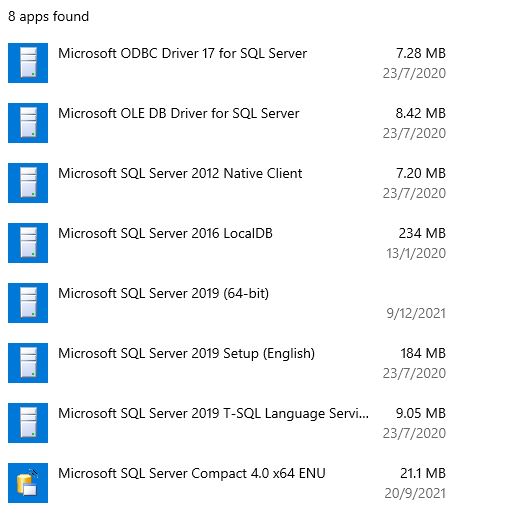
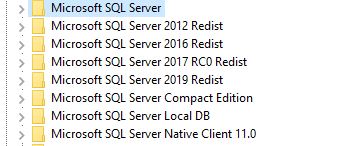 . I run into the same issue when trying to uninstall SQL Server 2019. When checking user removal instructions I found that I have several KEYS in the Registry. Follows screen shots of SQL Related KEYS in the Registry, SQL related APP and Features in Settings and SQL related folders in Windows\Program Files. I will appreciate if you could indicate which Registry Keys should be deleted, which APP programs should be deleted and which folders should be renamed/deleted
Thank you
' cx='32' cy='32' r='32' /%3E%3Ctext x='50%25' y='55%25' dominant-baseline='middle' text-anchor='middle' fill='%23FFF' %3ESS%3C/text%3E%3C/svg%3E)
You may try to uninstall manually:
Hi @Akash Nath ,
Welcome to Microsoft Q&A!
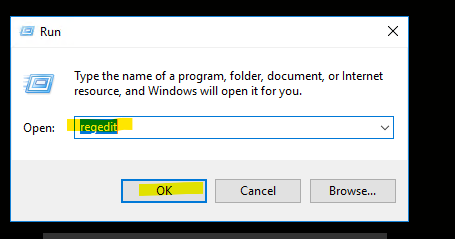
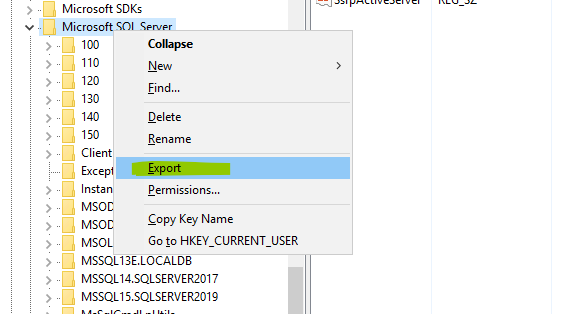
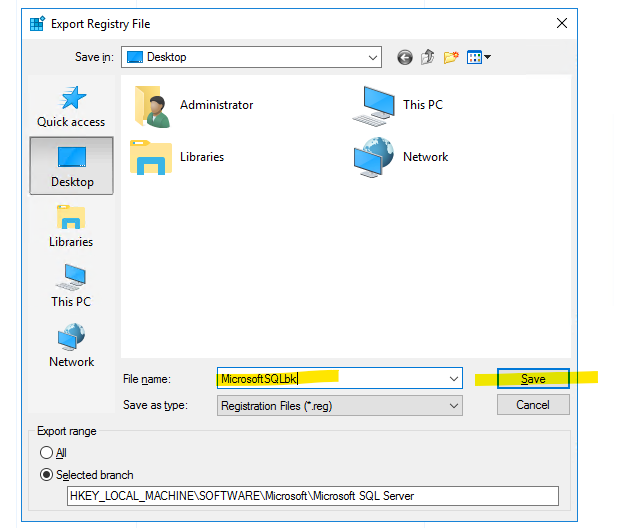
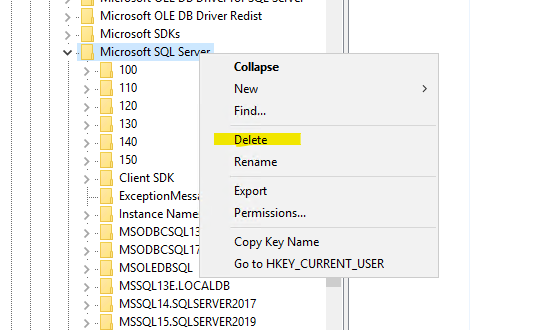
Before you uninstall your SQL Server, we recommend that you stop all SQL Server services before you uninstall SQL Server components. Active connections can prevent successful uninstallation. And then please follow below steps to uninstall SQL Server manually:
I have a similar issue before and solved by this solution, hope it will help you also.
Best regards,
Carrin
If the answer is helpful, please click "Accept Answer" and upvote it.
Note: Please follow the steps in our documentation to enable e-mail notifications if you want to receive the related email notification for this thread.
Hi @Akash Nath ,
Please refer to below shotcreem to figure it out:
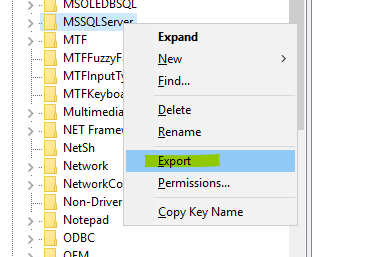
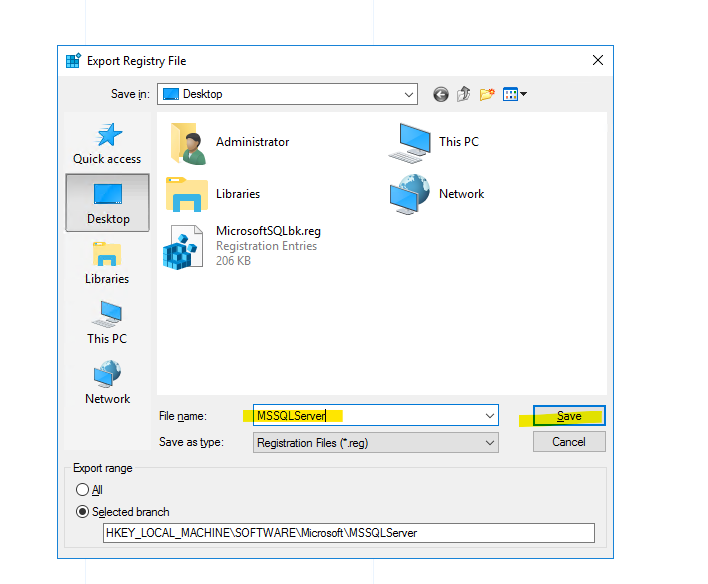
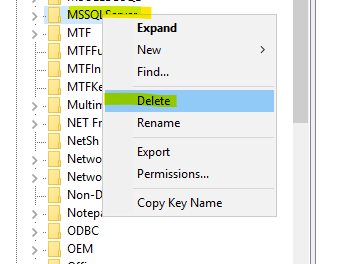
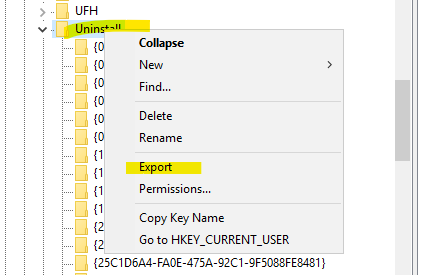
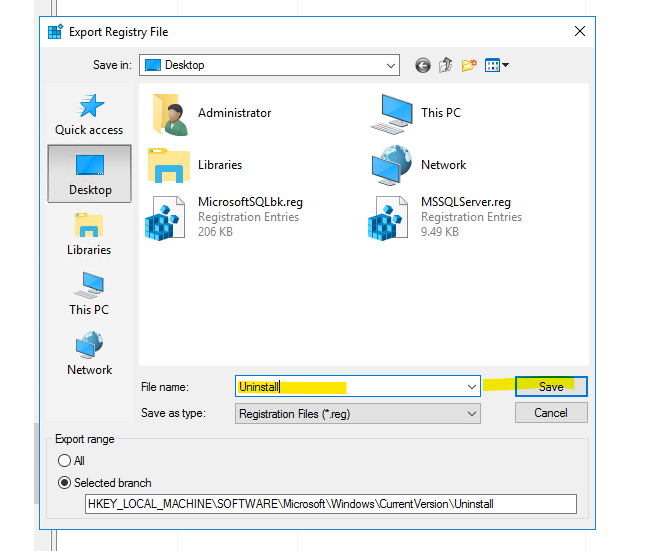
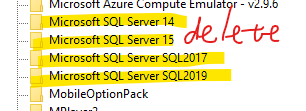

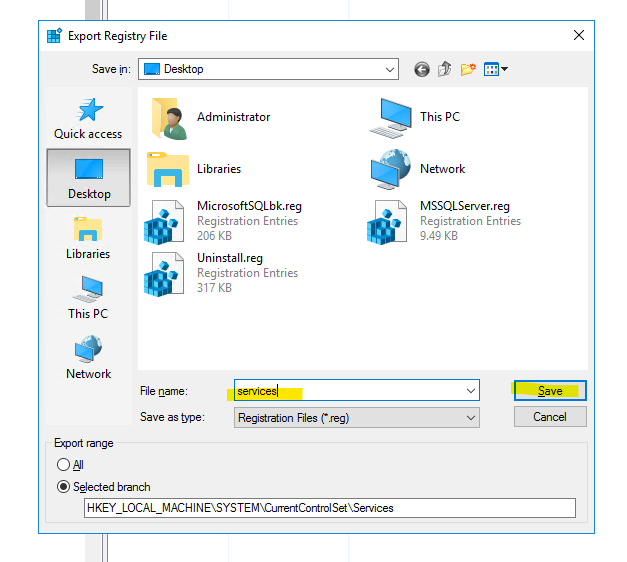
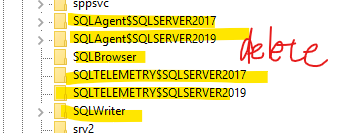
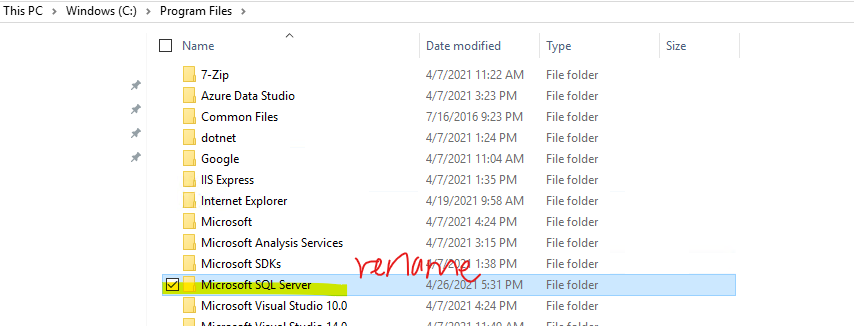

Finally, restart your computer and reinstall SQL server.
Thankyou for the screenshots.. it helped me follow the steps, but after i executed all the steps and tried to reinstall the SQL Server 2019, i got an error>> " unable to install SQL Server(setup.exe)." i have attached the error snap with this message.
Hi, please check the error log(Path: C:\Program Files\Microsoft SQL Server\150\Setup Bootstrap\Log\20210426_172319\Detail.txt) and get more details. I think you might be not delete all the keys in register editor, you should delete all the components of SQL server, otherwise the installation will be not succeed. And you should use administrator permission when you install SQL Server (right click -> run as administrator).
HI @CarrinWu-MSFT i followed all the steps again but still the issue was not resolved. Is there any other way to connect like a call or a video call to resolve this issue?
Hi @Akash Nath , I am sorry about that we cannot make a phone call, we just can chat in this web. I found a blog and have a detail process about how to uninstall SQL Server, please refer to this blog to uninstall it. Please stop all services are related with SQL Server when you uninstall it. And you need delete all the components of SQL Server.
If the answer is helpful, please click "Accept Answer" and upvote it.
Hi @CarrinWu-MSFT i went through the blog you provided me and followed the procedure. then somehow it sql server got uninstalled and not seen in the program and features panel.
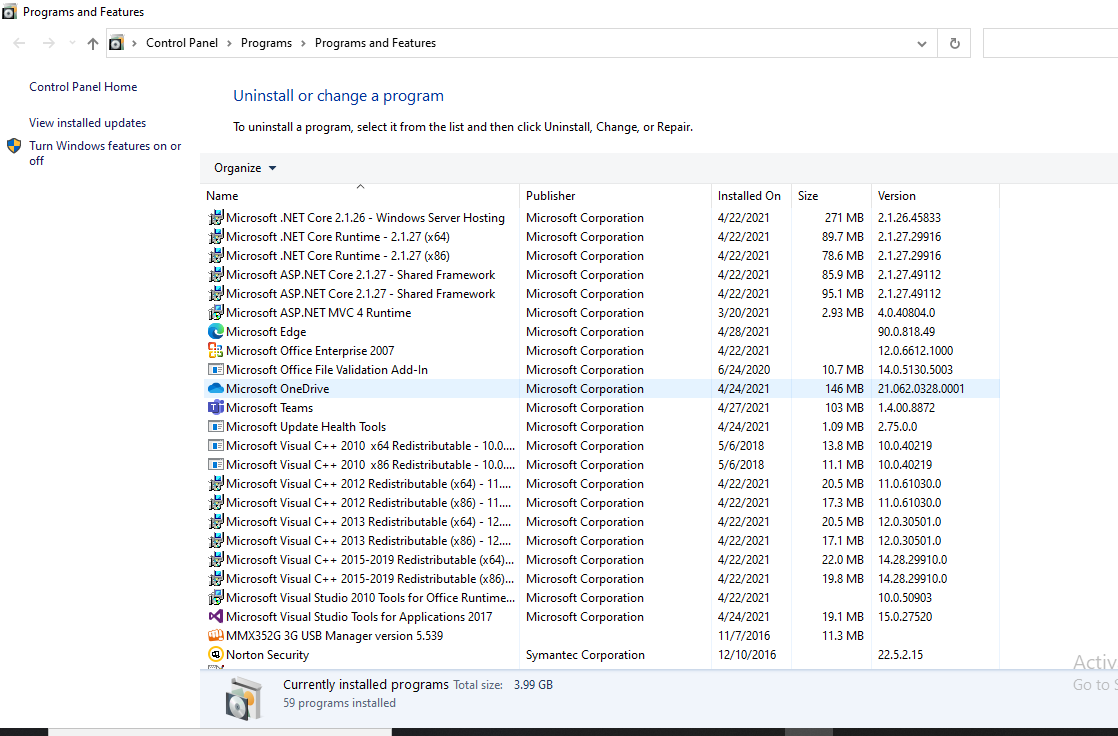
And then i deleted all the folders for the installation directory as well. Then, restarted the computer and tried to install SQL Server but again i received the same error as before.
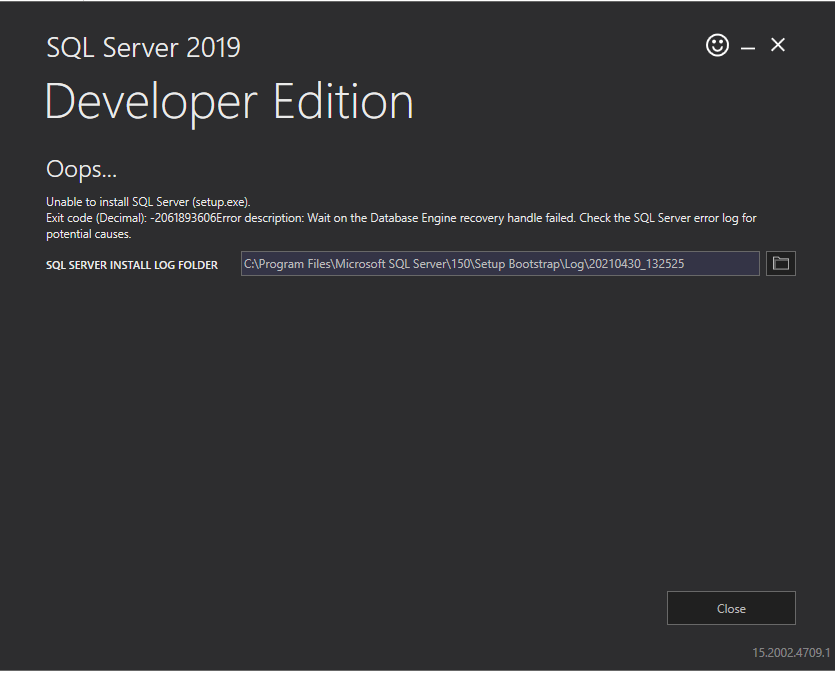
what do i do now?
Could you please provide the error log details? You could search ‘error’ in the Detail.txt. Path: C:\Program Files\Microsoft SQL Server\150\Setup Bootstrap\Log\20210430_152953\Detail.txt
Hi @CarrinWu-MSFT these are few error logs that i could find and i have attached the detail file with this message. 92963-errorlog-detail.txt93037-detail.txt
Hi @Akash Nath , here has a same thread as yours, please follow the solution and try to figure it out:
according to the log file you need to check the following:
1- the specified path you mention as MSSQL server base directory is valid
2- the specified path you mention as MSSQL server data directory is valid
3- (if step 1 and 2 did not help)user account is not corrupted, for testing create local user and grant it administrator permission and try installing the server again.
Hi @CarrinWu-MSFT , i tried to follow the steps you have mentioned and i created a new user with administrator permission and tried installing the server again but was unsuccessful in installing the server and faced the same issue.
Hi, please refer to this solution for your issues:
I have faced the same problem and fixed it as below:
I downloadeded the portable (executable on any window based computer without installation) "Program Install and Uninstall troubleshooter" (a replacement of Windows Installer Cleanup Utility) from http://support.microsoft.com/kb/2438651 and executed the Fixit.exe. Have repeated the option named as "Fix problems with programs that can't be installed or uninstalled" to uninstalled the SQL Server 2008 registry entry(ies). After that, I installed the SQL Server 2008 which completed successfully.
Hi @Akash Nath ,
(08) 2021-04-30 13:30:02 Slp: The MOF compiler could not connect with the WMI server. This is either because of a semantic error such as an incompatibility with the existing WMI repository or an actual error such as the failure of the WMI server to start.
please refer to this solution for your issues:
I have faced the same problem and fixed it as below:
I downloadeded the portable (executable on any window based computer without installation) "Program Install and Uninstall troubleshooter" (a replacement of Windows Installer Cleanup Utility) from http://support.microsoft.com/kb/2438651 and executed the Fixit.exe. Have repeated the option named as "Fix problems with programs that can't be installed or uninstalled" to uninstalled the SQL Server 2008 registry entry(ies). After that, I installed the SQL Server 2008 which completed successfully.
Also, please close your Firewall service when you reinstall SQL Server. And then you could open Firewall service after you complete the installtion.
Best regards,
Carrin
If the answer is helpful, please click "Accept Answer" and upvote it.
Note: Please follow the steps in our documentation to enable e-mail notifications if you want to receive the related email notification for this thread.
' cx='32' cy='32' r='32' /%3E%3Ctext x='50%25' y='55%25' dominant-baseline='middle' text-anchor='middle' fill='%23FFF' %3EJG%3C/text%3E%3C/svg%3E)
Thank you, Carrin,
Just had to use it and it worked as advertised.